Lifetime cloud storage for agencies: share large files with clients (2026)
Six checks before you send large files to clients, and which lifetime plans pass them.

The best lifetime cloud storage for agencies that need to share large files with clients passes six checks: the biggest file it accepts, client access without an account, your own branding, password and expiry on links, enough storage, and enough team seats. This guide runs Tarkle and four other lifetime sellers through those checks, so you can see which one pays off when the job is sending finished work to clients.
If you searched for cloud storage software to share large files with clients for agencies, start with the six checks below. Most lifetime storage is sold as a personal drive: sync, phone backup, a photo archive. That works for your own files, but it says little about how a client receives a 20 GB video. Tarkle is our own product, so read the ranking as Tarkle's view, with every competitor fact taken from the vendor's or marketplace's own page on October 30, 2026.
Last checked: October 2026. Tarkle may earn a commission when you buy pCloud through the link in this article.
What to check before you send files to clients
Run every tool through the same six questions. A low one-time price means little if one of these fails when you send files to a client.
Upload size limit per file. Look for the largest single file, not the storage total. A 2 TB drive that stops a transfer at 10 GB cannot carry a feature film or a RAW shoot.
Client access without an account. Your client should open a link and download. If they must create an account first, some will email you instead.
Branding. Check whether the link carries your logo and your own address, and whether the vendor's name stays on the page.
Expiry and password controls. A password and an end date on a link are the two controls you will use most.
Storage size. Count the whole library: active jobs plus the finished work you keep for clients.
Team seats. A plan for one person is fine for a freelancer and wrong for a studio of eight.
Before you buy, send yourself a test file at the size of your biggest delivery. Open the link in a private window with no sign-in, as your client would, and note every screen that asks for an account.
Lifetime cloud storage for agencies: which plans pass the checks?
Prices are one-time and were read on October 30, 2026. Marketplace offers are labelled as such.
Plan | One-time price | Storage | Per-file limit | Team seats |
|---|---|---|---|---|
Tarkle Pro 500 GB | $29 | 500 GB | Up to 200 GB | 1 |
Tarkle Pro | $169 | 3 TB | Up to 200 GB | Team members not capped |
Tarkle Agency | $299 | 6 TB | Up to 200 GB | Team members not capped |
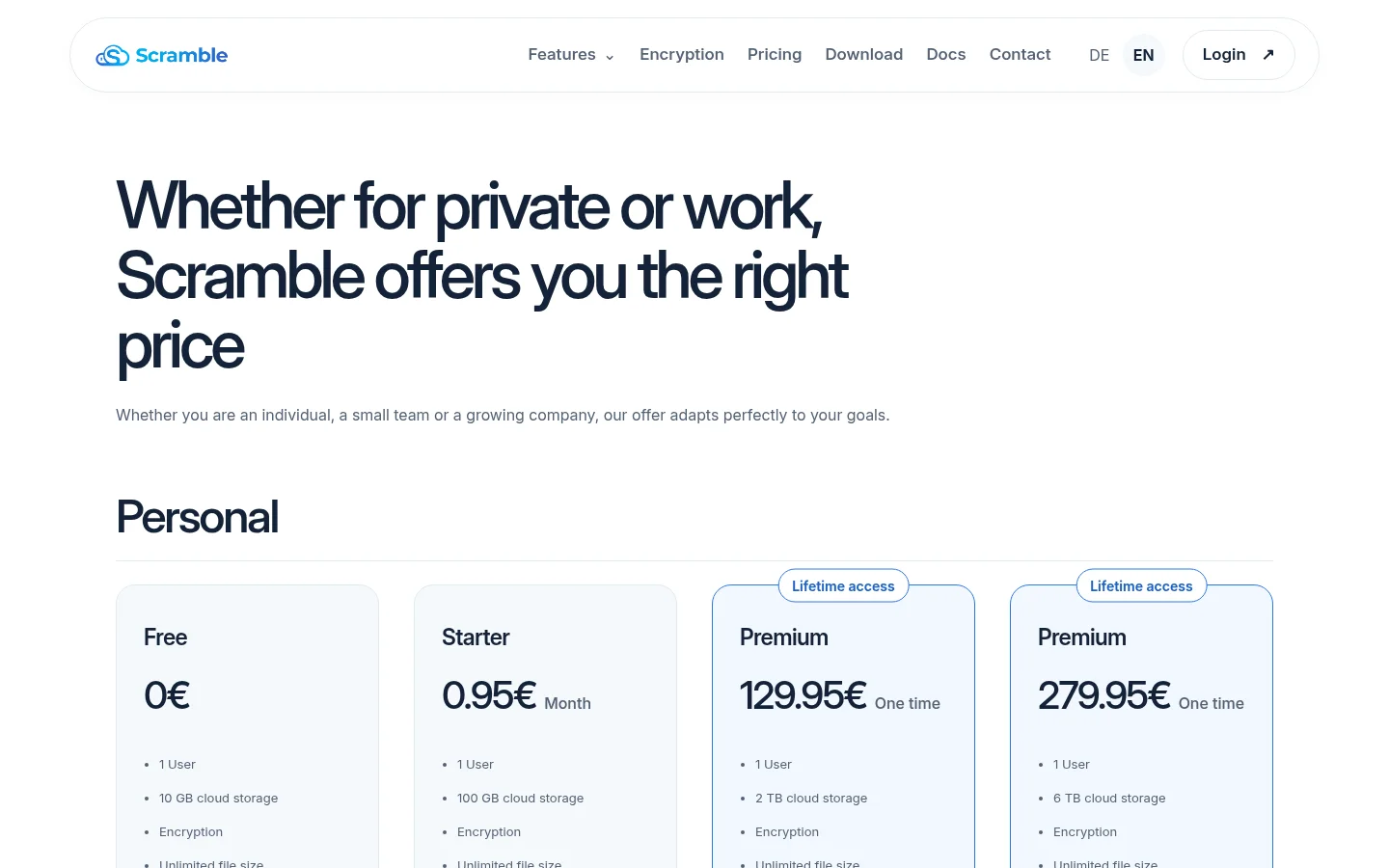
Scramble Cloud Premium | €129.95 | 2 TB | No cap listed | 1 user |
Scramble Cloud Premium | €279.95 | 6 TB | No cap listed | 1 user |
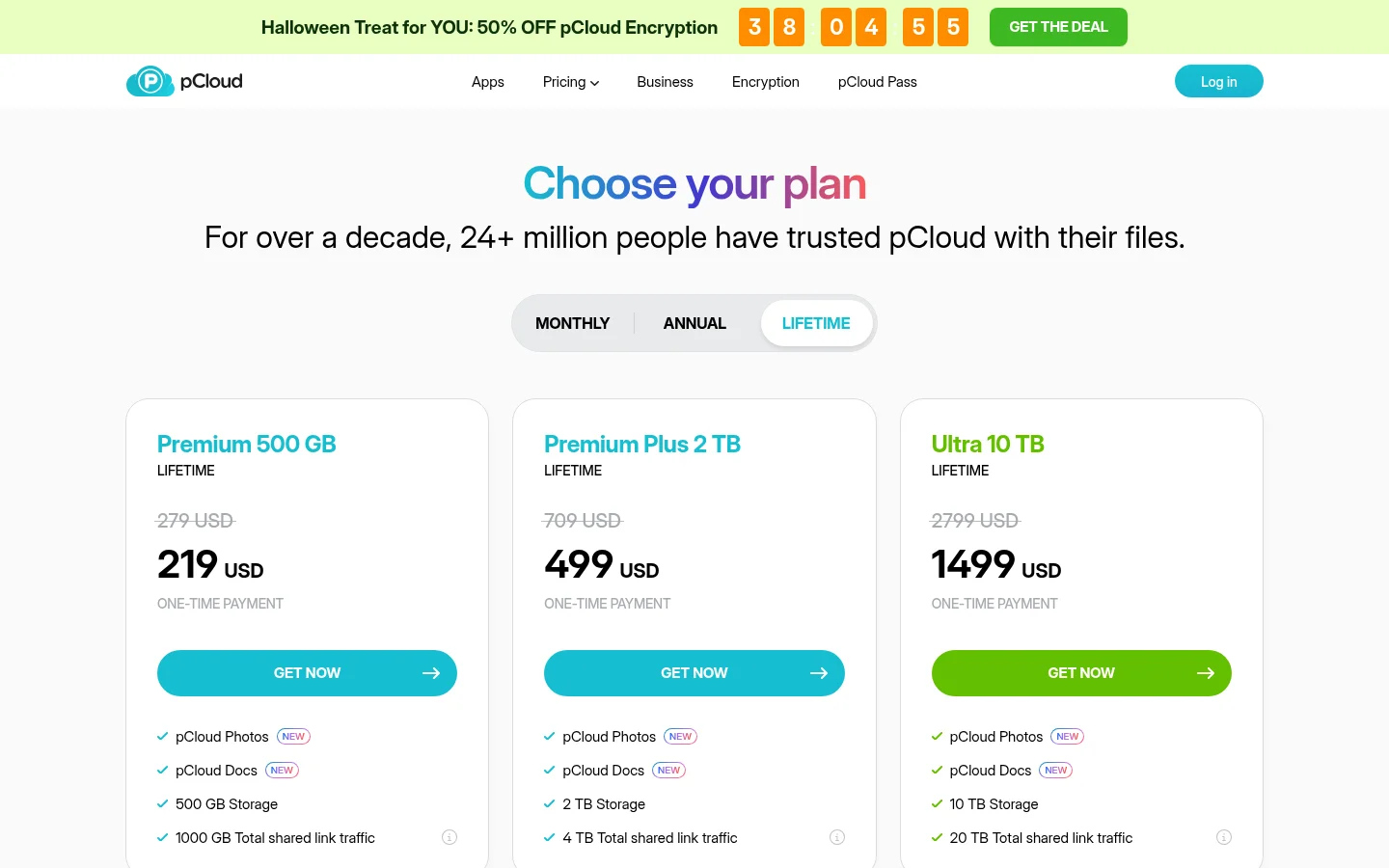
pCloud Premium | $219 | 500 GB | No cap listed | Not listed |
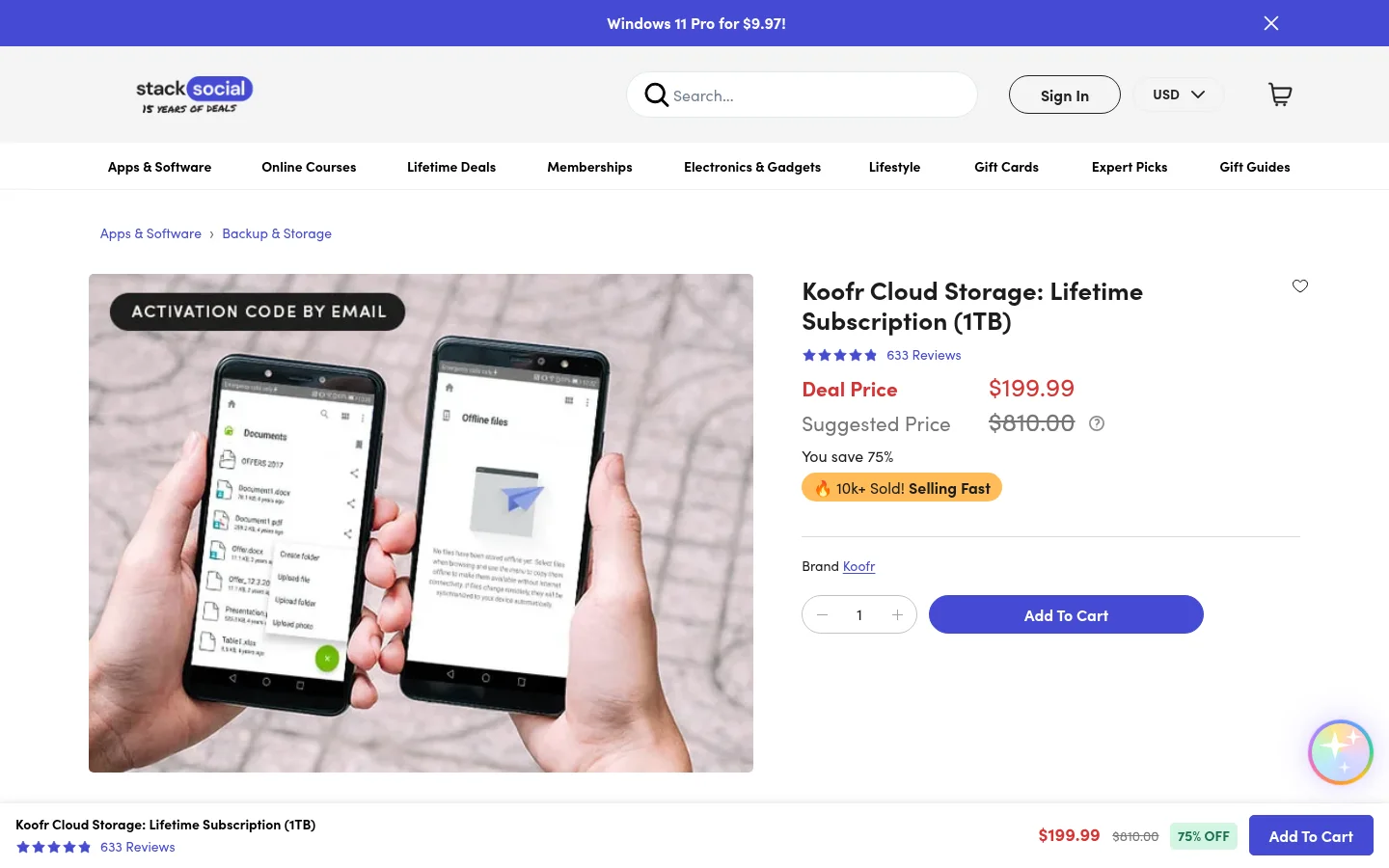
Koofr (StackSocial offer) | $199.99 | 1 TB | Not listed | One code per person |
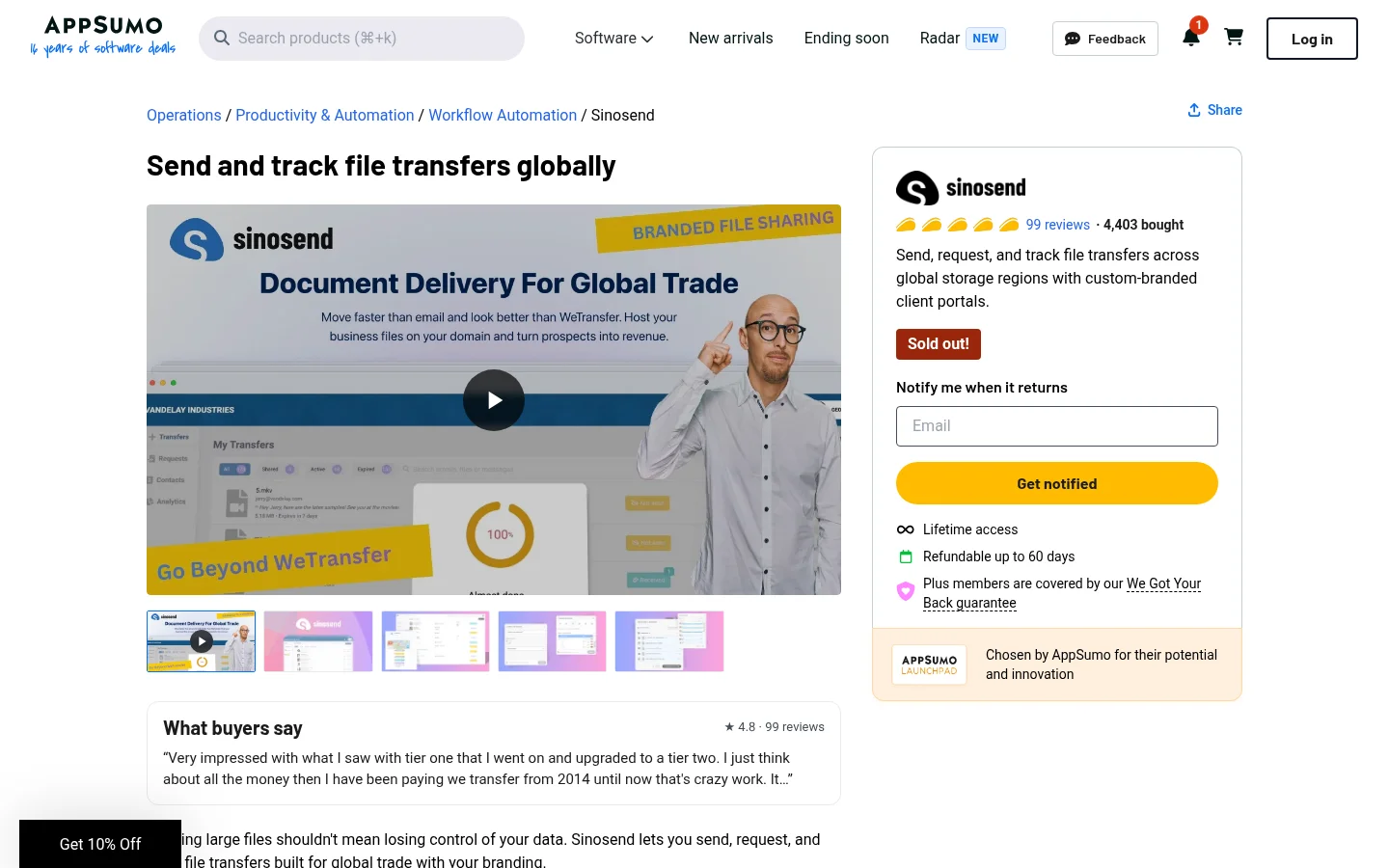
Sinosend (AppSumo offer, sold out) | $59 for 1 code | 50 GB | Up to 10 GB | 0 team logins |
Drime is not in the table because its own pricing page lists subscriptions only, with no lifetime plan, so there is no one-time price to compare.
1. Tarkle: three one-time plans for sending files to clients
Tarkle lets you send a file or folder with one link that the client opens without an account, collect files from clients with a file request, and give clients a branded sign-in portal. Free covers file sharing, so you can test the flow before you pay.
On the upload limit, Send large files works up to 200 GB per file on Pro and Agency, and all three lifetime plans carry the same 200 GB limit. Free stops at 1 GB per file. Access is where Tarkle is strongest: the person downloading needs no account, and a file request lets a client send files back the same way.
For branding, Custom domain and Custom branding put your logo, colours and address on transfer pages. The part to read carefully is the "Powered by Tarkle" backlink: on Pro 500 GB and Pro it stays on your pages, and on Agency it is replaced by your agency name. If a fully white-label platform matters, that decides the plan. Controls on links are password protection and link expiration.
Lifetime plan | Price | Storage | Workspaces | Team seats | Branding |
|---|---|---|---|---|---|
Pro 500 GB | $29 | 500 GB | 1 | 1 team seat | Fully branded client portal, backlink stays |
Pro | $169 | 3 TB | 2 | Team members not capped | Fully branded client portal, backlink stays |
Agency | $299 | 6 TB | 20 client workspaces | Team members not capped | 100% white-label platform |
Pro 500 GB is the plan for a freelancer who works alone. Pro suits a small studio with a team, and Agency suits an agency that wants each client in their own workspace on its own domain, such as cloud.youragency.com. The Agency white label page explains what clients see.
Lifetime plans are a single payment with no renewal. They do not include the AI assistant, and Tarkle's terms define how long lifetime access lasts, so read the terms and the refund policy before you buy. If you want to look first, start for free and send a test transfer.
Choose by the seat limit first. Pro 500 GB has one team seat, so a second person who needs to send files points you to Pro.
2. Scramble Cloud: encrypted storage for one person
Scramble Cloud sells two lifetime Premium plans directly: €129.95 for 2 TB and €279.95 for 6 TB. Both list one user, encryption, no file size cap, WebDAV and Rclone support, and a command-line tool.
It suits a freelancer who wants a large encrypted drive. For sending files to clients it is thinner: the lifetime plans do not list encrypted file sharing, a team link or branding. Those appear on Scramble's business plans, which are billed per user each month and start from three users. If you need your own domain or logo on the page the client sees, Scramble's pricing page does not show it.
3. pCloud: a personal archive with sharing included
pCloud sells lifetime plans on its pricing page: Premium 500 GB at $219 (shown against a $279 list price), Premium Plus 2 TB at $499 and Ultra 10 TB at $1,499. The page also lists sync, phone and desktop backup, offline access and a built-in music and video player.
For clients, pCloud lists password-protected links, shared folders, file requests and branded shares, and says files of any size can be uploaded. Each plan also has a shared link traffic figure: 1,000 GB on Premium 500 GB, 4 TB on Premium Plus and 20 TB on Ultra. That matters if many clients download large deliveries. Deleted data can be recovered for up to 30 days. pCloud is a good fit when device backup and sync are the main job. It does not list a custom domain or team seats on these plans.
4. Koofr: a drive that connects your other clouds
Koofr's lifetime plan is sold through a marketplace. StackSocial listed a 1 TB lifetime subscription at $199.99 on October 30, 2026. The listing mentions mobile and web access, WebDAV, connections to Dropbox, Google Drive and OneDrive, and link appearance customization.
Each person can redeem only one Koofr lifetime code, and a redeemed code is final. The code must be redeemed within 15 days of purchase. For an agency this means the plan covers one person's account. Koofr fits an owner whose files sit across several clouds, and the listing does not describe a branded client download page.
5. Sinosend: branded transfers, sold out on AppSumo
Sinosend is built for branded transfers. Its AppSumo listing says every transfer can carry your logo, background and profile image, that recipients need no account, and that you can set expiry dates and file size limits on requests. It also lists custom CSS.
The listing showed "Sold out" on October 30, 2026. Its four tiers ran from $59 for one code (50 GB storage, files up to 10 GB, no team logins) to $236 for four codes (1 TB, files up to 100 GB, 10 team logins). The largest file size is the check Sinosend fails for video work, since even the top tier stops at 100 GB. AppSumo shows a 60-day refund window on that marketplace offer. See our Sinosend lifetime deal comparison for the longer version.
A note on Drime
Drime is a cloud drive with sync, backup, signatures and review tools. Its pricing page on October 30, 2026 listed an Essentials plan at €5.50 per month (€4.40 billed annually) with 2 TB, 15 members, password-protected links and custom expiration dates, and no lifetime plan. If you see a Drime lifetime offer on a marketplace, read that listing's terms, because they are separate from Drime's own plans.
Which plan should an agency pick?
Match the plan to the job, not to the storage figure.
You send finished work and want your own name on it: Tarkle fits this job. Pro 500 GB for one person, Pro for a team, Agency for a platform with clients on your domain.
You want one encrypted drive for yourself: Scramble Cloud.
You want device backup and sync as well as sharing: pCloud.
Your files live in several clouds: Koofr.
A transfer tool is enough for a one-off send with no branding: a free transfer service may do, and no lifetime plan is needed.
Some agencies use two tools: pCloud or Koofr for their own archive, Tarkle for what clients receive. That works when each tool has one clear job.
For the broader checklist, read cloud storage for agencies: five checks beyond storage size. To compare more deals, see best lifetime cloud storage deals.
Next step
Open the checklist above, pick the biggest file you send to a client and test it on each tool you are considering. To see how Tarkle handles it, start for free, send a transfer with your logo, and compare it with the one-time plans on the lifetime plans page.