Lifetime Dropbox alternative: a checklist before you pay
A checklist for weighing a one-time Tarkle plan against a Dropbox subscription, and how to test on Free first.

If you are looking for a lifetime Dropbox alternative, the useful question is not which deal costs least. It is which limits you will hit in a year of sending work to clients. Dropbox's plans page offers monthly and yearly billing, so a one-time payment means choosing a different tool. This checklist covers what to check before you pay: storage, the largest single upload, seats, the recovery window, what each plan leaves out, and how to test on Free first.
We make Tarkle, so read this as one vendor's view, and check the sources linked in each section.
Who a lifetime Dropbox alternative suits, and who should stay on Dropbox
A lifetime plan suits a freelancer or small agency that sends finished work to clients, collects files from them and wants a branded link instead of a monthly charge. You can share files with a link. You can also collect files through a request link. Client feedback and approval is included on the Free plan.
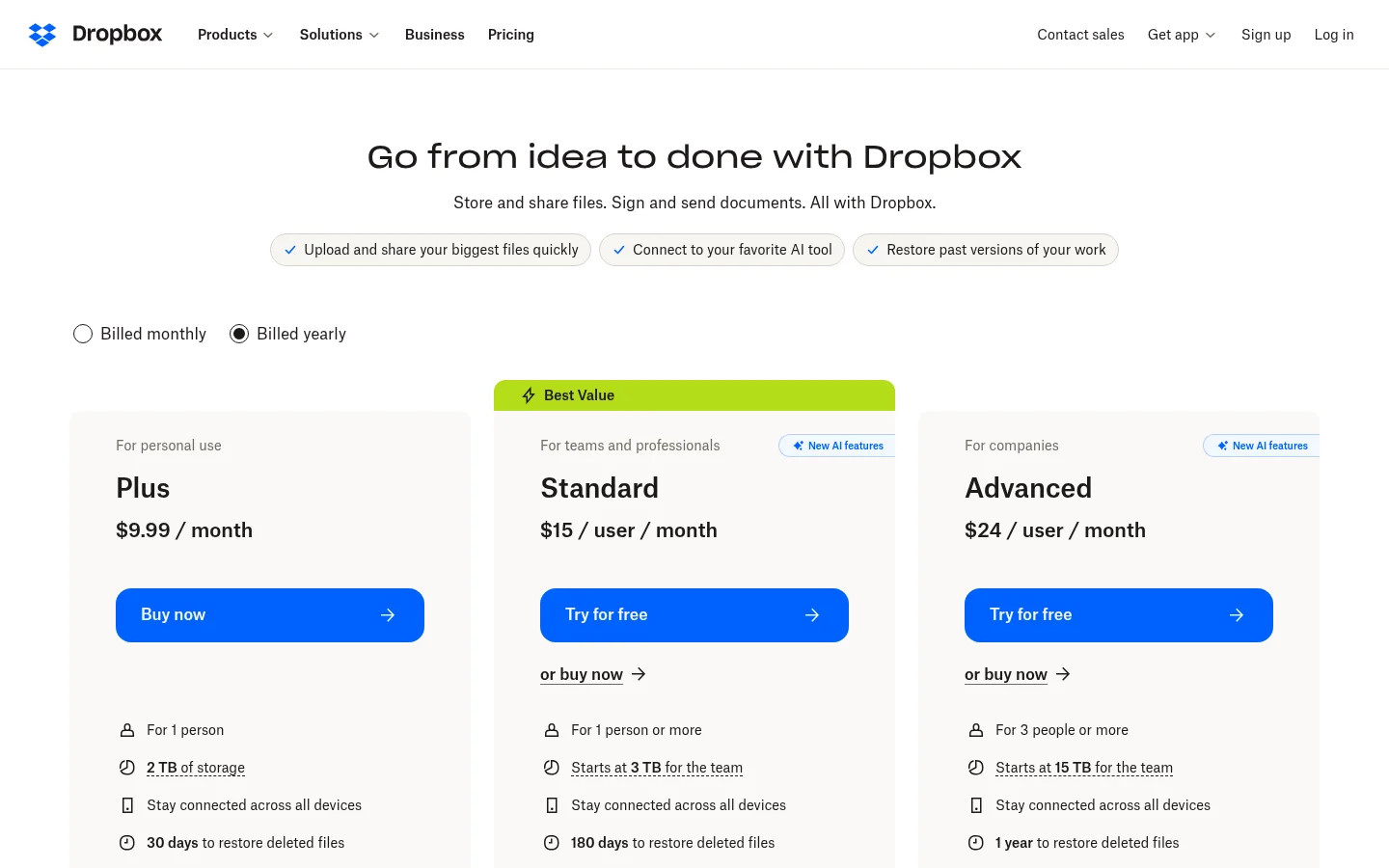
Dropbox is the better fit if you need folders kept in step on your computer. Its plans page says its plans "Stay connected across all devices". Tarkle's plans do not list a desktop folder sync, so you manage your library in the browser. If a large team edits shared documents, compare how long deleted files can be restored before you move, because the windows differ by plan.
Write down the three jobs you do with files each week (for example, send a delivery, collect brand assets, share a proof). If none of them is "keep a folder in step on my laptop", a lifetime plan is worth testing.
The numbers that matter
Dropbox changes its plans and limits, so check its plans page on the day you decide. Dropbox Plus costs $9.99 a month for 2 TB, and Dropbox Standard costs $15 per user a month, with storage that starts at 3 TB for the team. Plus transfers files up to 50 GB and gives 30 days to restore deleted files. Standard transfers files up to 100 GB and gives 180 days to restore deleted files.
The Tarkle figures come from its lifetime plans page, and they are one payment each. The sections below set them against the Dropbox figures.
Check 1: storage size and upload limit
Two numbers decide whether a plan works: total storage and the largest single upload. They are different limits, and the second one is the one that stops a delivery at 11 pm.
Pro 500 GB costs $29, paid once, with 500 GB of cloud storage, 1 workspace and 1 team seat. Pro costs $169, paid once, with 3 TB of cloud storage, 2 workspaces and unlimited team members. Agency costs $299, paid once, with 6 TB of cloud storage and 20 workspaces for your clients.
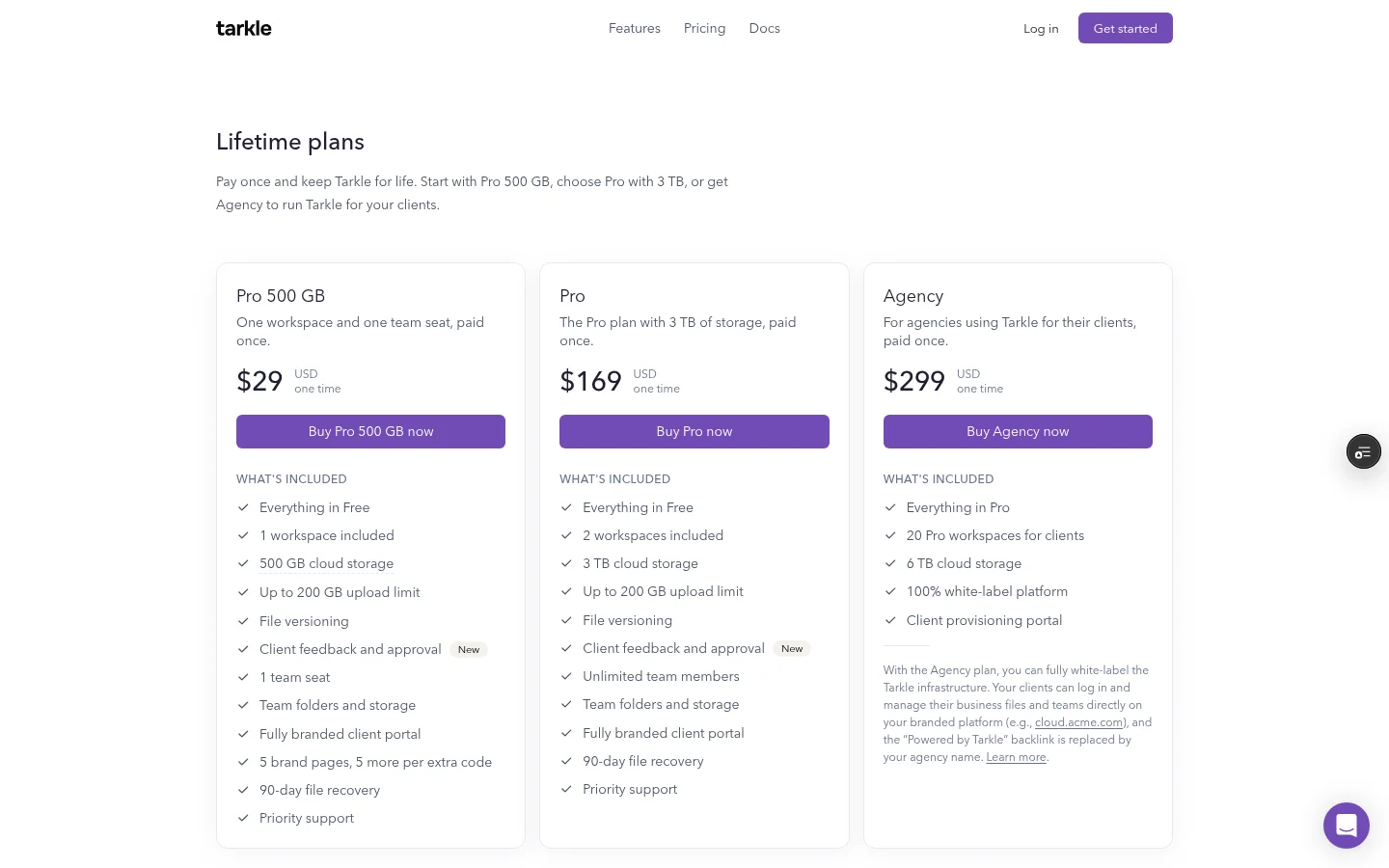
Pro 500 GB and Pro list an upload limit of up to 200 GB, and Agency includes everything in Pro. Add up your real library before you compare. Archive folders from finished jobs can take more space than the active projects, so count them too. Then check your largest single file against the 200 GB limit.
When you reach a limit, uploads may stop until you free up space or upgrade. Under section 14.1 of the Terms, reaching a limit does not delete existing files.
Check 2: team seats and workspaces
Seats are where one-time plans differ most. Pro 500 GB has one workspace and one team seat, so it suits a solo freelancer. Pro has two workspaces and unlimited team members. Agency includes everything in Pro. It adds 20 workspaces for your clients. It also includes a client provisioning portal.
Before you pay, count who needs to sign in: you, a freelancer you hire twice a year, an account manager. Tarkle lets you invite your team as Owner, Admin, Member or Viewer, as the team roles page explains.
Check 3: renewal and refunds
A lifetime plan is one payment with no renewal. Pro 500 GB ($29), Pro ($169) and Agency ($299) are available as lifetime plans with no renewal. Regular Pro is a monthly or yearly subscription, and a lifetime plan is a single payment with no renewals. You buy it at checkout with a card.
Refunds are handled as section 7.2 of the Terms sets out. Tarkle has a permanent Free plan, so you can try it before you pay. Payments are non-refundable once processed, except where the law requires a refund or this Section says otherwise, and a duplicate charge or billing error is refunded once Tarkle confirms it. That is why the free test in Check 6 comes first.

Photo by Gabriel Cox on Unsplash
Check 4: the file recovery window
Ask how long a deleted file can come back. Deleted items wait in a recovery bin, 30 days on Free and 90 days on Pro, as the file retention and recovery page explains. The lifetime plans list 90-day file recovery too.
File versions are the other half of a safety net: upload a new version of a file, see the history and go back to an earlier one. The lifetime plans list file versioning too.
Test recovery before you trust it. Upload a dummy file, delete it, find it in the recovery bin and restore it. It takes two minutes and shows you the real screen.
Check 5: what is included and what is not
Read the feature list line by line. Pro 500 GB and Pro list file versioning, client feedback and approval, team folders and storage, a fully branded client portal, 90-day file recovery and priority support. Agency includes everything in Pro.
Two things are limited. The AI assistant is not included on any lifetime plan. On Pro 500 GB and Pro, the "Powered by Tarkle" backlink stays on your pages, and on Agency it is replaced by your agency name. If you are an agency that wants clients to see your name only, read the guide to a white-label Dropbox alternative for what to check beyond price.
Check 6: test on Free first
Tarkle's Free plan is $0 forever, no credit card required. It gives you 1 workspace, 5 GB of storage, 1 person, and uploads of up to 1 GB, along with sharing and requests, client feedback and approval, and custom domain and branding. Recipients can open or download shared files without a Tarkle account, so a client needs no sign-up to receive your work.
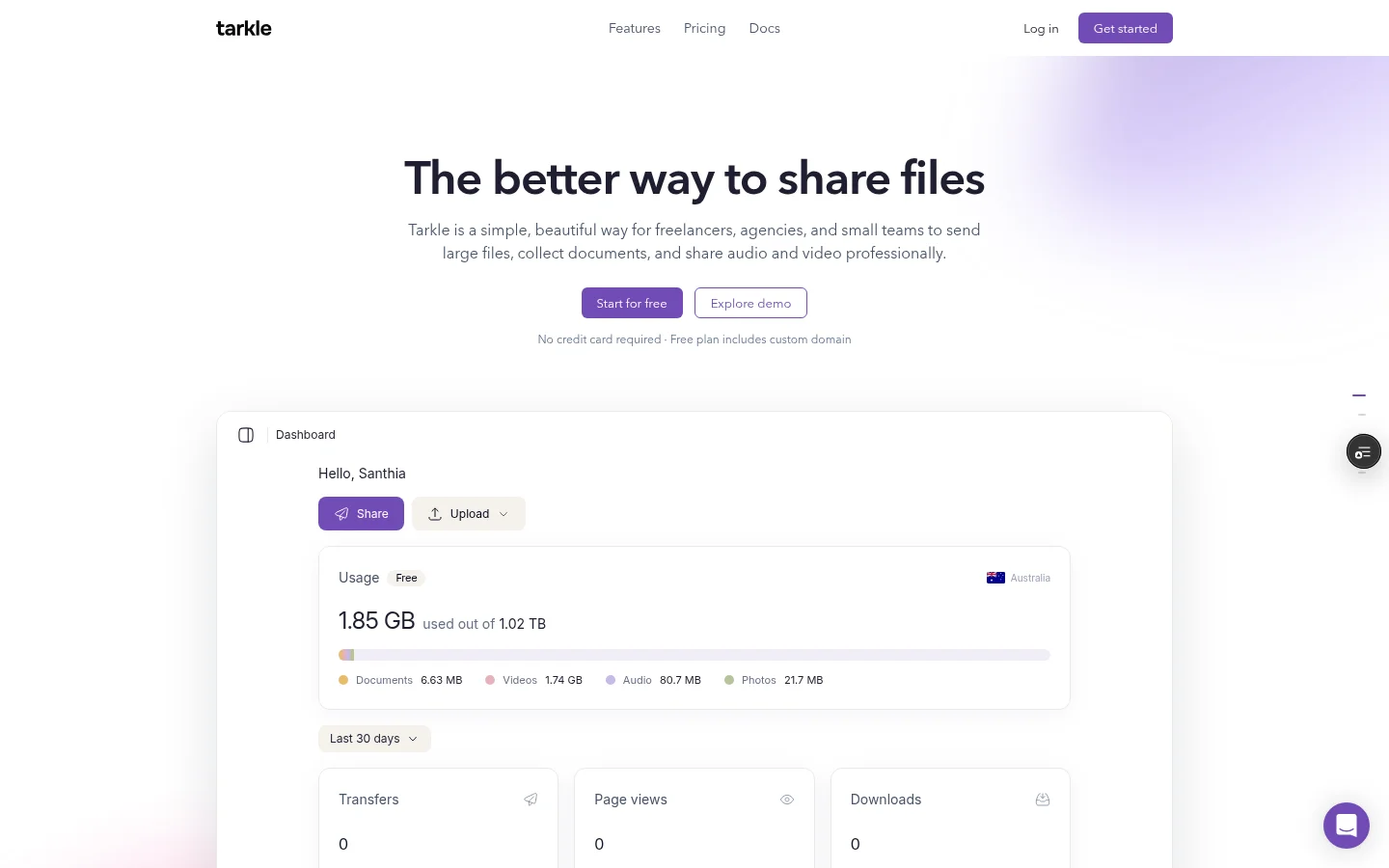
Free also lists importing files from Dropbox or Google Drive, and the import feature brings files in without downloading them first.
A good test takes an afternoon. Import a few files, send one real delivery to a client, ask another client to upload through a request link, and restore a deleted file from the recovery bin. If a client asks how to open the link, you learn something no price table shows.
Keep your Dropbox subscription running during the test, and move over only the projects you are about to send.
What to remember about Tarkle
Pro 500 GB ($29), Pro ($169) and Agency ($299) are available as lifetime plans with no renewal. Refunds are handled under section 7.2 of the Terms, and the lifetime plans do not include the AI assistant. The Free plan lets you test with real files first, so start for free or read the lifetime plans page before you choose.