
Tarkle vs Filecamp alternative: client files on your domain
Filecamp is a DAM library; Tarkle sends and collects client files on your domain. Plans, limits and who fits which.
Filecamp is better when you need a shared media library with tags, search and proofing for many users. Tarkle is a Filecamp alternative for the other job: sending and collecting client files on your own domain, with a branded client portal, file requests and tracking. We make Tarkle, so read this as one vendor's view, and check the sources.
Last checked: 2026. Filecamp figures come from Filecamp's pricing page and its other public pages, read in 2026. Prices change, so confirm them on the vendor's page before you decide.
What Filecamp is
Filecamp is a cloud digital asset management (DAM) platform from Filecamp AG, on the market since 2010. It is built for marketing and creative teams that need to organise, find, review and share photos, graphics, videos and documents. Its own site lists agencies, photographers, printers, freelancers, non-profits and marketing departments as users.
The core of the product is a library: folders with granular permissions, tags and metadata, collections that group files from several folders, and AI auto-tags on the higher plans. Sharing with outsiders sits on top of that library.
What Filecamp offers
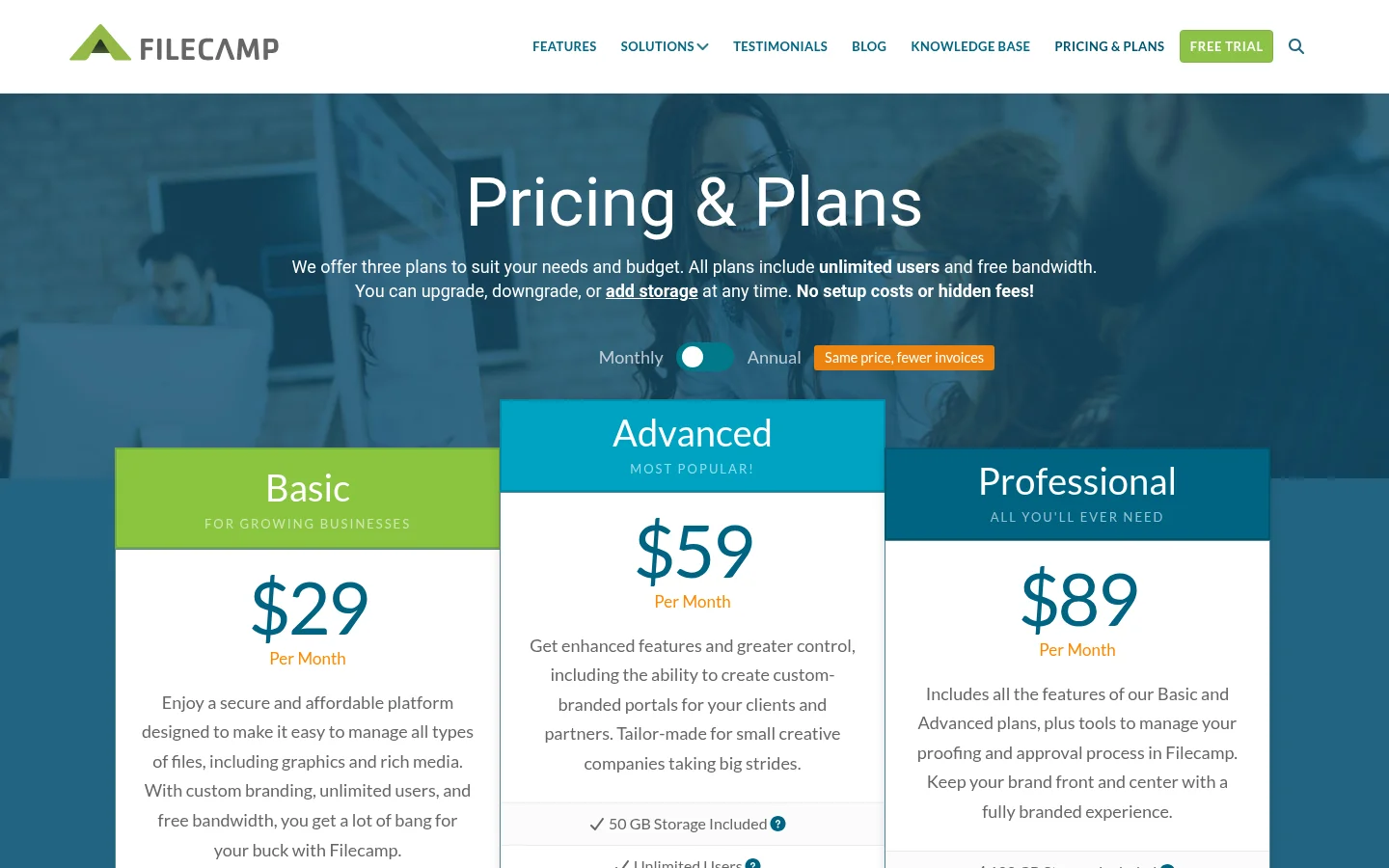
Filecamp sells three plans, each with unlimited users, priced by storage. As published on filecamp.com/pricing in 2026:
Basic: $29 a month, 20 GB of storage, custom branding.
Advanced: $59 a month, 50 GB, multiple themes, collections and AI auto-tags.
Professional: $89 a month, 100 GB, plus custom domain, white label, access requests and commenting for proofing.
Annual prices are twelve times the monthly price. Extra storage is sold as add-ons, from $10 a month for 10 GB. Filecamp lists a 30-day trial on the Professional plan with 10 GB and no card.
For sharing, Filecamp offers share links for files and folders, a branded download page, request links that let people upload without an account, click-on agreements, and an embeddable upload button. Proofing lets reviewers comment with markers on PDFs and supported image and design files, and approval works through custom labels such as "Approved" (Filecamp proofing page). Browser uploads go up to 4 GB per file, and up to 20 GB through WebDAV or FTP (Filecamp support).
Filecamp's own FAQ says it has no public API and no SSO, and its proofing page says it has no integrations with Creative Cloud, Slack or Zapier. Data is hosted on Microsoft Azure in the United States, Europe or Asia-Pacific, chosen at sign-up (Filecamp security page). Support is by email only.
What Tarkle does
Tarkle gives freelancers, agencies and small teams one place to store and share files under their own brand. You send a transfer link, a recipient opens it on your domain, and you can see whether it was delivered, viewed or downloaded (transfer status). Passwords protect shared files, link expiration ends access on a date, and you can revoke access in one click.
For clients, Tarkle has a branded client portal: each client signs in with an emailed link and sees only what you shared with them. File requests collect files from anyone with one link, with a close date and an upload cap per person. Clients can also give feedback and approve or request changes. Transfer pages include a video and audio player, and paid transfers charge through your own Stripe account before a download.
Branding and your own domain are listed on every plan, Free included. The white-label platform for agencies is on Agency: clients log in on your domain and "Powered by Tarkle" becomes your agency name. Storage can be placed in Europe, the United States, Asia-Pacific or Oceania.
Plans, as published on Tarkle's pricing page:
Free: $0, no card, 1 person, 5 GB, uploads up to 1 GB.
Pro: $29 a month, or $19 a month billed yearly ($228 a year). 2 workspaces, 3 TB, uploads up to 200 GB, unlimited team members, team folders, file versioning and a branded client portal.
Agency: $59 a month, or $49 a month billed yearly ($588 a year). Everything in Pro, plus 20 client workspaces, 6 TB, the white-label platform and a client provisioning portal.
Filecamp alternative: Filecamp vs Tarkle
The two products solve different jobs, so this table is not like for like. Filecamp prices rise with storage; Tarkle prices are per plan.
Tarkle | Filecamp | |
|---|---|---|
Built for | Sending and collecting client files | Managing and reviewing a media library (DAM) |
Entry price | Free, then Pro $29 a month | Basic $29 a month |
Storage | Free 5 GB, Pro 3 TB, Agency 6 TB | 20, 50 or 100 GB, add-ons extra |
Biggest file | 1 GB Free, 200 GB Pro and Agency | 4 GB in the browser, 20 GB by WebDAV or FTP |
Users | One person on Free, unlimited team members on Pro and Agency | Unlimited on every plan |
Custom domain | Every plan | Professional, $89 a month |
White label | Agency | Professional, $89 a month |
Client portal | Pro and Agency, passwordless sign-in | Branded portals, access requests on Professional |
File requests | Free and up, with close date and upload cap | Request links, branded upload pages |
Tracking | Delivered, viewed, downloaded status, activity log | Audit log, analytics, notifications |
Proofing | Client feedback and approval | Commenting with markers on Professional |
Payments before download | Yes, through your Stripe account | Not found on its pages |
Tags and metadata library | No | Yes, with AI auto-tags |
Data location | Europe, US, Asia-Pacific, Oceania | US, Europe, Asia-Pacific |
Who should choose Filecamp
Choose Filecamp if your main need is an internal library. Tags, metadata, collections and search across folders are things Tarkle does not do. If many people in a marketing team browse the same assets all day, unlimited users on every plan and a storage-based price fit that.
It is also the better fit if you proof design files with markers and want a library that keeps previous versions next to their comments, or if you want a WebDAV or FTP mount. If brand guidelines and a media library are the centre of your work, read our guide to brand asset management for small business first.
Who should choose Tarkle
Choose Tarkle when the job is sending files to clients and collecting files from them. Your logo and your domain sit on the transfer page, so the client never sees another vendor. On Filecamp that needs the $89 Professional plan; on Tarkle a custom domain is on Free, and white label is on Agency at $59 a month.
Tarkle also covers work a library does not. A file request brings client files back into a folder you choose. Transfer status tells you whether the client opened and downloaded the delivery. Paid transfers take payment before the download. A client portal shows each client only their own files. Storage is also far larger per dollar: Pro includes 3 TB, with single uploads up to 200 GB.
If you run a platform for many clients, see the white-label Dropbox alternative for how Agency works. For a similar library-versus-delivery comparison, read Tarkle vs Air.inc. A free organization is enough to send one real transfer. Start for free.
Switching from Filecamp to Tarkle
Filecamp has no API, so moving is a download-and-upload job.
Create a free organization at tarkle.com/sign-up.
Download the folders you still use from Filecamp, or use its WebDAV mount to copy them to your computer.
Add your logo and your custom domain in Branding and Domain.
Upload one client's files first, and send them a transfer link to check how it looks.
Replace Filecamp request links with Tarkle file requests, and tell clients the new address.
Move to Pro or Agency when you need more storage, team members or white label.
Keep Filecamp running while you move your first client. Cancel only after that client has opened, downloaded and uploaded through Tarkle.
Filecamp's service terms recommend keeping a local copy of your data, so download your library before you cancel.
FAQ
Is Tarkle a DAM like Filecamp? No. Tarkle has no tagging or metadata library. It is for sending and collecting files with clients.
Does Filecamp offer white label and a custom domain? Yes, on the Professional plan at $89 a month, as published in 2026. On Tarkle a custom domain is on every plan and white label is on Agency.
Can I use my own domain with Tarkle? Yes. A custom domain is available on every plan, including Free.
What is the file size limit? Tarkle allows uploads up to 1 GB on Free and up to 200 GB on Pro and Agency. Filecamp allows 4 GB in the browser and 20 GB through WebDAV or FTP.
Does Filecamp have a free trial? Filecamp lists a 30-day trial on the Professional plan with 10 GB. Tarkle has a Free plan with 5 GB and no card.
Can clients sign in to see their files? Yes. On Tarkle's client portal each client signs in with an emailed link and sees only what you shared with them.
Where is my data stored? Tarkle storage can be in Europe, the United States, Asia-Pacific or Oceania. Filecamp hosts on Azure in the United States, Europe or Asia-Pacific.
Can Tarkle replace Filecamp's proofing? Partly. Clients can give feedback and approve or request changes on images and PDFs. Filecamp covers more file types and keeps versions beside comments.