
Tarkle vs WeTransfer: branded delivery for client work (2026)
WeTransfer suits a quick send. Tarkle suits client work: your own domain, file requests and a Pro client portal.
Tarkle vs WeTransfer comes down to the job. WeTransfer is better for a quick send of files to anyone, with nothing to set up. Tarkle is better when you deliver work to clients and want it on your own domain, with a client portal, file requests and transfer status.
We make Tarkle, so read this as one vendor's view, and check the sources. WeTransfer facts come from its own pages as published in October 2026.
What WeTransfer is
WeTransfer is a file transfer service. On WeTransfer, anyone can download your files, as its pricing page describes.
What WeTransfer offers
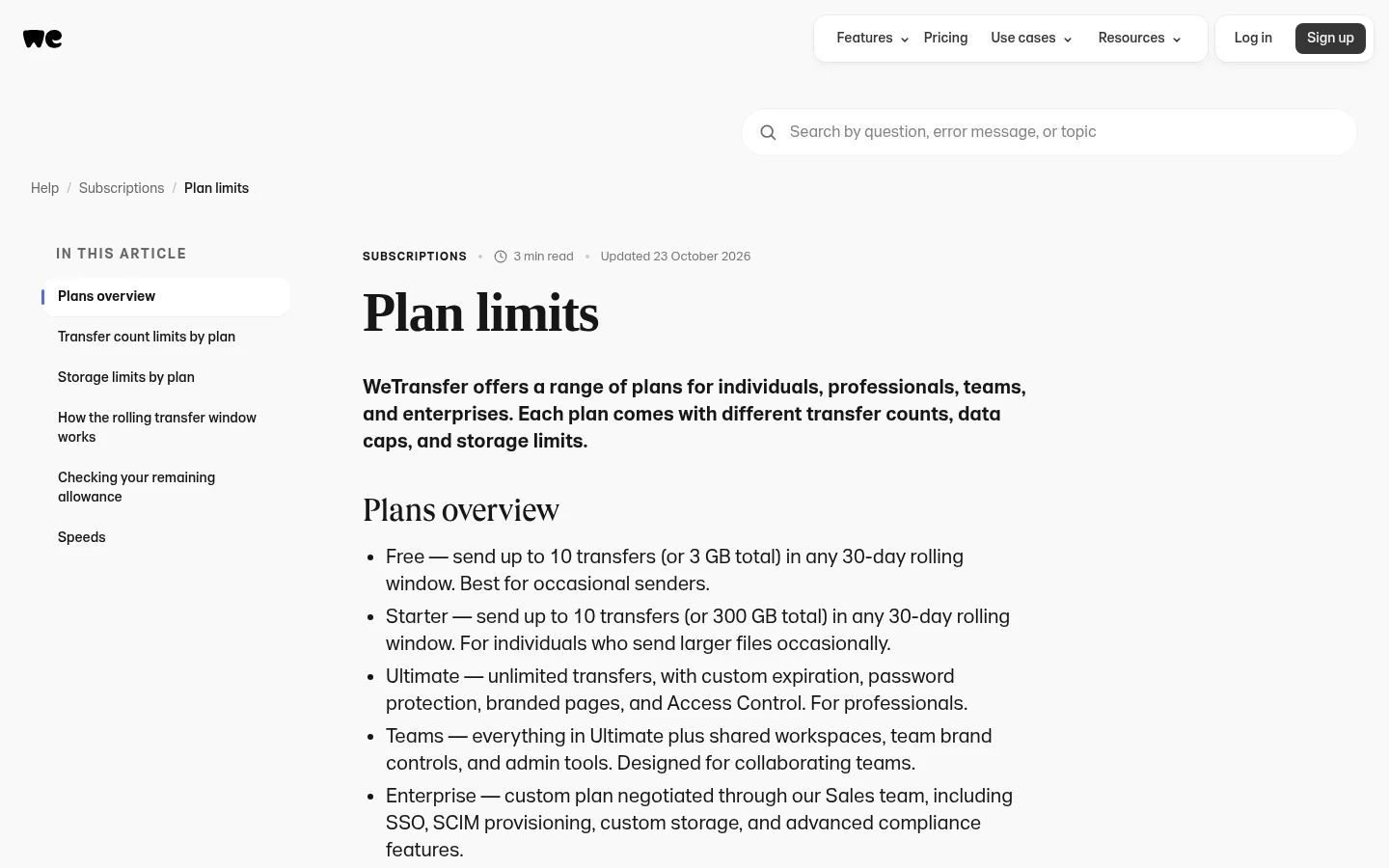
As published on its pricing page and plan limits help page:
Free: 3 GB and 10 transfers in any 30-day window, with expiry up to 3 days. The pricing page says it is for individual, non-commercial use only.
Individual plan: $25 a month billed monthly, for individual use only. Its plan limits page names password protection, branded pages, and Access Control on this plan.
Teams: $25 per user a month, with a minimum of 2 users and up to 50 members.
Enterprise: a custom price for 50 or more members, with single sign-on (SSO).
Starter: $10 a month, with up to 300 GB a month and 10 transfers in any 30-day window.
Transfer Activity shows who downloaded and when, and Access Control adds tracked or restricted downloads. The pricing page also says you can add a price to a transfer and get paid before it is downloaded, with no platform fees.
WeTransfer closed Portals. It stopped creating new Portals on October 22, 2025, and removed the content on December 22, 2025.
What Tarkle does
Tarkle is a cloud storage and file-sharing platform for freelancers, agencies, and client-facing businesses. Its plans, as listed on the Tarkle pricing page, are:
Free: $0, no credit card required.
Free is for one person.
Free includes 5 GB of storage and uploads up to 1 GB.
Free includes file sharing and file requests.
Free includes client feedback and approval.
Free includes custom branding and a custom domain.
You can protect shared files with passwords.
You can also import files from Dropbox or Google Drive.
Free keeps the Powered by Tarkle notice.
Pro: $29 a month, or $19 a month billed yearly ($228 a year). Pro includes everything in Free.
Pro has 2 workspaces and 3 TB of storage.
Pro allows uploads up to 200 GB.
Pro includes file versioning.
Pro includes unlimited team members and team folders.
Pro includes a fully branded client portal.
Pro keeps 90-day file recovery.
Pro includes an AI assistant (Beta).
Agency: $59 a month, or $49 a month billed yearly ($588 a year).
Agency includes everything in Pro.
Agency has 20 workspaces for your clients and 6 TB of storage.
Agency includes a 100% white-label platform.
Agency can run Tarkle entirely on your own domain.

For client work:
File requests collect files from anyone with one link, into the folder you choose.
Transfer status shows whether a transfer was delivered, viewed or downloaded.
Free includes one custom domain. Learn more on the custom domain page.
Tarkle emails a one-time sign-in link to each client. Each client sees only what you shared with them. Learn more on the client portal page.
A client can upload files back into a private folder.
Pro and Agency support files up to 200 GB with one link.
WeTransfer vs Tarkle
Feature | Tarkle | WeTransfer |
|---|---|---|
Free plan | $0, one person | 3 GB and 10 transfers in any 30-day window, non-commercial use only |
Paid plan for one person | Pro, $29 a month | $25 a month, individual use only |
Team | Pro includes unlimited team members and team folders | Teams, $25 per user a month, minimum 2 users |
Client portal | Pro and Agency | |
Own domain | Free includes one custom domain | Branded pages on the individual plan |
Passwords | Free includes passwords | Password protection on the individual plan |
Tracking | Transfer status: delivered, viewed or downloaded | Transfer Activity shows who downloaded and when |
Who should choose WeTransfer
Choose WeTransfer when the job is one quick send. A recipient opens a link and downloads the files. It also fits a company that needs single sign-on, which its Enterprise plan lists for 50 or more members.
Who should choose Tarkle
The reasons to choose Tarkle follow. Each one ties to a job you do.
Links on your own domain. Free includes one custom domain. Agency can run Tarkle entirely on your own domain.
One place for each client. Each client sees only what you shared with them. WeTransfer closed Portals in 2025.
Files that come back. A file request collects files from anyone with one link, into the folder you choose.
Proof of delivery. Transfer status shows whether a transfer was delivered, viewed or downloaded.
Big files. Pro and Agency support files up to 200 GB.
Client work for other people. Agency has 20 workspaces for your clients.
Free is for one person. On Free, portal access can't be turned on.
Switching from WeTransfer to Tarkle
Create a free account at tarkle.com/sign-up.
Connect a custom domain, such as files.yourstudio.com. Free includes one custom domain.
Import files from Google Drive or Dropbox, or upload the ones you still share.
Send one real transfer with a password, check its status, then make a file request link for the files you usually chase.
If clients need a home, move to Pro and turn on Portal access for each of them.
Run both side by side for a week, and leave old WeTransfer links to expire on their own, so no client has a broken link.
WeTransfer vs Tarkle: common questions
Can WeTransfer be used for business work? Its pricing page says its Free plan is for individual, non-commercial use only.
How much does WeTransfer cost? As published on its pricing page: Starter is $10 a month, the individual plan is $25 a month billed monthly, and Teams is $25 per user a month, with a minimum of 2 users. Enterprise is a custom price for 50 or more members.
Do recipients need an account? On WeTransfer, anyone can download your files. Recipients can open or download shared files without creating a Tarkle account.
Does WeTransfer still have client portals? No. It stopped creating new Portals on October 22, 2025, and removed the content on December 22, 2025.
Can I use my own domain on Tarkle Free? Yes. Free includes one custom domain.
How big can a Tarkle transfer be? Up to 1 GB on Free and up to 200 GB on Pro and Agency.
Which should I pick for a one-off send? If you send once and need no branding or portal, WeTransfer is the quicker path.
Next step
Check your last five client deliveries. If each one was a one-off, WeTransfer may be enough. If clients keep asking where their files are, start for free and send one real transfer from your own domain. Plans and prices are on the Tarkle pricing page. Looking at more tools first? See free file sharing for business.