
Tarkle vs Dropbox: branded client sharing vs file sync
Dropbox suits synced folders. Tarkle suits branded client sharing, file requests and tracking.
Dropbox is better when you need files synced across your devices and your team already works inside it. Tarkle is better when the job is sending files to clients, collecting files back and showing your own brand while you do it. This Tarkle vs Dropbox page compares both for business file sharing.
We make Tarkle, so read this as one vendor's view, and check the sources. Dropbox facts come from Dropbox's own plans page, as read in November 2026. Confirm the plans and prices on that page before you decide.
What Dropbox is
Dropbox is a cloud storage and sync service for individuals and teams. It keeps a folder in step across your computer, phone and the web, and it adds tools for sharing links, file requests, large transfers, e-signatures and video review. Its plans page lists Basic, Plus, Standard, Advanced and Enterprise.
People use it as a shared drive for a team or as personal storage that follows them across devices. Sharing with clients is one of its jobs, not the only one.
What Dropbox offers
As shown on Dropbox's plans page when read in November 2026:
Basic is free, with 2 GB to store and share your files.
Plus is $9.99 / month, for 1 person, with 2 TB of storage.
Standard is $15 / user / month, for 1 person or more, starting at 3 TB for the team.
Advanced is $24 / user / month, for 3 people or more, starting at 15 TB for the team.
Enterprise is priced by contacting Dropbox sales.
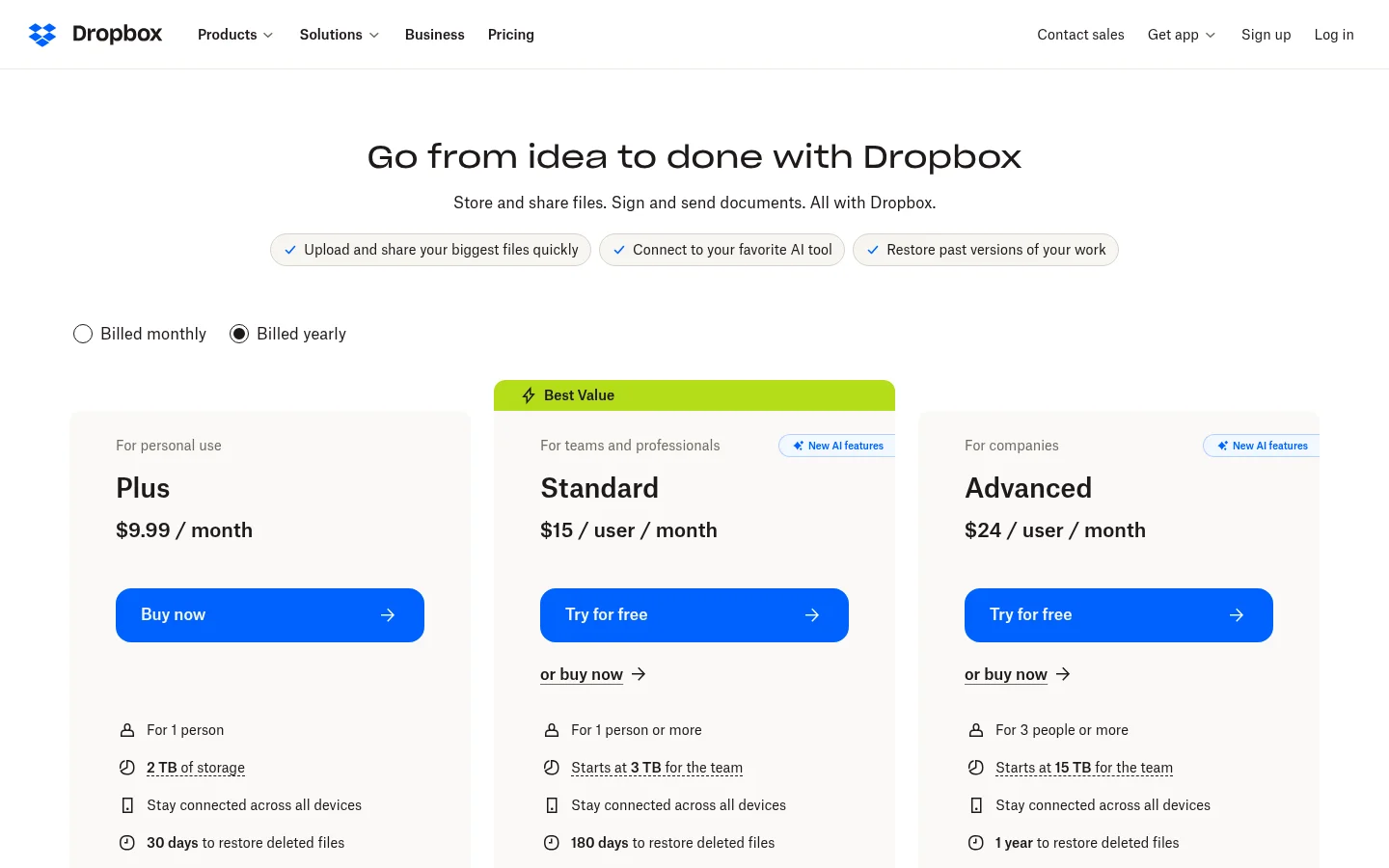
For sharing outside your team, the limits depend on the plan. Plus can deliver up to 50 GB, and Standard and Advanced up to 100 GB. Password-protected transfers and custom expiration dates are listed on Standard and Advanced, not on Plus, and branded transfers are listed there too. Deleted files can be restored for 30 days on Plus, 180 days on Standard and one year on Advanced.
What Tarkle does
Tarkle gives freelancers, agencies and small teams one place to store files and share them under their own brand. You pick files or folders, get one link and send it. The person downloading needs no account. See file sharing for the full flow.
The parts that matter when you work with clients:
Branding on your own address. Your logo and colours go on every transfer page and request page with custom branding. Free includes one custom domain for file sharing, so links can run from your own address with custom domain. Custom domains on brand pages need Pro or Agency.
A client portal. On Pro and Agency, each client signs in with their email and sees only what you shared with them. Turn on portal access for a contact and Tarkle emails them a one-time sign-in link, with no password to remember. On Free, portal access can't be turned on. See client portal.
Access control. Require a password before anyone can open a transfer with password protection. Set a date after which a transfer or request link stops working with link expiration. Free also lets you protect shared files with passwords.
Tracking. Transfer status shows whether a transfer was delivered, viewed or downloaded.
Requests that bring files back. File requests collect files from anyone with one link, into the folder you choose. Free allows 1 active request form.
Payment before download. On Pro and Agency, paid transfers charge for access through your own Stripe account. Paid transfers are a Pro feature. To charge, connect Stripe in Settings > Integrations and turn on paid transfers in Settings.
Video, audio and review. Video and audio sharing plays media on the page with a built-in player, and client feedback lets clients comment on and approve images and PDFs with one link, no account.
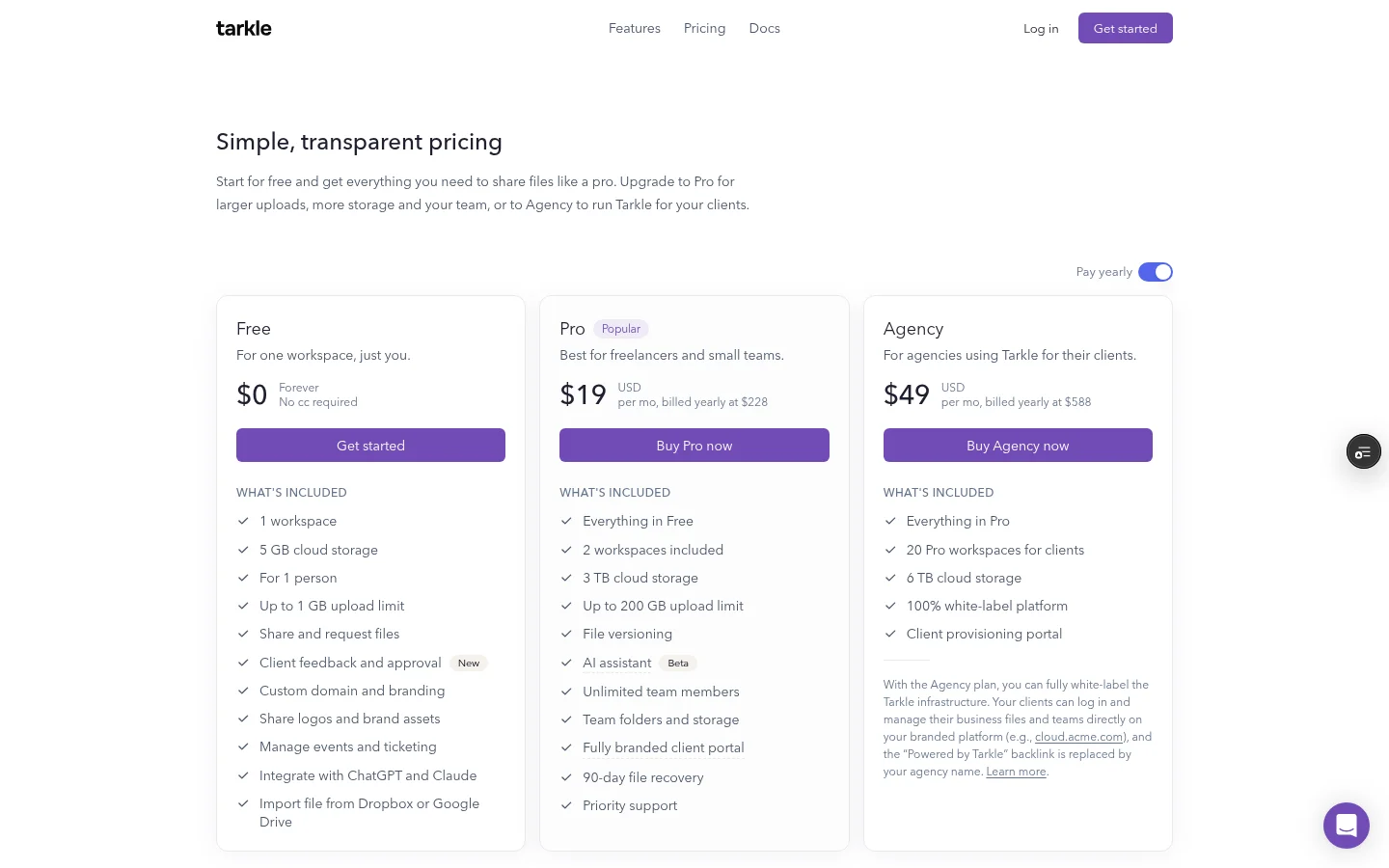
Plans and prices are on the pricing page. Free costs $0 and needs no credit card, with 1 workspace, 5 GB of storage and uploads up to 1 GB. Pro is $29 a month, or $19 a month billed yearly, with 3 TB and uploads up to 200 GB. Agency is $59 a month, or $49 a month billed yearly, and adds 20 workspaces for your clients and a white-label platform on your own domain. Deleted files stay in the recovery bin for 30 days on Free and 90 days on Pro.
Dropbox vs Tarkle
Feature | Tarkle | Dropbox |
|---|---|---|
Free plan | Free: 5 GB, 1 person, no credit card | Basic: 2 GB to store and share your files |
Entry paid plan | Pro: $19 a month billed yearly | Plus: $9.99 / month, 2 TB for one person |
Password-protected links | Yes, Free too | Password-protected transfers: not on Plus, listed on Standard and Advanced |
Link expiry | Yes, a date after which the link stops working | Custom expiration dates: not on Plus, listed on Standard and Advanced |
File requests | Yes, on Free: 1 active request form | Incoming transfer requests on Plus, Standard and Advanced |
Delivery tracking | Delivered, viewed or downloaded status | Transfer analytics on Plus, Standard and Advanced; viewer history on Standard and Advanced |
Deleted file recovery | 30 days on Free and 90 days on Pro | 30 days on Plus, 180 days on Standard, one year on Advanced |
White label on your own domain | Agency plan | Branded transfers listed on Standard and Advanced |
Folder sync to your computer | Built around sending and requesting files by link | Stay connected across all devices, listed on Plus, Standard and Advanced |
Sources: Tarkle's pricing page and feature pages, and Dropbox's plans page, as read in November 2026.
Who should choose Dropbox
Stay with Dropbox if you need a folder that stays in step across your computer and phone. Dropbox's Plus, Standard and Advanced cards list "Stay connected across all devices". Tarkle is built around sending and requesting files by link, so for that job Dropbox is the better fit.
Stay with Dropbox too if your team already works inside it and your clients only get a link now and then, not a branded place of their own. If your clients need an occasional file and you do not care how the link looks, a Dropbox link does the job.
Who should choose Tarkle
A client opens a page with your logo, on your own address. On Agency, "Powered by Tarkle" becomes your agency name, and you get 20 workspaces for your clients. See white label for agencies.
It also fits when you need to know what happened to a file. The transfer status above shows that. File requests collect files from anyone with one link, into the folder you choose, so you stop chasing attachments.
And it fits when the cost of seats matters. Pro and Agency include unlimited team members, so adding a colleague does not add a per-person line. Dropbox's team plans are priced per user.
Start with the Free plan, which needs no credit card. Start for free. For more on why people look at other tools, read why people leave Dropbox and the white-label Dropbox alternative guide for agencies.
Switching from Dropbox to Tarkle
Start with the files you share with clients. You can move the rest later.
Create a Free account at tarkle.com/sign-up.
Copy the files you need from Dropbox into your Tarkle library, with no download first.
Add your logo and colours, and a custom domain if you have one.
Send one transfer, or create a file request, and open the link as your client would.
Import one active client's folder first and send them a real transfer. You see the branded page and the tracking before you move anything else.
Frequently asked questions
Is Tarkle a replacement for Dropbox?
For sending files to clients and collecting theirs back, Tarkle covers that job. For a folder that stays in step across your computer and phone, Dropbox is the tool this page describes.
Is there a free plan on both?
Yes. Dropbox Basic gives 2 GB to store and share your files. Tarkle Free gives 5 GB of storage for one person, with uploads up to 1 GB on Free.
Can I import my Dropbox files into Tarkle?
Yes. You can copy files from Dropbox into your Tarkle library, with no download first.
What is the largest file I can send?
On Tarkle, uploads go up to 1 GB on Free and up to 200 GB on Pro and Agency. On Dropbox, transfers go up to 50 GB on Plus and up to 100 GB on Standard and Advanced.
Where are my files stored?
Pick a storage region for your workspace, in Europe, the US, Asia-Pacific or Oceania. Pro and Agency can also buy a one-time change of region for a workspace, for $49. See choose where your files are stored.