ShareFile alternative: 6 tools compared for small agencies (2026)
Six tools compared for small agencies leaving ShareFile, with published prices, file limits and what to check first.

The best ShareFile alternative for a small agency depends on the job. Dropbox suits teams that already live in shared folders, Filemail suits agencies that mostly send large files, Hightail suits creative teams that want review features, Clinked suits firms that want a full client workspace, and Tarkle suits agencies that want to send files, collect files and get client approval under their own domain on flat plan prices. We make Tarkle, so read this as one vendor's view and check the sources linked under each tool.
Last checked: October 2026.
Why small agencies look for a ShareFile alternative
ShareFile is built around secure document exchange for accounting, legal, finance, insurance and healthcare firms. Progress, its maker, launched a ShareFile Enterprise plan on 29 September 2026 for larger and regulated organizations, adding security monitoring and identity controls (Progress press release). That is useful for a firm with a security team, and more than most five-person studios need.
On its pricing page (October 2026), ShareFile charges per user with a minimum of three users on Advanced, Premium and Enterprise. Advanced shows $18.15 and $16.50 per user per month, Premium shows $28.59 and $26.00, and Enterprise shows $42.00 and $35.00. The client portal on Advanced is basic, and e-signature, workflows and request lists start on Premium. Every plan lists unlimited client users and a 100 GB upload limit (ShareFile docs).
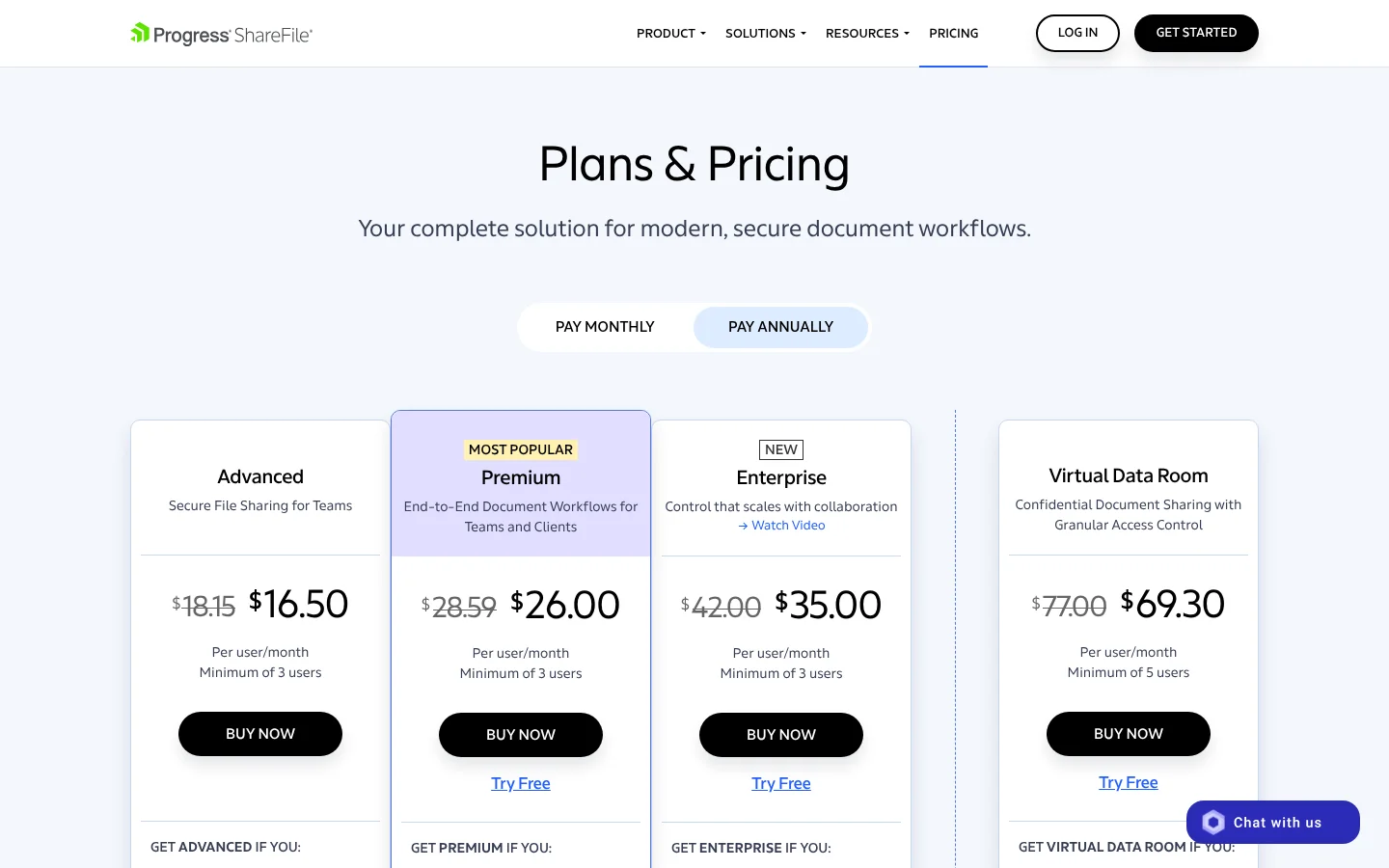
None of that is a flaw. It is a different shape: per-user pricing, a feature set that grows with the plan, and a regulated-industry focus. If you want the detailed side-by-side, read Tarkle vs ShareFile. The rest of this page is about what else fits a small team.
What a small agency usually needs
Most agencies and studios want four things from a file tool. They send finished work and large files with one link. They collect files from clients without chasing email attachments. They want the link or portal to carry their own name. And they want clients to comment or approve without creating an account.
Pricing shape matters as much as features. A tool priced per user gets more expensive with every designer, editor or freelancer you add, while a flat plan price does not. A tool priced per client or per member pool can jump sharply between its first and second plan. Check which shape you are buying before you compare feature lists.
If you are unsure whether you need a sharing tool or a storage tool, file sharing vs cloud storage explains the difference.
Six ShareFile alternatives compared
Tool | Published price | Largest file | Client portal | File requests |
|---|---|---|---|---|
Dropbox | Standard $15 and Advanced $24 per user per month | Transfer up to 100 GB | No named portal found | Yes, no account needed |
Filemail | Prices not readable on its page | Pro 250 GB, Business any size | Pro and Business | Pro and Business |
Tarkle | Free $0, Pro $29, Agency $59 per month per organization | Free 1 GB, Pro and Agency 200 GB | Pro and Agency | Yes, on Free |
Hightail | Pro $12, Teams $24, Business $36 per user per month, billed annually | Pro 25 GB, Teams 50 GB, Business 500 GB | Not found | Not found |
Clinked | Start Up $11 per user, Standard $239 and Premium $599 per month | Not found | Yes, the core product | Listed, details not found |
Box | Not read on its own page | Not confirmed | Not on Business, per a third party | Not confirmed |
Prices are in USD as published by each vendor in October 2026. "Not found" means we did not find it on the vendor pages we read, not that the tool lacks it.
Dropbox: best for teams that already share folders
Dropbox sells team plans on its plans page: Standard at $15 per user per month and Advanced at $24 per user per month, with Advanced for three people or more. Dropbox Transfer sends up to 100 GB on both. File requests work for people without a Dropbox account, and submitters can upload up to 250 GB on team plans. Standard and Advanced add password-protected links, expiry dates and transfer analytics.
The limit is cost and shape. Pricing is per user, and Standard starts at 3 TB shared by the team (Dropbox help). We did not find a named client portal or a custom domain on the pages we read, so a studio that wants clients to sign in on its own address should ask Dropbox first.
Filemail: best for sending and receiving large files
Filemail is built for sending and receiving large files. Its plan comparison page lists a custom subdomain, your logo and colors, private file requests and a client portal on Pro and Business, with 250 GB per transfer on Pro and any size on Business. Recipients do not need an account to download.
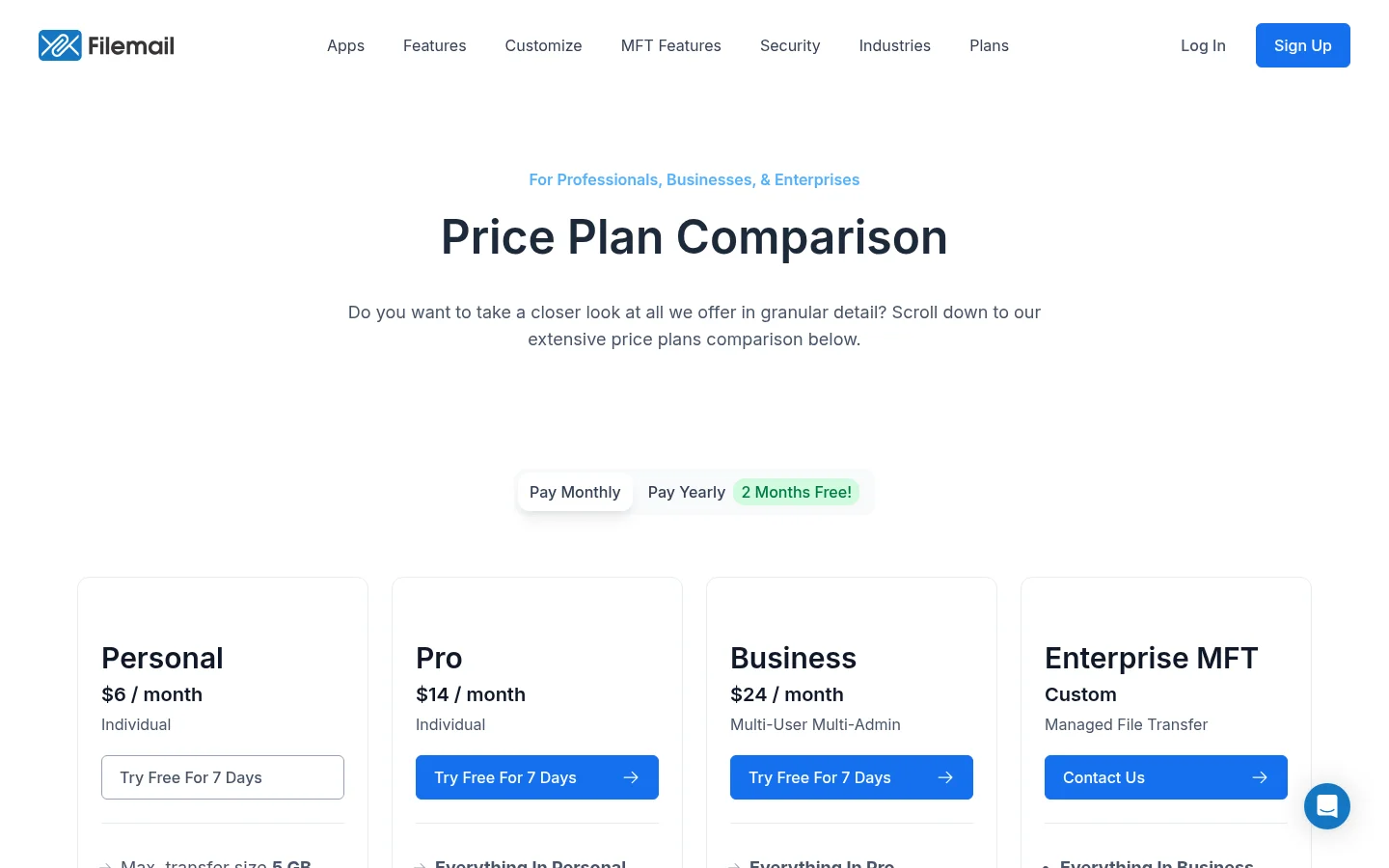
The limits are on the entry plan and on the address. Personal is capped at 5 GB per transfer and 30 days of availability, and the branded address is a subdomain of filemail.com, not your own domain. Its plan prices did not show in the page text when we checked and third-party sources disagree, so read the price on Filemail's own page before you decide. We compared the two in more detail in Tarkle vs Filemail.
Tarkle: best for sending, collecting and approval on your own domain
Tarkle gives freelancers, agencies and small teams one place to store and share files. On the Free plan you share files by link and use file requests to collect files from clients. Free also includes client feedback, where clients comment on and approve images and PDFs with one link and no account, plus custom branding and a custom domain, so links can come from an address like files.yourstudio.com. Anyone downloading a transfer needs no account.
The client portal, where each client signs in with their email, sees only what you shared with them and sends files back, is on Pro and Agency. Pro is $29 a month, or $19 a month billed yearly ($228 a year), with 3 TB of storage, a 200 GB upload limit and team members included. Agency is $59 a month, or $49 a month billed yearly ($588 a year), with 6 TB, 20 workspaces for clients and a 100% white-label platform. Plans are priced per organization, not per person (pricing).
The limits are real. Free is for one person with 5 GB of storage and a 1 GB upload limit. Tarkle has no e-signature in its feature list and makes no HIPAA claim, so a team that needs signing inside the tool or a signed compliance agreement should look at ShareFile Premium or another tool built for that.
Hightail: best for creative teams that send big files
Hightail is aimed at large-file transfer and creative review. Its pricing page shows Lite free (100 MB per file, 7-day expiry), Pro at $12 a month billed annually ($15 monthly), Teams at $24 per user billed annually ($30 monthly, 1 to 30 users) and Business at $36 per user billed annually ($45 monthly, 3 or more users). Send limits are 25 GB on Pro, 50 GB on Teams and 500 GB on Business, and custom branding is listed as an add-on.
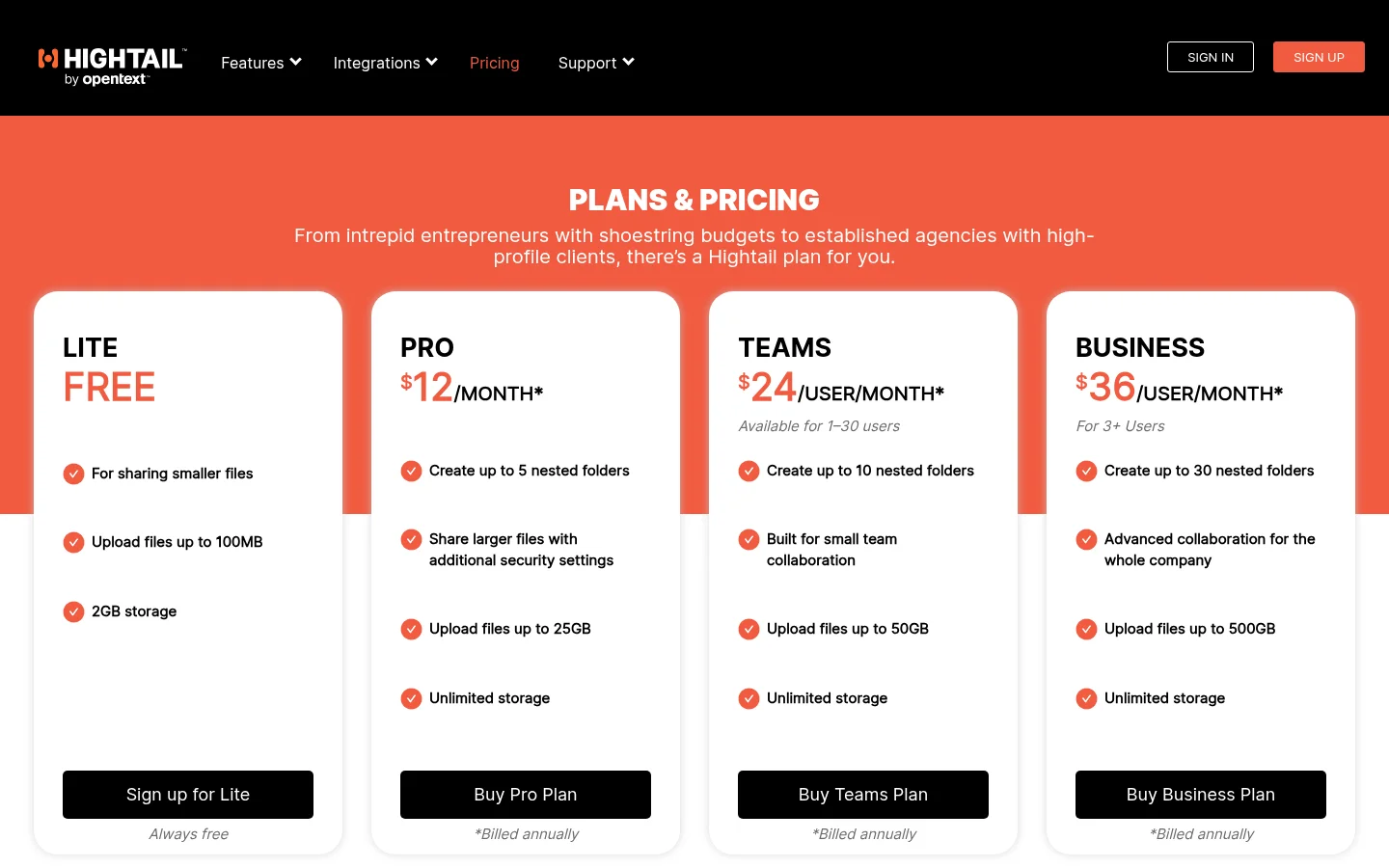
The limit for a growing studio is per-seat pricing on the plans with the higher send limits. We did not find a client portal, file requests or a custom domain on the pages we read. Tarkle vs Hightail covers the difference between branded delivery and creative review.
Clinked: best for a full client workspace
Clinked is a branded client portal and collaboration workspace. Its pricing page shows Start Up at $11 per user per month for 1 to 25 users with 2 GB and no custom URL, Standard at $239 a month with 100 members, 1 TB and your own domain, and Premium at $599 a month with 250 members, 3 TB, white-label email notifications and enforced two-factor sign-in. The page does not make clear whether the figures are monthly or yearly rates.
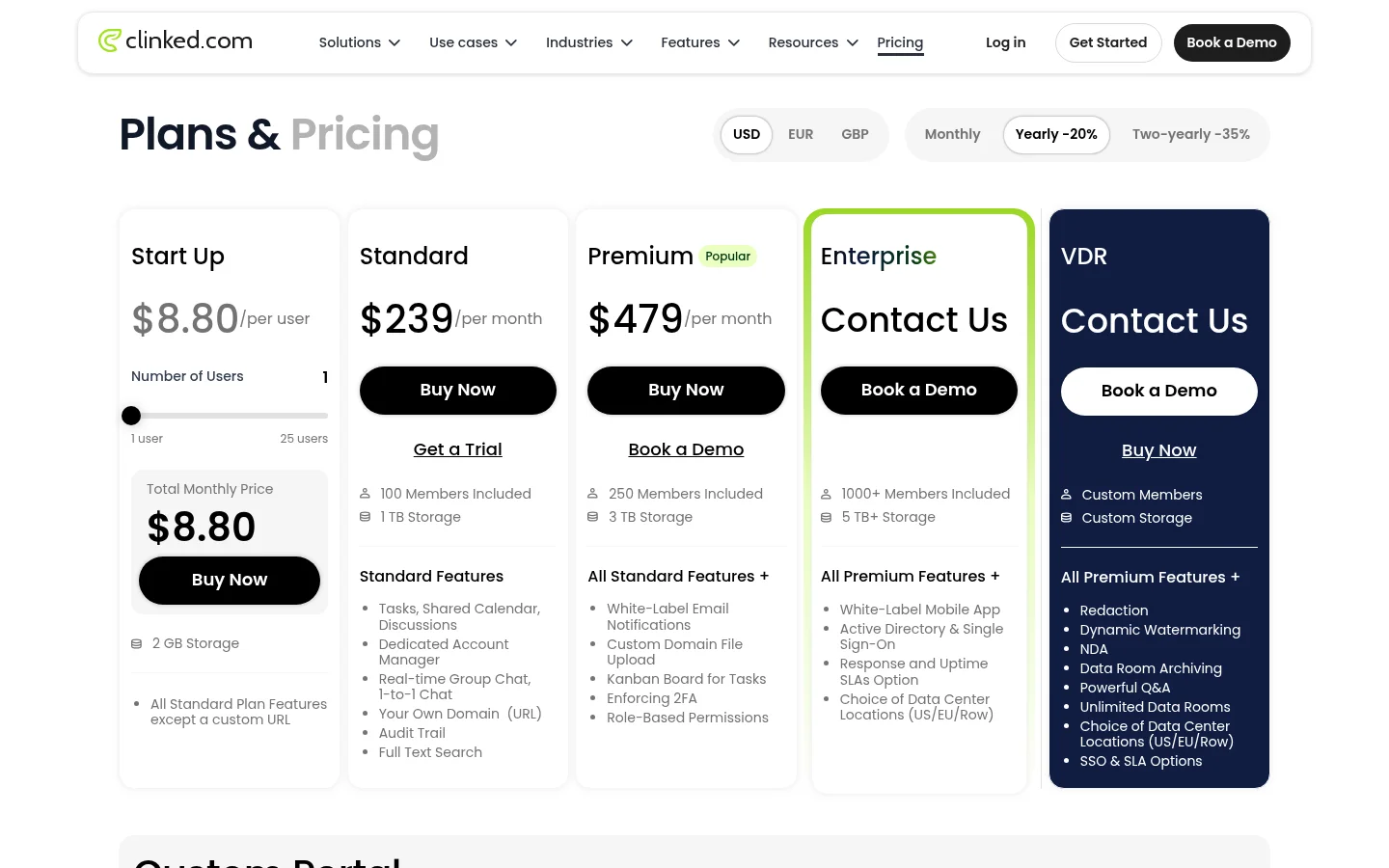
The strength is that a portal with tasks, calendar and discussions is the core product. The limit is the price gap: a 2 to 15 person studio goes from 2 GB without a custom URL to $239 a month. Our Tarkle vs Clinked page covers it in detail.
Box: best for teams that want content management
Box is enterprise content management with a wide range of integrations. Its own pricing page could not be read by our tools, so we give no Box price here. A Yahoo Tech review dated 30 March 2026 describes the Business tier as relatively bare-bones and notes that external collaborators cost extra (Yahoo Tech). That is the main thing to check if clients will be outside collaborators in your account. See Tarkle vs Box for how it differs from branded client sharing.
Which ShareFile alternative fits which team
You mostly send large files and want a simple branded address: Filemail or Hightail, checking the price and the file size for the plan you need.
You already store everything in shared folders: Dropbox, with the per-user cost in mind.
You want clients to sign in to a portal with tasks and discussions: Clinked.
You want to send, collect and get approval under your own domain, on flat plan prices: Tarkle.
You need e-signature, workflows or a signed HIPAA agreement: stay with ShareFile Premium or compare tools built for regulated work.
Run one real client job through each shortlisted tool before you pay. Send a finished delivery, request a file from a client who has never used it, and ask a client to approve something. Note how many steps the client needed and whether they had to create an account.
What to check first
Price at your headcount. Multiply the per-user price by everyone who will upload, then compare it with a flat plan.
Minimum users. ShareFile, Hightail Business and Dropbox Advanced all set minimums of three people or more.
Largest file on your plan. The headline number is often on a higher plan than the one you buy.
Your own domain. Ask whether the client sees your address or the vendor's, and whether the vendor's name is removed.
What clients need to do. An account to download, to upload or to approve is friction.
What is missing. E-signature, HIPAA terms and Outlook add-ins matter to some firms and not to others.
Next step
Shortlist two or three tools from the list above, run the same client job through each and compare the result. To try Tarkle's side of it, start for free, connect a custom domain and send one transfer and one file request to a colleague.