
Tarkle vs Clinked: branded file sharing or a full client workspace
Clinked is a client workspace with tasks and chat. Tarkle sends and collects files under your brand. See which fits.
Clinked is better when clients need a shared workspace with tasks, chat, a calendar and approvals. Tarkle is better when the job is sending and collecting files under your own brand, and you want to start free. We make Tarkle, so read this as one vendor's view, and check the Clinked facts against its own site.
What Clinked is
Clinked is a white-label collaboration platform. It puts files, messages, tasks and document approvals into branded client or partner workspaces. On its home page Clinked names accounting, finance, legal, insurance, agencies, HR, healthcare and M&A as its markets, and it also sells a Virtual Data Room and a Custom Portal build on top of its Enterprise plan.
The job Clinked was built for is ongoing work with clients inside one shared space. The client logs in, finds files, discusses them, completes tasks and approves documents without leaving the portal.
What Clinked offers
Clinked publishes its plans on its pricing page, read in 2026. Prices there change with the billing period (monthly, yearly or two-yearly), and the page shows different figures for the same plan in different places, so check it for the figure that applies to you.
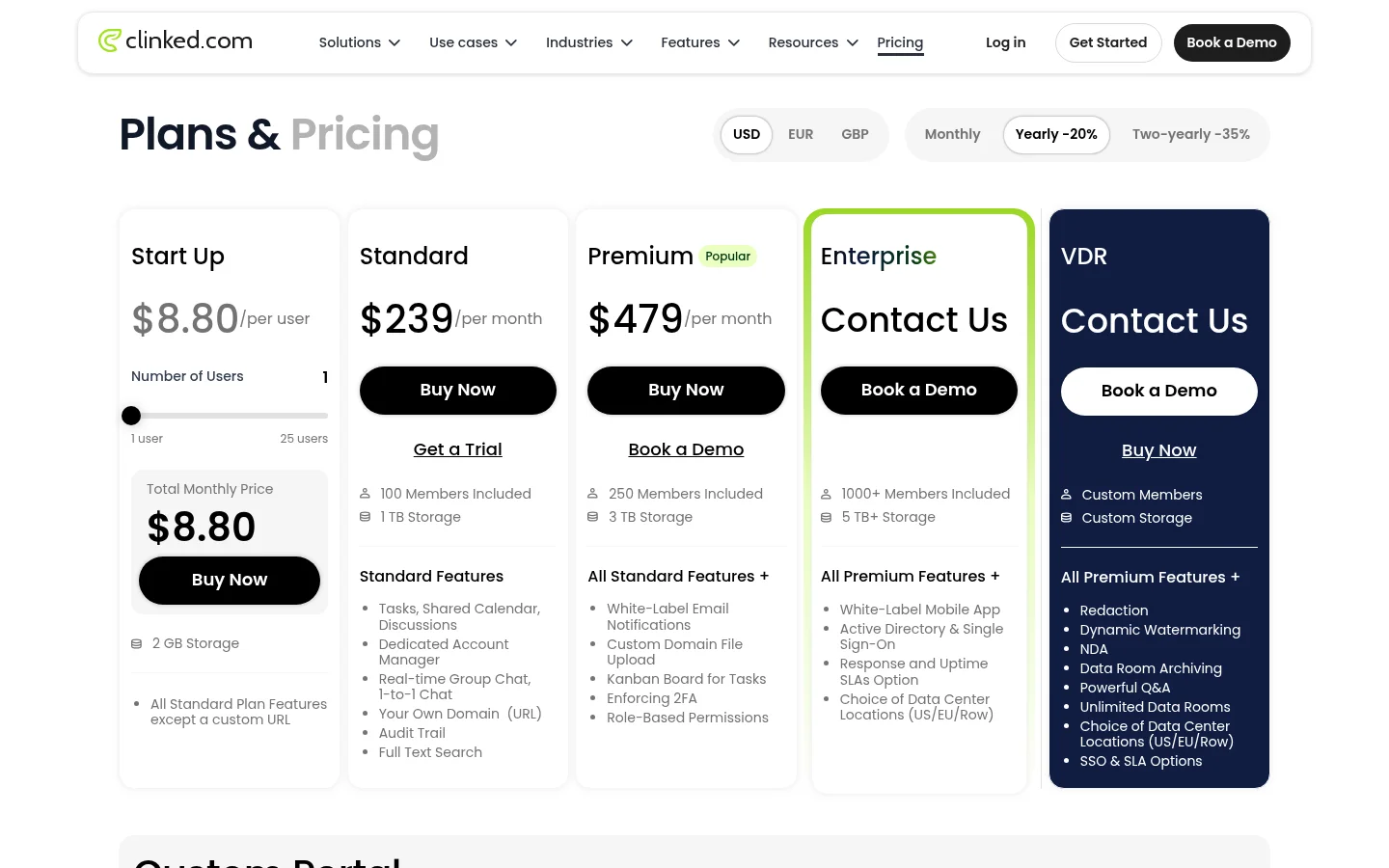
Start Up: $11 per user for 1 to 25 users, with 2 GB of storage and no custom URL.
Standard: shown from $239 per month, with 100 members, 1 TB of storage, your own domain, tasks, a calendar, discussions, chat, an audit trail and a dedicated account manager.
Premium: its compare table shows $479 per month and its plan card shows $599, with 250 members, 3 TB, white-label email notifications, Kanban boards, enforced two-factor sign-in and role-based permissions.
Enterprise and VDR: priced by contacting Clinked, with 1,000 or more members, 5 TB or more, single sign-on, a white-label mobile app and a choice of data center (US, EU or rest of world).
For sharing with outsiders Clinked lists guest sharing, file requests, file approval, file locking, version control and link expiration. Its client collaboration page says you can upload large files up to 5 GB directly. Integrations include Google Workspace, Microsoft OneDrive, DocuSign, Adobe Acrobat Sign and Zoom, plus Zapier. Clinked's pages offer a free trial and a demo, and the larger plans are sales-led.
Reviewers praise ease of use for non-technical clients and responsive support. Assembly's review from August 2025 calls the starting price high and the interface more like a corporate intranet than a modern web app. That is one reviewer's opinion, not a Clinked claim.
What Tarkle does
Tarkle gives freelancers, agencies and small teams one place to store and share files under their own brand. The work is files going out and files coming back.
Send: share files by link with a password, an expiry date or one-time links, and see whether a transfer was delivered, viewed or downloaded in transfer status. Files can be up to 200 GB on Pro and Agency (1 GB on Free), and the person downloading needs no account.
Collect: file requests bring files back into the folder you choose, with deadlines and size limits.
Your brand: custom branding and a custom domain put your logo and address on every page. Brand pages hold logos, colors and fonts.
Client portal: on Pro and Agency, each client signs in with their email, sees only what you shared with them and sends files back. See client portal.
Review: client feedback turns images and PDFs into a board clients comment on and approve, with no account. It is on every plan, Free included.
Also: video and audio sharing with a built-in player, paid transfers through your own Stripe account, Slack alerts, file versions and imports from Google Drive and Dropbox.
Plans are per organization. Free is $0 with 1 workspace, 5 GB of storage and a 1 GB upload limit, and it includes file sharing, file requests, client feedback, custom domain and branding. Pro is $29 per month, or $19 per month billed yearly, with 3 TB, a 200 GB upload limit, 2 workspaces, team members, team folders and the branded client portal. Agency is $59 per month, or $49 per month billed yearly, with everything in Pro, 20 workspaces for clients, 6 TB and a white-label platform on your own domain where "Powered by Tarkle" becomes your agency name. See pricing for the live numbers.
Tarkle is a file tool. Its features are about files going out and coming back, and it has no task board, team chat or calendar.
Clinked vs Tarkle
Feature | Tarkle | Clinked |
|---|---|---|
Main job | Send and collect files under your brand | Shared client workspace with files, tasks and chat |
Entry price | Free plan, then Pro at $29 per month | Start Up at $11 per user, Standard shown from $239 per month |
Storage | Free 5 GB, Pro 3 TB, Agency 6 TB | Start Up 2 GB, Standard 1 TB, Premium 3 TB |
Upload size | 1 GB on Free, 200 GB on Pro and Agency | Up to 5 GB directly, as Clinked states |
Custom domain | On every plan, Free included | Standard and above |
White label | Agency plan | Standard and above, white-label mobile app on Enterprise |
Client portal | Pro and Agency | All plans |
Request files from clients | File requests on every plan | File request listed |
Client approval | Client feedback on images and PDFs | File approval listed |
Tasks, chat, calendar | Not built | Standard and above |
Video and audio player | Built in | Not listed on its pricing page |
Paid downloads | Through your Stripe account | Not listed on its pricing page |
Sales call needed | No, sign up and start | Enterprise, VDR and Custom Portal are sales-led |
Who should choose Clinked
Stay with Clinked if your clients work with you day to day inside one shared space. Tasks, a calendar, discussions and chat in the same portal as the files are things Tarkle does not have. Clinked is also the fit if you need single sign-on, a white-label mobile app or a virtual data room for a deal.
It makes sense when the portal is the product you sell and the monthly price fits the contract.
Who should choose Tarkle
Choose Tarkle when most of your work is delivering files and getting files back. A designer sending final artwork, a video editor sending cuts, an accountant collecting documents or an agency sharing assets with ten clients all need the same few things: a link that carries their brand, a password or expiry when it matters, a way to see that the client opened it, and a request link so the reply comes back into the right folder.
Your own address matters to clients, and on Tarkle it does not sit behind a higher plan. The Free plan includes custom branding and a custom domain, so you can send one real transfer from your own address before you pay anything. Pro adds the branded client portal for $29 per month. Agency adds 20 client workspaces and a white-label platform, so clients log in on your domain and see your agency name.
You also get things around the file: video and audio with a built-in player, payments for a transfer through your own Stripe account, and Slack alerts when files are viewed or downloaded. There is no sales call between you and the first transfer.
Start for free and send one real transfer from your own domain.
Switching from Clinked to Tarkle
Download your files from Clinked to your computer, folder by folder. If the files also sit in Dropbox or Google Drive, skip this and import them in step 3.
Create your workspace on Free and add your logo, accent color and custom domain.
Bring the files in by upload, or import from Google Drive or Dropbox without downloading them first.
Set up each client: share a folder by link, or on Pro and Agency invite the client to the client portal. Agency can create a workspace for every client.
Replace the chasing: send a file request where you used to ask clients to upload into Clinked.
Move tasks and chat elsewhere before you cancel, because Tarkle does not have them.
Move one client first. Send them a transfer from your own domain and a file request for what you need back, then judge the result before you move the rest.
FAQ
Is Tarkle a Clinked alternative?
For sharing and collecting files under your own brand, yes. For tasks, chat and a calendar inside a client workspace, no: Tarkle does not have those.
How much does Clinked cost?
Clinked's pricing page shows Start Up at $11 per user and Standard from $239 per month. Premium appears at $479 in its compare table and $599 on its plan card, and Enterprise is by quote. Check clinked.com/pricing for today's figure.
Does Clinked have a free trial?
Clinked's own pages say you can start a free trial or book a demo. Tarkle has no trial, but its Free plan is $0 with 5 GB of storage.
Can I use my own domain with Tarkle?
Yes. Custom domain and branding are on the Free plan. On Agency you can also replace "Powered by Tarkle" with your agency name.
Does Tarkle have a client portal?
Yes, on Pro and Agency. Each client signs in with their email, sees only what you shared with them and can send files back.
How big a file can I send with Tarkle?
Up to 1 GB on Free and up to 200 GB on Pro and Agency. The person downloading needs no account.
Can clients approve work in Tarkle?
Yes, for images and PDFs. Client feedback lets them comment on a board and approve or request changes with one link.