
Tarkle vs Egnyte: client sharing or content governance
Egnyte governs company content for IT teams. Tarkle shares files with clients on your own domain. See plans and limits.
Egnyte is better when IT needs to govern all company content: compliance, retention, ransomware recovery and a synced file server. Tarkle is better when you send files to clients and want them on your own domain, behind your own branding, with a record of who opened what. We make Tarkle, so read this as one vendor's view, and check the sources linked below. Last checked: October 2026.
What Egnyte is
Egnyte, Inc. is a US company based in Mountain View, California. Its home page describes an "AI Context Layer and Content Cloud" that replaces file servers and adds governance, ransomware protection and AI on top. Its pricing page calls the product "your secure file server in the cloud".
The industries it lists are architecture, engineering and construction, financial services, life sciences, media and entertainment, and the public sector. These are teams with large shared drives, compliance duties and an IT person or provider who runs the system. File sharing with outsiders is part of Egnyte, but the product is built around the company's own content first.
What Egnyte offers
As published on Egnyte's pricing page in October 2026, plans are priced per user per month and paid annually:
Egnyte plan | Price per user per month | Upload size | Users |
|---|---|---|---|
Business | $22 | Files up to 100 GB | Maximum 100 |
Enterprise Lite | $39 | Files up to 150 GB | Not capped |
Elite | $48 | Files up to 150 GB | Not capped |
Top plan | Custom quote | Files up to 150 GB | Not capped |
Add-ons such as Snapshot and Recovery ($10 per user per month) and industry packages are priced on top or by quote.
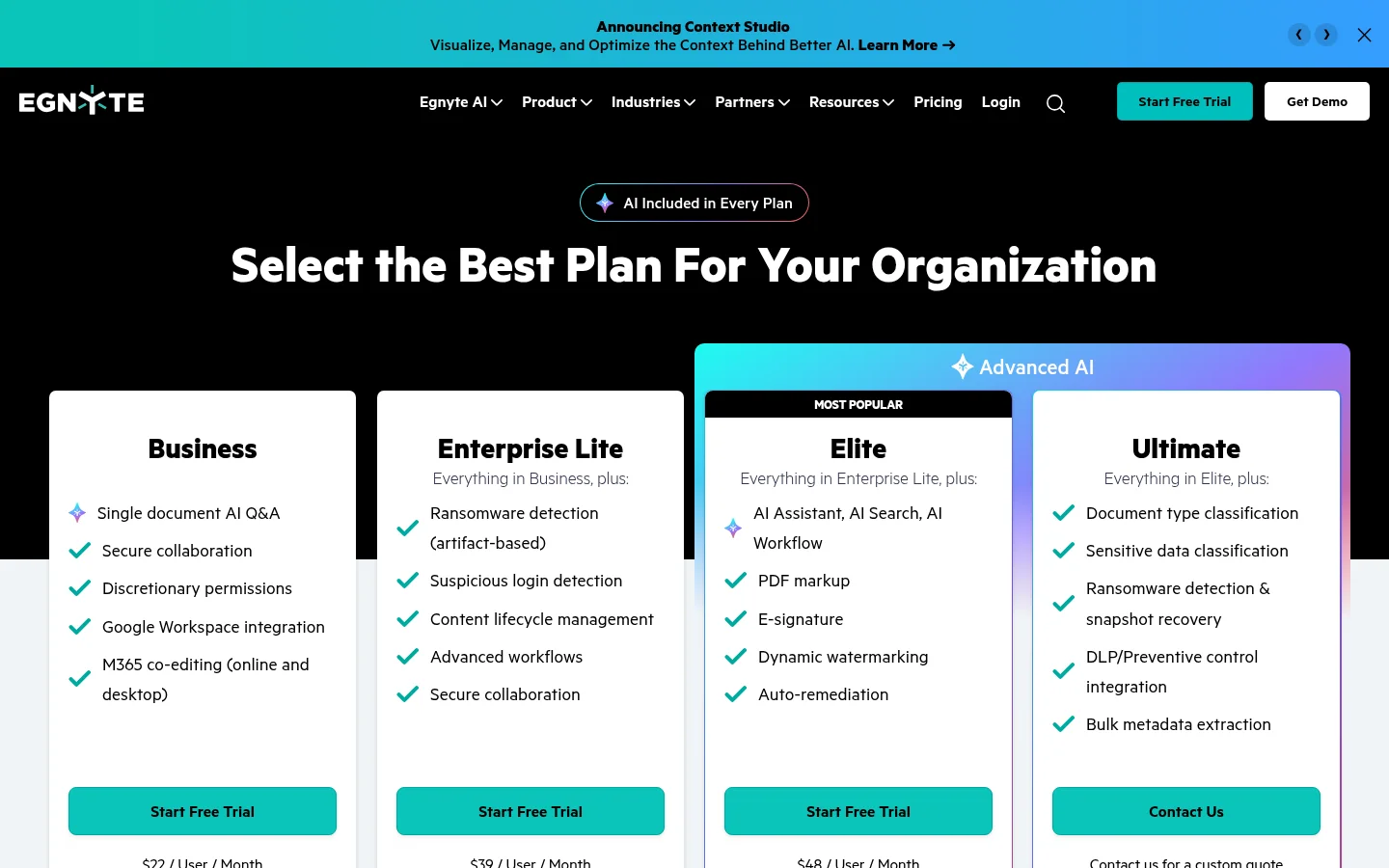
The headline features are a Windows and macOS desktop app, co-editing in Microsoft 365 and Google Workspace, content lifecycle policies, ransomware detection and recovery, and AI that grows with the plan (single-document Q&A on Business, an AI assistant and AI workflows on Elite). Its governance page adds sensitive data discovery and classification, and the pricing page lists compliant storage for HIPAA, FINRA, SOC 2 and ISO/IEC 27001. Customer-managed encryption keys and DLP integrations are on the top plan, which is quoted on request.
For sharing with outsiders, Egnyte's help center describes links with a password, an expiry by date or number of clicks, and preview-only links. It emails the link owner when a link is clicked, and upload links let recipients send files without signing in. Egnyte's data can sit in the US or EU, with more regions an admin can choose. Client areas such as Document Portal and Document Room are separate add-ons that you request from sales. Egnyte's pages I read do not mention a custom domain or branding for share links, or payments for files.
Reviewers on Capterra praise the mapped drive, large file handling, version history and secure links. The common complaints are cost for small businesses, occasional desktop sync delays and file locks that hold up work.
What Tarkle does
Tarkle gives freelancers, agencies and small teams one place to store and share files with clients. Everything below is on the plans named; prices are from the pricing page.
Plans. Free is $0 for one person: 5 GB of storage, a 1 GB upload limit, file sharing and file requests, client feedback and approval, a custom domain and custom branding. Pro is $29 per month, or $19 per month billed yearly: everything in Free, plus 3 TB of storage, uploads up to 200 GB, 2 workspaces, team members, team folders, file versions, 90-day file recovery and a fully branded client portal. Agency is $59 per month, or $49 per month billed yearly: everything in Pro, plus 6 TB of storage, 20 workspaces for your clients and a white-label platform.
Share and track. Share files by link with a password, a link expiry or an email check before download. Recipients need no account. Transfer status shows whether a transfer was delivered, viewed or downloaded, and the activity log keeps a searchable record with export.
Client portal. On Pro and Agency, each client portal lets a client sign in with an emailed link, see only what you shared with their organization, and send files back.
Requests, feedback and payments. File requests collect files with one link and can close on a deadline. Client feedback turns images and PDFs into a board clients comment on and approve. Paid transfers charge through your own Stripe account.
Your brand and domain. Custom domain and custom branding are on Free. On Agency, white label replaces the Powered by Tarkle backlink with your agency name, and your clients log in and manage their files on your own domain.
Storage region. You can choose where files are stored: Europe, the United States, Asia-Pacific or Oceania.
Tarkle does not price per user: team members come with the plan. It is also not a company file server: it has no governance suite for classification, retention policies or DLP, and no co-editing of documents.
Egnyte vs Tarkle
Feature | Egnyte | Tarkle |
|---|---|---|
Built for | IT-led content governance and a cloud file server | Sending files to clients under your brand |
Pricing model | Per user per month, paid annually; top plan by quote | Flat plans; Pro and Agency include team members |
Entry price | Business, $22 per user per month | Free at $0; Pro from $19 per month billed yearly |
Largest file | 100 GB on Business, 150 GB on higher plans | 1 GB on Free, 200 GB on Pro and Agency |
Compliance and governance | Retention policies, classification, DLP, compliant storage | Not offered |
Password and expiry on links | Yes, expiry on Enterprise Lite and above | Yes, plus email check and one-time links |
Custom domain for links | Not mentioned on Egnyte's pages | Free, Pro and Agency |
Branded client portal | Document Portal and Document Room add-ons | Pro and Agency |
Client file requests | Upload links; document requests in Document Portal | File requests on every plan |
Paid downloads | Not mentioned on Egnyte's pages | Paid transfers through Stripe |
Storage regions | US and EU, plus other regions | Europe, US, Asia-Pacific, Oceania |
Who should choose Egnyte
Choose Egnyte if your company needs to control its own content as much as it needs to share it. That means retention and lifecycle policies, discovery of sensitive data, ransomware recovery, compliance standards such as HIPAA or ISO 27001, and customer-managed keys. Choose it if people work on shared drives from a Windows or Mac desktop, co-edit in Microsoft 365 or Google Workspace, or you want to replace an on-premises file server. Tarkle is not built for any of this, and a firm with those duties should not swap Egnyte for Tarkle.
Who should choose Tarkle
Choose Tarkle when the job is the hand-off to a client. A client opens a link on files.yourstudio.com, sees your logo and colors, enters a password or an email, and downloads. You can see whether it was viewed or downloaded, close the link when the project ends, and ask for files back with a request link that needs no account.
For ongoing clients, the Pro client portal gives each client a place that shows only their files. An agency can go further: the Agency plan gives you a workspace for each client on your own domain, with the Powered by Tarkle backlink replaced by your agency name. Egnyte's pages do not mention branded links on your own domain, which is the gap Tarkle fills.
The cost model also differs. Egnyte charges per user, so a growing team raises the bill. Tarkle's Pro and Agency plans include team members, which suits a small firm where several people send files. Judge the two on the job, not the price: governance and client hand-off are different products.
Start with a free workspace and send one real transfer to a client. Start for free.
Switching from Egnyte to Tarkle
You do not have to move everything. Most firms keep governed internal content in Egnyte and use Tarkle for the files that go to clients. If you do move client-facing folders:
Download the folders you share with clients from Egnyte, then upload them into Folders and library in Tarkle. Files that sit in Google Drive or Dropbox can be imported directly.
Add your logo and colors, and connect your custom domain.
Invite your team, then create a transfer or a client portal for each client.
Replace old Egnyte links in your emails and proposals with the new links, and revoke the old ones in Egnyte.
Move one active client first. Send them a transfer on your own domain, and keep the old Egnyte link live for a week so nothing breaks while they switch.
Frequently asked questions
Is Tarkle an Egnyte alternative?
For sharing files with clients, yes. For governance, retention, DLP and a synced company file server, no. Tarkle is built for the client hand-off.
How much does Egnyte cost?
As published in October 2026, Business is $22 per user per month, Enterprise Lite $39 and Elite $48, paid annually, and the top plan is by quote. See Egnyte's pricing page.
Can I put my own domain on Egnyte share links?
Egnyte's pages do not mention a custom domain or branding for share links. If it matters, ask Egnyte's sales team. Tarkle includes a custom domain on Free, Pro and Agency.
Does Tarkle charge per user?
No. Free is for one person, and Pro and Agency include team members in the plan price.
What is the largest file I can send with Tarkle?
Free allows uploads up to 1 GB. Pro and Agency allow uploads up to 200 GB, and the person downloading needs no account.
Can clients upload files to me?
Yes. A file request gives clients a link to send files into the folder you choose, and the Pro client portal lets signed-in clients send files back.
Where does Tarkle store my files?
You can choose Europe, the United States, Asia-Pacific or Oceania for your workspace.
Is there a free Tarkle plan?
Yes. The Free plan costs $0 for one person and includes file sharing, file requests, a custom domain and custom branding. See Tarkle pricing.