
Tarkle vs Files.com: client sharing or managed file transfer
Files.com suits SFTP and automated transfers. Tarkle suits branded file sharing with clients, from $0.
Files.com is better when you move files between systems and partners with SFTP, automations and compliance reports. Tarkle is better when you send files to clients and collect files back under your own name and domain. This is Tarkle vs Files.com for people who share files with clients, and we make Tarkle, so read it as one vendor's view and check the linked sources. Files.com facts are as published on its own pages in October 2026.
What Files.com is
Files.com calls itself a "File Orchestration Platform". It is a managed file transfer service: it runs SFTP, FTPS, FTP, WebDAV, AS2 and HTTPS endpoints, connects to storage such as S3, Azure Blob and Google Cloud Storage, and runs automated file workflows. Its About page says it was founded in 2010 and that more than 4,000 organizations use it. The buyer is usually an IT, operations or security team that moves files between systems, vendors and partners.
It also shares files with people. Its outbound sharing page describes branded share links that need no Files.com account, with a password, an expiry date, single use, preview-only mode, watermarks and limits by email domain. Its inbox page describes a branded upload page, no account needed, where each uploader sees only their own uploads.
What Files.com offers
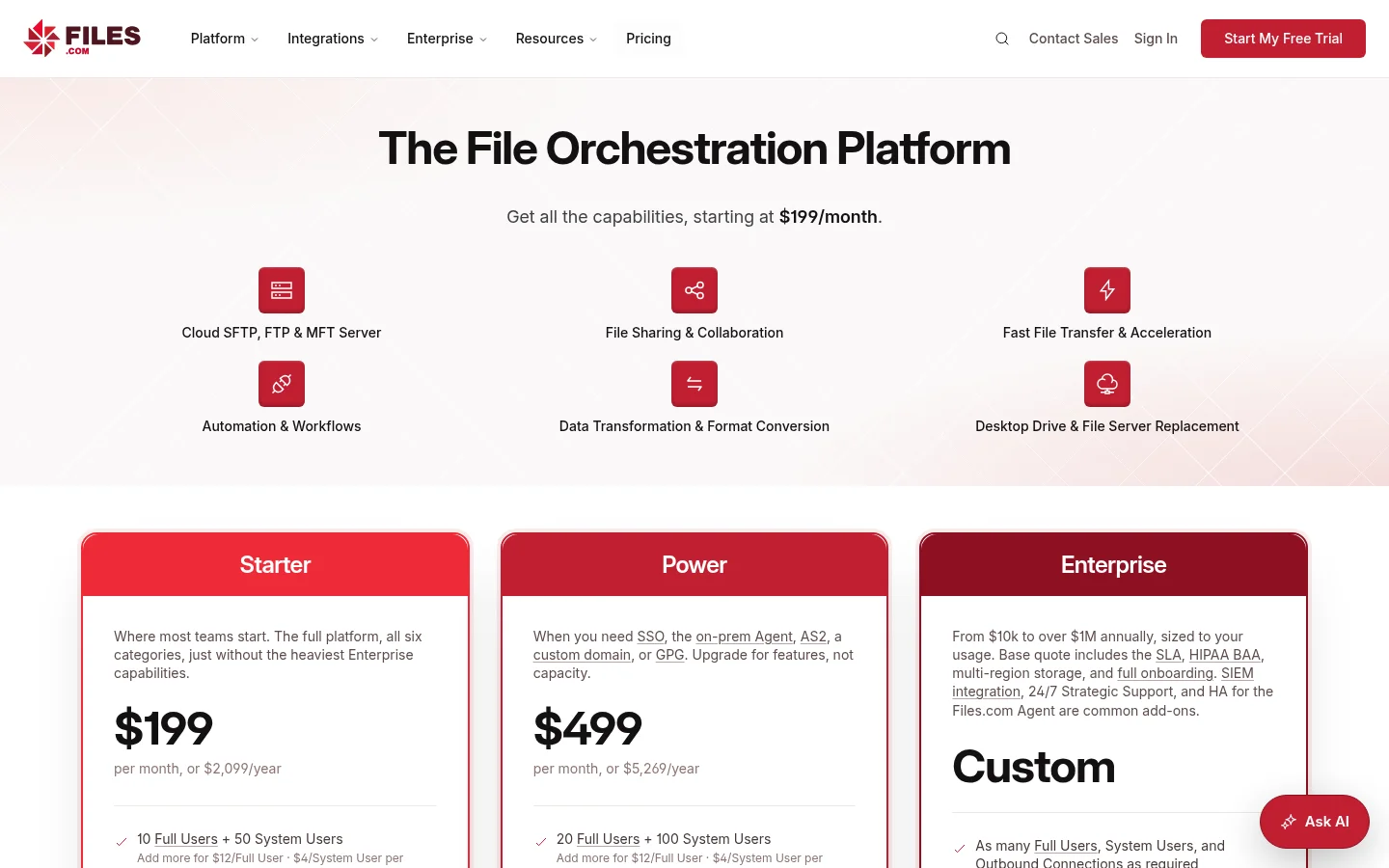
Plans and prices below come from the Files.com pricing page, read on 30 October 2026.
Starter: $199 per month, or $2,099 per year. It includes 10 full users, 50 system users, 2 outbound connections and 1 TB of monthly storage and transfer. Extra full users cost $12 per user per month.
Power: $499 per month, or $5,269 per year. It includes 20 full users and 2 TB. SSO/SAML, IP allowlisting, a custom domain with a dedicated IP and AS2 start here.
Enterprise: a custom quote. The page says from $10k to over $1M a year. The HIPAA BAA and up to eight storage zones are on this plan.
The pricing page lists no free plan. It offers a 7-day free trial with no credit card, and a 90-day money-back guarantee on annual plans.
Beyond sharing, Files.com publishes a single-file limit of up to 5 TB on its transfer page, a desktop app that mounts storage as a drive, no-code automations, a tamper-evident audit log, eight storage zones set per folder on its data residency page, and SOC 2 Type II and other attestations on its compliance page. Its branding page says basic colors are on every plan, while a custom domain and custom email sending start on Power.
What Tarkle does
Tarkle gives freelancers, agencies and small teams one place to store files and share them with clients. You send a file transfer with one link, and the person downloading needs no account. You protect it with a password, a link expiry, a one-time link, a view-only transfer or an email check before the download. You see whether it was delivered, viewed or downloaded, and the activity log keeps the record.
A file request brings files back with one link into the folder you choose. The client portal gives each client a branded place to sign in with an emailed link, see only what you shared with them and upload files back. Add a custom domain and custom branding, and links open on your own address. You can charge for a download with paid transfers through your own Stripe account, share video and audio on a page with a player, and collect comments and approval on images and PDFs with client feedback.
Plans belong to your organization. As listed on the pricing page:
Free: $0, no credit card required. 1 workspace, 5 GB of storage, 1 GB upload limit, file sharing and file requests, custom branding and a custom domain.
Pro: $29 per month, or $19 per month billed yearly ($228 a year). 2 workspaces, 3 TB of storage, uploads up to 200 GB, file versioning, the branded client portal and 90-day file recovery. Team members are not priced per seat.
Agency: $59 per month, or $49 per month billed yearly ($588 a year). Everything in Pro, plus 20 client workspaces, 6 TB of storage, a 100% white label platform and a client provisioning portal.
For security, Tarkle's Privacy Policy lists TLS in transit, AES at rest, and two-factor authentication and passkeys for users. It does not list a compliance certification. Workspace files are stored in Europe, the United States, Asia-Pacific or Oceania, and you choose the region when you create the workspace.
Files.com vs Tarkle side by side
Tarkle | Files.com | |
|---|---|---|
Built for | Sending and collecting files with clients | Managed file transfer between systems and partners |
Starting price | Free at $0, Pro from $19 per month billed yearly | Starter from $199 per month |
Free plan | Yes, 5 GB | None listed, 7-day trial |
Per-user pricing | Plans priced per organization | $12 per extra full user per month |
Largest single file | 1 GB on Free, 200 GB on Pro and Agency | Up to 5 TB per file |
Link protection | Password, expiry, one-time, view-only, email check | Password, expiry, single use, preview-only, watermarks |
Collecting files | File requests, client portal uploads | Branded inboxes, upload forms, email-to-folder |
Custom domain | Free, Pro and Agency | Power and above |
White label | Agency plan, Powered by Tarkle replaced | Child sites, one brand each |
Data regions | Four, chosen per workspace | Eight zones, set per folder |
Compliance | TLS, AES, 2FA and passkeys listed | SOC 2 Type II, HIPAA BAA on Enterprise |
Who should choose Files.com
Choose Files.com if the job is moving files between systems. That means SFTP, FTPS or AS2 endpoints for partners, scheduled and event-driven workflows with retries, mounting S3, Azure or an on-premise NAS without moving the files, and a desktop app that streams files on open. Choose it if a customer or auditor asks for SOC 2 Type II, a HIPAA BAA, SSO/SAML or a SIEM feed, or if one file can pass 200 GB. Its reviewers on G2 also praise ease of use and support, and some call the per-user price steep for small use, which is an opinion, not a fact we checked.
A small agency that only sends deliverables will pay for a lot it does not use. A design studio does not need AS2.
Write down the three things a lost deal would hinge on. If any is a protocol, a certification or an automation, start with Files.com. If all three are links, branding and clients, start with Tarkle.
Who should choose Tarkle
Choose Tarkle when the people on the other end are clients. A client gets a link on your domain, with your logo and colors, and needs no account to download. They can sign in to a portal that shows only their files, and send files back through a file request. You see who opened and downloaded, and you can stop a link in one click with revoke access.
Price is the other reason. Files.com starts at $199 a month for a team platform. Tarkle starts at $0 for one workspace with 5 GB and a 1 GB upload limit, with custom branding and a custom domain already included, and moves to Pro at $19 a month billed yearly when you need the client portal and 200 GB uploads. Those are different jobs, so this is not a claim that one is cheaper for the same work. It means a freelancer or a five-person agency can send files to clients without buying a transfer platform.
If you serve many clients under your own name, Agency adds 20 client workspaces and replaces Powered by Tarkle with your agency name. A free workspace is enough to send one real transfer and see what your client sees. Start for free.
Switching from Files.com to Tarkle
Pick the files you share with clients. Leave partner feeds and automated jobs on Files.com.
Create a Tarkle workspace and add your logo, colors and a custom domain.
Upload the files, or import them from Google Drive or Dropbox if they also live there.
Create a file transfer or turn on the client portal for your first client, and send the new link.
Move the next clients once the first one has downloaded without help.
Send your first client a real transfer with a password and an expiry date, and check the transfer status afterwards. It shows you what the client's side looks like before you move anyone else.
FAQ
Is Files.com free?
Files.com lists no free plan. Its pricing page, read in October 2026, offers a 7-day free trial with no credit card. Tarkle has a Free plan at $0.
How much does Files.com cost?
Starter is $199 per month and Power is $499 per month, with extra full users at $12 per month each. Enterprise is a custom quote.
Can Files.com be white label?
Yes. Basic branding is on every plan, a custom domain and custom email are on Power and above, and child sites give each brand its own domain. Tarkle replaces its name with yours on the Agency plan.
Does Tarkle replace Files.com?
For sending files to clients and collecting files back, yes. For SFTP endpoints, automations and compliance attestations, no, keep Files.com.
Do recipients need an account on Tarkle?
No. People who download a transfer need no account. Clients in the portal sign in with an emailed link.
What is the biggest file I can send with Tarkle?
1 GB on Free, and up to 200 GB on Pro and Agency, as listed on the pricing page. Files.com publishes up to 5 TB per file.
Is Tarkle SOC 2 certified?
We do not claim a certification. Tarkle's Privacy Policy lists TLS and AES encryption, two-factor authentication and passkeys. If your client requires a specific attestation, ask before you buy.