
Tarkle vs ShareFile: flat plans or per-user pricing for white label
How Tarkle and ShareFile differ on pricing, domains, white label and limits, and who should pick which.
ShareFile is the better fit for regulated firms that need e-signature, workflows and a signed HIPAA agreement. Tarkle is the better ShareFile alternative for agencies and small teams that want to send, collect and review files under their own name and domain, on flat plan prices. We make Tarkle, so read this as one vendor's view and check the sources linked below. Competitor facts were read on ShareFile's own pages in October 2026.
What ShareFile is
ShareFile is made by Progress Software. Its home page describes it as secure file sharing, client collaboration, e-signature and automated workflows for client work (sharefile.com, October 2026). Its industry pages are aimed at accounting, legal, finance, insurance, healthcare, construction and real estate firms that exchange sensitive documents with outside clients.
What ShareFile offers
ShareFile charges per user. On its pricing page (October 2026) Advanced is $18.15 per user per month billed monthly or $16.50 billed annually, Premium is $28.59 monthly or $26.00 annually, and Enterprise is $42.00 monthly or $35.00 annually. Each of those plans has a minimum of three users, and ShareFile shows "Try Free" buttons without stating a trial length. The sums are simple: three people on Advanced billed annually come to $49.50 a month, ten people to $165.
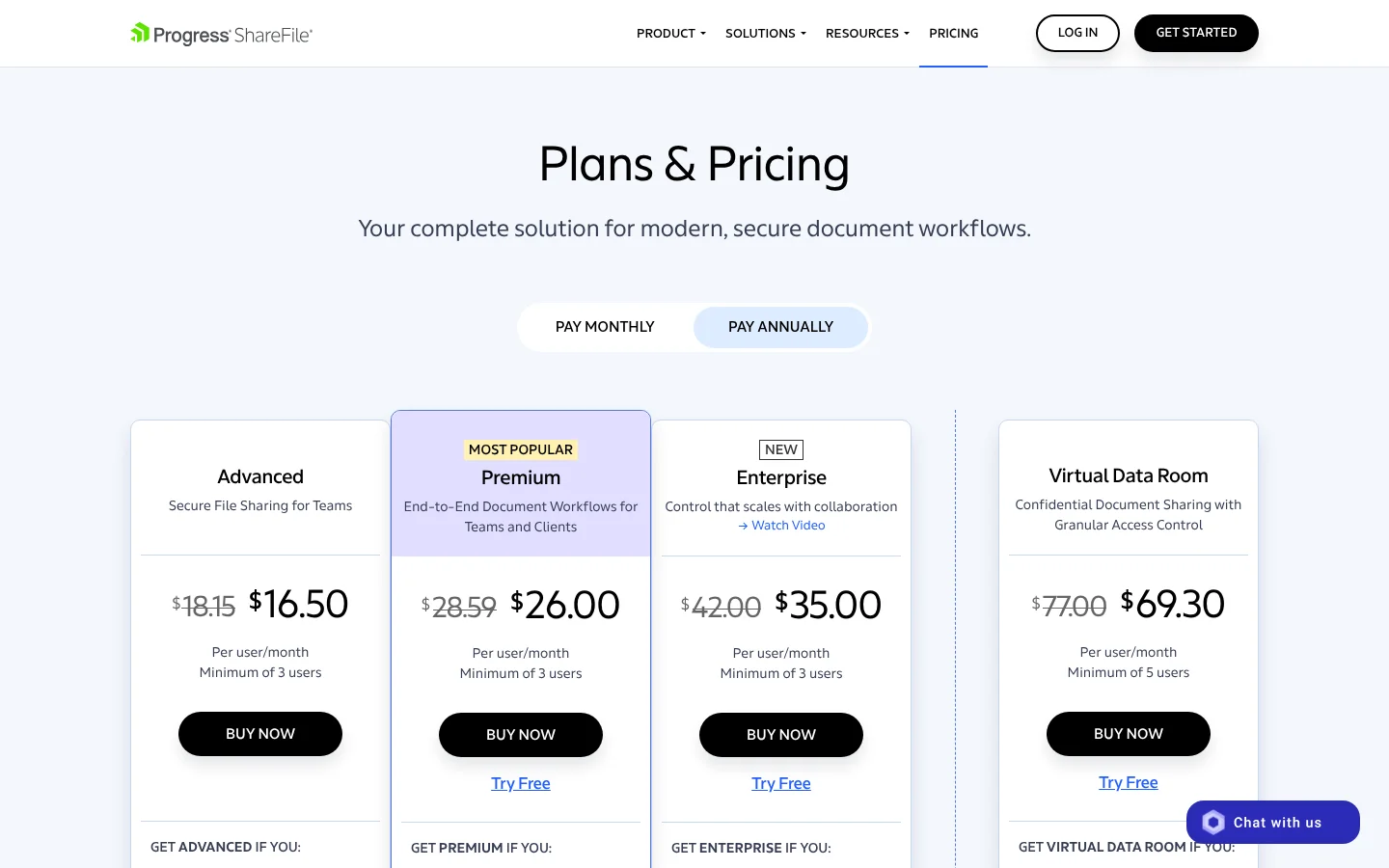
Every plan lists custom branding, file drop links so clients can upload without an account, feedback and approval, and unlimited client users. Premium adds an enhanced client portal, request lists, forms, automated workflows, integrated e-signature, and HIPAA eligibility with a signed agreement. Enterprise adds security tooling such as SCIM provisioning and SIEM connections. ShareFile's upload documentation gives 100 GB as the largest file (ShareFile docs), and plans start with 3 TB of account storage.
On white label, ShareFile publishes your logo, brand colors and a subdomain. Accounts sit on a yourcompany.sharefile.com address, with up to three subdomains per account (ShareFile docs). I did not find a ShareFile page that describes serving the portal from your own full domain, or removing ShareFile's name from it, so check that with ShareFile if it matters to you.
Its storage choices are wide: account regions in the US or Europe, many managed storage zones, and on-premises storage on Enterprise (ShareFile docs). On review sites, users praise ease of use and large transfers, and complain about cost: Capterra shows 4.4 from 442 reviews, with high and confusing costs among the common cons (Capterra, October 2026).
What Tarkle does
Tarkle gives freelancers, agencies and small teams one place to store files and share them with clients. You send a file transfer with one link, protect it with a password or an email check, and set a link expiry. You collect files back with file requests, and see whether a transfer was delivered, viewed or downloaded in transfer status. With client feedback, clients comment on images and PDFs from one link with no account.
For branding, Tarkle's pricing page lists a custom domain and branding on Free, so your links can come from an address like files.yourstudio.com (custom domain). The client portal, where each client signs in and sees only what you shared with them, is on Pro and Agency. The Agency plan adds a 100% white-label platform: your clients log in on your own domain, and the Powered by Tarkle line becomes your agency name. It also includes 20 workspaces for clients (client workspaces).
Plans are priced per organization, not per person. Pro is $29 a month, or $19 a month billed yearly ($228 a year), with 3 TB of storage, a 200 GB upload limit and team members included. Agency is $59 a month, or $49 a month billed yearly ($588 a year), with 6 TB. Free is $0 with 5 GB, a 1 GB upload limit and one person. Details are on the pricing page.
ShareFile vs Tarkle: side by side
Feature | Tarkle | ShareFile |
|---|---|---|
Pricing model | Flat per organization: Pro $29 a month, Agency $59 a month | Per user, minimum 3 users, from $16.50 a month billed annually |
Free plan | Yes: 5 GB, one person | None listed; "Try Free" buttons, length not stated |
Largest file | 200 GB on Pro and Agency, 1 GB on Free | 100 GB |
Own domain | Custom domain on Free and every plan | yourcompany.sharefile.com, up to 3 subdomains |
Full white label | Agency: your name, your domain, Powered by Tarkle replaced | Logo, colors and subdomain; name removal not confirmed |
Client portal | Pro and Agency | Basic on Advanced, enhanced on Premium |
File requests | Yes, with expiry date and upload caps | File drop links; request lists on Premium |
Feedback on images and PDFs | Yes, no account for reviewers | Feedback and approval on Advanced and up |
Payments for files | Paid transfers on Pro through your Stripe account | Not found on its pages |
E-signature and workflows | Not in Tarkle's feature list | Premium and up |
HIPAA agreement | Not claimed | Premium and up, with a signed agreement |
Storage location | Europe, US, Asia-Pacific or Oceania | US, Europe, many zones, on-premises on Enterprise |
Who should choose ShareFile
Choose ShareFile if your clients sign documents inside the same tool, if your firm needs a HIPAA agreement or SEC and FINRA terms on a published plan, or if you want data in a specific region or on your own servers. It also fits teams that live in Outlook and Microsoft 365 and have budget for per-user pricing. Tarkle has no e-signature, no Outlook or Gmail add-in and no HIPAA claim, so a team that needs those should stay.
Who should choose Tarkle
Choose Tarkle when the job is delivering and collecting files under your own brand. A custom domain is there from the Free plan, so the first transfer can already come from your address. Agency puts your name and domain on the client login, with workspaces per client, and the price does not grow with every person you add to the team. Clients can also pay before downloading with paid transfers, and you can see who opened what in the activity log. A transfer goes up to 200 GB on Pro and Agency, and the person downloading needs no account.
Start for free and send one real transfer from your own domain before you decide.
Switching from ShareFile to Tarkle
Download the folders you want to keep from ShareFile.
Create a free Tarkle account and upload the folders. If the files also live in Dropbox or Google Drive, import them without downloading first.
Connect your custom domain and add your logo and colors under Branding.
Send a test transfer and a file request to a colleague, then set the same password and expiry you use today.
On Agency, create one workspace per client and invite them to the portal.
Keep ShareFile running until your clients have opened their first Tarkle link, and tell them the new address in advance so the change does not look like a phishing email.
ShareFile vs Tarkle: common questions
Is Tarkle a good ShareFile alternative for small teams? Yes, if you mostly send and collect files and review them with clients. If you also need e-signature or a HIPAA agreement, ShareFile covers more.
Does ShareFile charge per user? Yes. Its pricing page shows per-user prices with a three-user minimum on Advanced, Premium and Enterprise.
Does Tarkle charge per user? No. Tarkle prices plans per organization, and team members are included on Pro.
Can I use my own domain with ShareFile? ShareFile documents subdomains such as yourcompany.sharefile.com. I did not find a page on full custom domains, so ask ShareFile.
Can Tarkle remove its name for my clients? On Agency, the Powered by Tarkle line is replaced by your agency name and clients log in on your domain.
What is the biggest file I can send? ShareFile documents 100 GB. Tarkle allows 200 GB on Pro and Agency and 1 GB on Free.