Tarkle vs DropSend: client portals and your own domain
DropSend emails large files. Tarkle adds a client portal, your own domain, file requests and tracking.
DropSend is a long-running tool for emailing large files, with apps and an Outlook plugin. Tarkle is better when you share files with clients and want a branded client portal, your own domain, file requests and tracking in one place.
We make Tarkle, so read this as one vendor's view, and check the sources linked below. DropSend facts come from its own pages, read in 2026. Its pages do not always agree with each other, and where they differ we say so.
What DropSend is
DropSend is a file transfer service run by SJA Enterprises, Inc. in Eugene, Oregon, according to its terms. It was built for one job: upload a large file and email the recipient a link. The recipient needs no account and no software. Individuals use it, and so do small businesses that want a branded send.
What DropSend offers
DropSend sells monthly plans on its price list and its home page. The list prices are Basic at $5, Standard at $9 and Pro at $19 for one account, then Business Lite at $45 for 10 accounts and Business at $99 for 100 accounts. Storage runs from 10 GB on Basic to 250 GB on Business Lite and 500 GB on Business. Encrypted versions of the plans cost more. A free plan allows 5 sends a month.
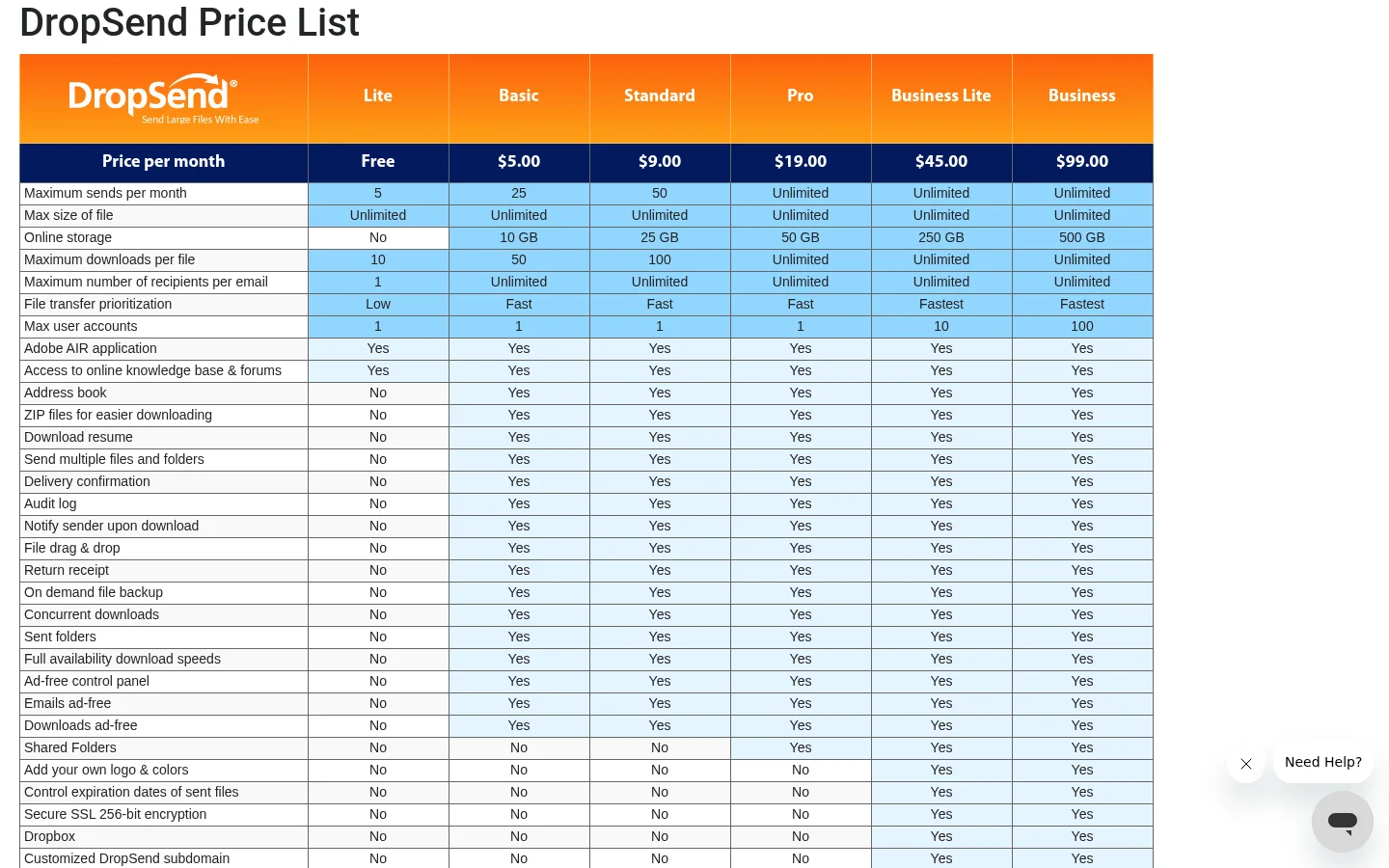
File size is where its pages disagree. The home page and the business page say 50 GB per transfer on paid plans and 2 GB on the free plan. The price list says unlimited file size. Check the limit at sign-up.
For sharing with outsiders, DropSend sends an email or a link. Its price list shows white label branding (your logo and colors, custom notifications and download pages), a customer drop box and a customized DropSend subdomain on the two Business plans. Password-protected sends, expiry dates, notification on download and an audit log appear on paid plans. We found no custom domain and no way to collect payment before a download on its pages. It also publishes a desktop app, an Outlook plugin and iOS and Android apps. Its home page shows "Start a Free Trial" buttons for a Business Encrypted plan.
What Tarkle does
Tarkle gives freelancers, agencies and small teams one place to store files and share them under their own name. You send a file transfer or collect files with a file request, and the other person needs no Tarkle account to open or download.
Branding and your custom domain are on every plan, including Free. On Pro and Agency you also get a fully branded client portal, where a client signs in with their email and sees only what you shared. The Agency plan adds white label for agencies: clients log in on your domain, and "Powered by Tarkle" becomes your agency name.
For control, a transfer can carry a password, and a link can expire. Transfer status shows whether a transfer was delivered, viewed or downloaded, and Pro and Agency can send Slack alerts on downloads. Paid transfers let you charge through your own Stripe account before a download. Brand Pages hold logos, colors, fonts and images on one page, and video and audio play in the browser.
Free is $0 with 5 GB of storage and 1 GB per upload. Pro is $29 a month, or $19 a month billed yearly, with 3 TB and up to 200 GB per file. Agency is $59 a month, or $49 a month billed yearly, with 6 TB and 20 workspaces for clients. Pro and Agency include unlimited team members. These figures come from the live pricing page.
DropSend vs Tarkle
Tarkle | DropSend | |
|---|---|---|
Built for | Sharing, storing and collecting files for clients | Emailing large files |
Entry price | Free, 5 GB storage | Free, 5 sends a month |
Paid plans (monthly) | Pro $29, Agency $59 | Basic $5 to Business $99 |
Largest file | 1 GB Free, 200 GB Pro and Agency | 2 GB free, 50 GB paid (price list says unlimited) |
Storage | 5 GB Free, 3 TB Pro, 6 TB Agency | 10 GB to 500 GB on paid plans |
White label | Agency plan, whole platform | Business Lite and Business, logo and colors |
Custom domain | Every plan | Not found, subdomain on Business plans |
Client portal | Pro and Agency | Shared folders from Pro |
File requests | Free and up | Customer drop box on Business plans |
Passwords and expiry | Passwords and expiring links | Passwords on paid plans, expiry controls |
Tracking | Delivered, viewed, downloaded status | Notify on download, audit log |
Payment before download | Pro and Agency | Not found |
Apps | Web only | Desktop, Outlook plugin, iOS, Android |
Team members | Unlimited on Pro and Agency | 10 or 100 accounts on Business plans |
Who should choose DropSend
Choose DropSend if the job is sending big files by email and you want the tool to sit inside your mail. Its Outlook plugin and mobile apps are things Tarkle does not have. Its low entry prices also suit one person who sends a few files a month and needs no client area.
Stay with it if you already pay for a Business plan and your clients are happy with the branded download page.
Who should choose Tarkle
Choose Tarkle if files are part of how you serve clients. A client portal gives each client one place to find what you shared, instead of a trail of emails. Your own domain means the link says your studio name from the first click. A file request brings files back to you in a folder, without a mail attachment.
You also see what happened after you hit send, through transfer status and download alerts. If you charge for deliverables, a paid transfer collects payment before the download. If you run an agency, one Agency plan covers 20 client workspaces on your own domain. Read the white-label Dropbox alternative for agencies and client portal vs file sharing to see which shape fits.
The Free plan is enough to send one real transfer with your logo and your domain. Start for free and try it with a client file.
Switching from DropSend to Tarkle
Download the files you still need from DropSend. Its terms say delivered files are removed from the free plan after 14 days.
Create your account and upload the files to a folder, or import them from Dropbox if you keep copies there.
Add your logo and accent color, then connect your custom domain.
Replace your DropSend drop box with a file request link and send it to the clients who return files.
Send your next delivery as a file transfer with a password or expiry date if needed.
Move one active client first. Send them a transfer on your own domain and a file request, and keep DropSend running until that client has used both.
FAQ
Does DropSend have a free plan? Yes. Its pages list 5 sends a month on the free plan, with a smaller file limit than paid plans.
Does DropSend offer white label? Its price list shows logo, color and notification branding on Business Lite and Business. Tarkle's Agency plan runs the whole platform on your domain.
Can DropSend use my own domain? We found a customized DropSend subdomain on its Business plans and no custom domain. Tarkle supports a custom domain on every plan.
How big a file can I send with Tarkle? Up to 1 GB on Free and up to 200 GB per file on Pro and Agency.
Do recipients need an account? Not for DropSend, and not for Tarkle. A client portal asks the client to sign in with their email, but a normal transfer does not.
Does Tarkle have a mobile app or an Outlook plugin? No. Tarkle works in the browser.
Is there a free trial on Tarkle? There is no trial. The Free plan costs nothing and needs no credit card.