
Tarkle vs FileCloud: client sharing without an IT project
FileCloud suits IT-run, self-hosted teams. Tarkle suits sending and collecting client files on your own domain.
FileCloud is better when your IT team must run file sharing on its own servers, meet strict compliance programs or sync folders to desktops and phones. Tarkle is better when you send files to clients and collect files from them, and you want that to happen on your own domain with no IT project. If you are weighing FileCloud against a hosted tool, this page puts both side by side.
We make Tarkle, so read this as one vendor's view and check the sources. FileCloud facts come from FileCloud's own pages, last checked in October 2026.
What FileCloud is
FileCloud is an enterprise file sharing, sync and collaboration platform made by CodeLathe, which trades as FileCloud. Organizations can run it on their own servers or use it as a hosted service. Its home page points at IT-run deployments, regulated industries, managed service providers and resellers.
The job it was built for is secure content collaboration inside an organization, with sharing to clients and vendors on top. That shapes the rest of the product: deep admin controls, many integrations and several ways to deploy it.
What FileCloud offers
FileCloud lists two products on its pricing page. FileCloud Server is software you host yourself on Windows, Linux, AWS or other public clouds. FileCloud Online is a managed hosted service.
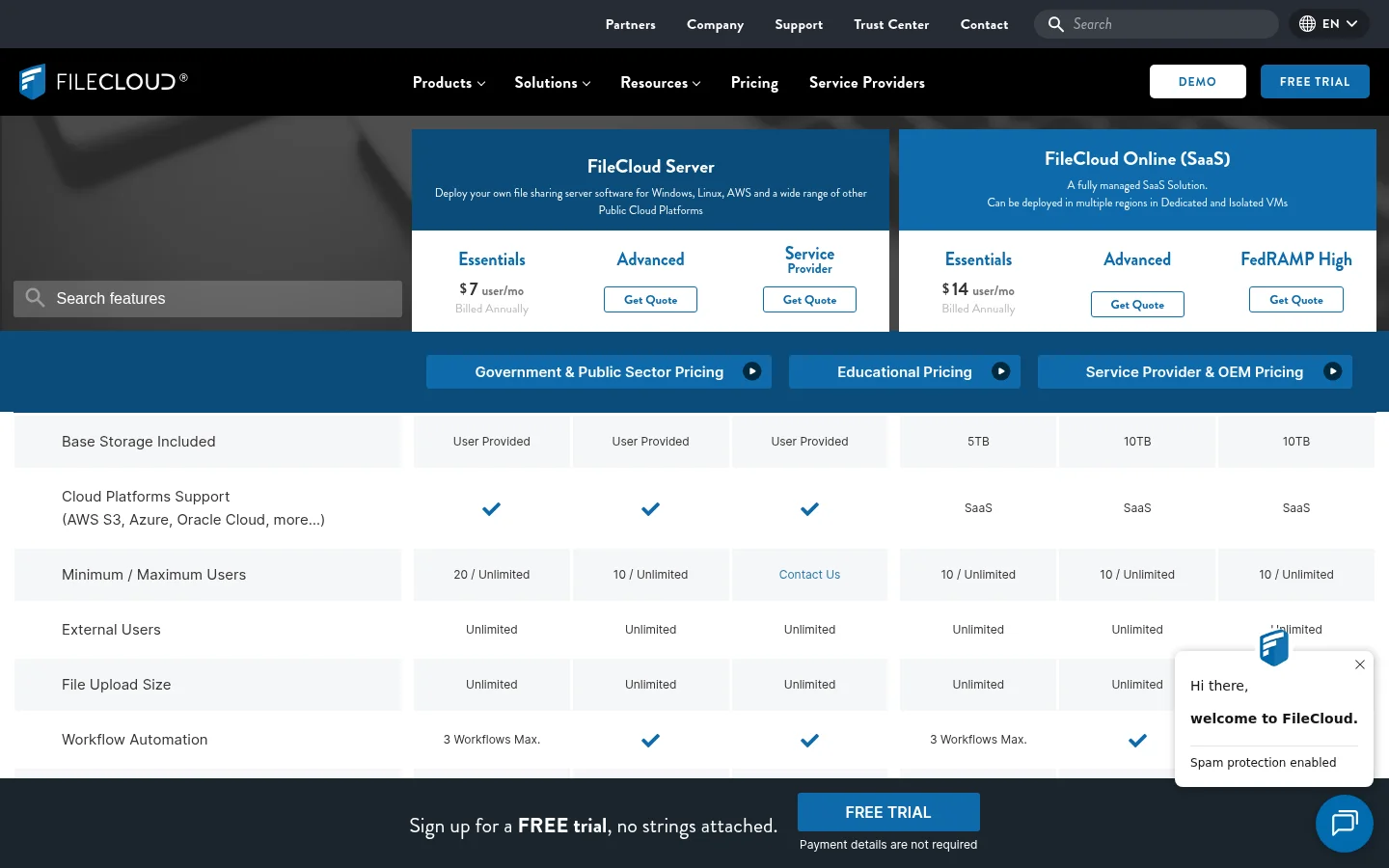
As published in October 2026, Server Essentials costs $7 per user per month billed annually, with a 20-user minimum and storage you provide. Online Essentials costs $14 per user per month billed annually, with a 10-user minimum and 5 TB of storage. Advanced, Service Provider and FedRAMP High are quote-based, and Online Advanced and FedRAMP High include 10 TB. At the 10-user minimum, Online Essentials comes to $140 a month. FileCloud also states a free trial with no payment details, and no free plan.
For sharing with outsiders, the pricing page lists public links with or without a password, private shares that need a FileCloud account, expiry dates, view-only shares, limits on uploads or downloads and share analytics. It states no limit on file upload size and no cap on external users. Its feature list also mentions file requests, commenting and notifications, and its site describes a client portal and custom branding. The pricing text I read does not show which plan includes each of those, so confirm that with FileCloud.
Beyond sharing, FileCloud lists desktop sync for Windows, Mac and Linux, iOS and Android access, Microsoft Office and Google Docs co-authoring, file locking, SAML single sign-on and a Compliance Center for HIPAA, GDPR, ITAR and NIST 800-171. It also says it is FedRAMP High authorized. These are vendor claims; verify the ones you rely on.
What Tarkle does
Tarkle is a hosted place for freelancers, agencies and small teams to store and share files with clients. You pick files or folders, get one link and send it. The person downloading needs no account, and the link can carry your logo and colors and sit on your own domain.
Each transfer can have a password, a link expiry, an email check before download, a one-time link or view-only access. Transfer status shows whether a transfer was delivered, viewed or downloaded, and the activity log records what happened across your workspace. File requests collect files from anyone with one link, into the folder you choose.
The client portal gives each client a branded place. They sign in with a 6-digit code sent to their email, with no password, see only what you shared with them and send files back. It is available on Pro and Agency. Paid transfers let you charge for access to a transfer through your own Stripe account, and also need Pro or Agency. Other pieces include a custom domain, custom transfer links, client feedback on images and PDFs, a built-in player for video and audio and a developer API.
Tarkle has three plans, read from the pricing page:
Free costs $0, with 1 workspace, 5 GB of storage and uploads up to 1 GB. It includes file sharing, file requests, client feedback and approval, custom branding and a custom domain.
Pro costs $29 a month, or $19 a month billed yearly ($228 a year). It has 3 TB of storage, uploads up to 200 GB, 2 workspaces, team members included in the one price, team folders and 90-day file recovery.
Agency costs $59 a month, or $49 a month billed yearly ($588 a year). It includes everything in Pro, plus 20 workspaces for your clients, 6 TB of storage and a white-label platform on your own domain, where "Powered by Tarkle" becomes your agency name. See white label for agencies.
You choose where files are stored when you create a workspace: the European Union, the United States, Hong Kong or Australia. Tarkle's privacy policy states encryption in transit (TLS) and at rest (AES), two-factor authentication and passkeys for users, and audit logging.
FileCloud vs Tarkle
What you compare | Tarkle | FileCloud |
|---|---|---|
Built for | Sending files to clients and collecting them back | Enterprise content collaboration and secure sharing |
How you run it | Hosted only | Self-hosted, or hosted as FileCloud Online |
Price as published | Free $0; Pro $29 a month ($19 yearly); Agency $59 a month ($49 yearly) | Server Essentials $7 and Online Essentials $14 per user a month, billed annually; other plans by quote |
Pricing model | One price per organization | Per user, with a 10 or 20 user minimum |
Storage | 5 GB Free, 3 TB Pro, 6 TB Agency | 5 TB on Online Essentials, 10 TB on Online Advanced; your own storage on Server |
Biggest file | 1 GB Free, 200 GB Pro and Agency | No size limit stated |
Link controls | Password, expiry, email check, one-time, view-only | Password, expiry, view-only, upload and download limits |
Client portal | Branded, passwordless sign-in, clients send files back (Pro, Agency) | Described on its site; plan not shown |
Own domain | Custom domain on every plan; Agency white label | Custom domain and branding listed; plan not shown |
Charge for access | Paid transfers through your Stripe account (Pro, Agency) | Not listed on its pricing page |
Desktop sync and mobile apps | No | Yes |
Real-time document editing | No | Yes, through Office and Google Docs |
Sign-in and compliance | Two-factor and passkeys; no compliance programs published | SAML SSO; HIPAA, GDPR, ITAR and FedRAMP High claims |
Data location | EU, US, Hong Kong or Australia | Your own infrastructure, or its hosted regions |
Who should choose FileCloud
Stay with FileCloud when your files must stay on servers you control, or when an auditor asks for FedRAMP, HIPAA or similar programs. It also fits teams that need folders synced to laptops, mobile apps, co-authoring in Microsoft Office, single sign-on through your identity provider or file locking. If you have IT staff to run it and many users, its depth and per-user price make sense.
Tarkle does not do any of those jobs. It has no desktop sync app, no mobile app, no real-time editing and no self-hosted version. If those matter more than sending files to clients, FileCloud is the better fit.
Who should choose Tarkle
Choose Tarkle when the job is business file sharing: a designer sending final files, an agency running a portal for each client, an accountant collecting documents. There is no server to run and no IT setup.
Each point ties to something you do. You send a transfer on your own domain so the client sees your name, not ours. You ask clients for files with a request link instead of chasing email attachments. You see whether a transfer was delivered, viewed or downloaded. You can charge for access before the files open. On Agency, each client gets a workspace on your platform, with storage you control.
Cost is the other difference. Tarkle prices per organization, while a hosted FileCloud plan is priced per user with a 10-user minimum. For a small team that mainly sends files out, the Tarkle bill is easier to predict.
Send one real transfer before you decide. Create a free workspace, upload a folder, add your logo and send the link to yourself in a private window. You see exactly what a client sees.
Start for free and check it against your own client files.
Switching from FileCloud to Tarkle
Moving takes an afternoon for most small teams. Tarkle has no sync, so you copy files across by downloading and uploading.
Create an account and a workspace, and choose the storage region you need.
Add your logo, colors and custom domain so every link looks like yours.
Download the folders you share with clients from FileCloud and upload them to Folders and library. Files that sit in Google Drive or Dropbox can come across with import from Google Drive and Dropbox.
Invite your team, then create transfers or portal access for each client and send the new links.
Switch off the old FileCloud shares once clients have the new ones.
Move one active client first. Keep the others on FileCloud until you are happy with the new links.
FileCloud vs Tarkle: common questions
Is FileCloud self-hosted?
It can be. FileCloud Server runs on your own infrastructure, and FileCloud Online is hosted by FileCloud. Tarkle is hosted only.
How much does FileCloud cost?
FileCloud's pricing page showed $7 per user a month for Server Essentials and $14 for Online Essentials, billed annually, in October 2026. Other plans are quote-based.
Does FileCloud have a free plan?
Its pricing page offers a free trial that needs no payment details, not a free plan. Tarkle has a Free plan with 5 GB of storage.
Can Tarkle replace FileCloud for client file sharing?
Yes, for sending files to clients, collecting files back and running a branded client portal. No, for desktop sync, mobile apps, real-time editing or self-hosting.
Can I white label Tarkle?
Yes. On Agency, clients sign in on your own domain and "Powered by Tarkle" becomes your agency name.
Can clients upload files to Tarkle?
Yes, through a file request link or the client portal. A request link needs no account.
Where does Tarkle store files?
In the European Union, the United States, Hong Kong or Australia, chosen when you create a workspace.