Tarkle vs Filen: branded client sharing or encrypted sync
Filen is encrypted storage with sync. Tarkle sends branded files to clients. Plans and limits side by side.
Tarkle vs Filen comes down to what you do with files. Filen is better if you want zero-knowledge encrypted storage that syncs across your own devices. Tarkle is better if you send files to clients and want them on your brand, behind a password or a portal, with a record of who opened them.
We make Tarkle, so read this as one vendor's view and check the sources. Filen facts come from Filen's own pages, read in 2026. Tarkle facts come from our live plans and product.
What Filen is
Filen is a cloud storage service from Filen Cloud Dienste UG in Recklinghausen, Germany. Its core design is client-side, zero-knowledge encryption: files are encrypted with AES-256 on your device before they upload, and Filen says it cannot read them (Filen about page). Filen states that its company and all its servers are in Germany (filen.io).
Filen's pages describe it as built for individuals, professionals, developers and people who put security first. Its apps are open source under AGPL v3. It has web, desktop (Windows, macOS, Linux), mobile (iOS, Android) and command line apps, plus a network drive and sync (desktop apps).
What Filen offers
Filen has a Free plan with 10 GB. Paid plans, as published on Filen's pricing page in 2026, are priced in euros: Pro I with 200 GiB at €1.99 a month, Pro II with 500 GiB at €3.99, Pro III with 2 TiB at €8.99 and Pro X with 10 TiB at €39.99. Check the pricing page for annual prices and any plan not listed here.
To share with someone outside Filen, you make a public link. You can set it to view only, give it an expiry and add a password (Filen sharing docs). The person opening the link does not need a Filen account, because the decryption key travels inside the link. Since November 2024, public links are for paid accounts only (Filen post).
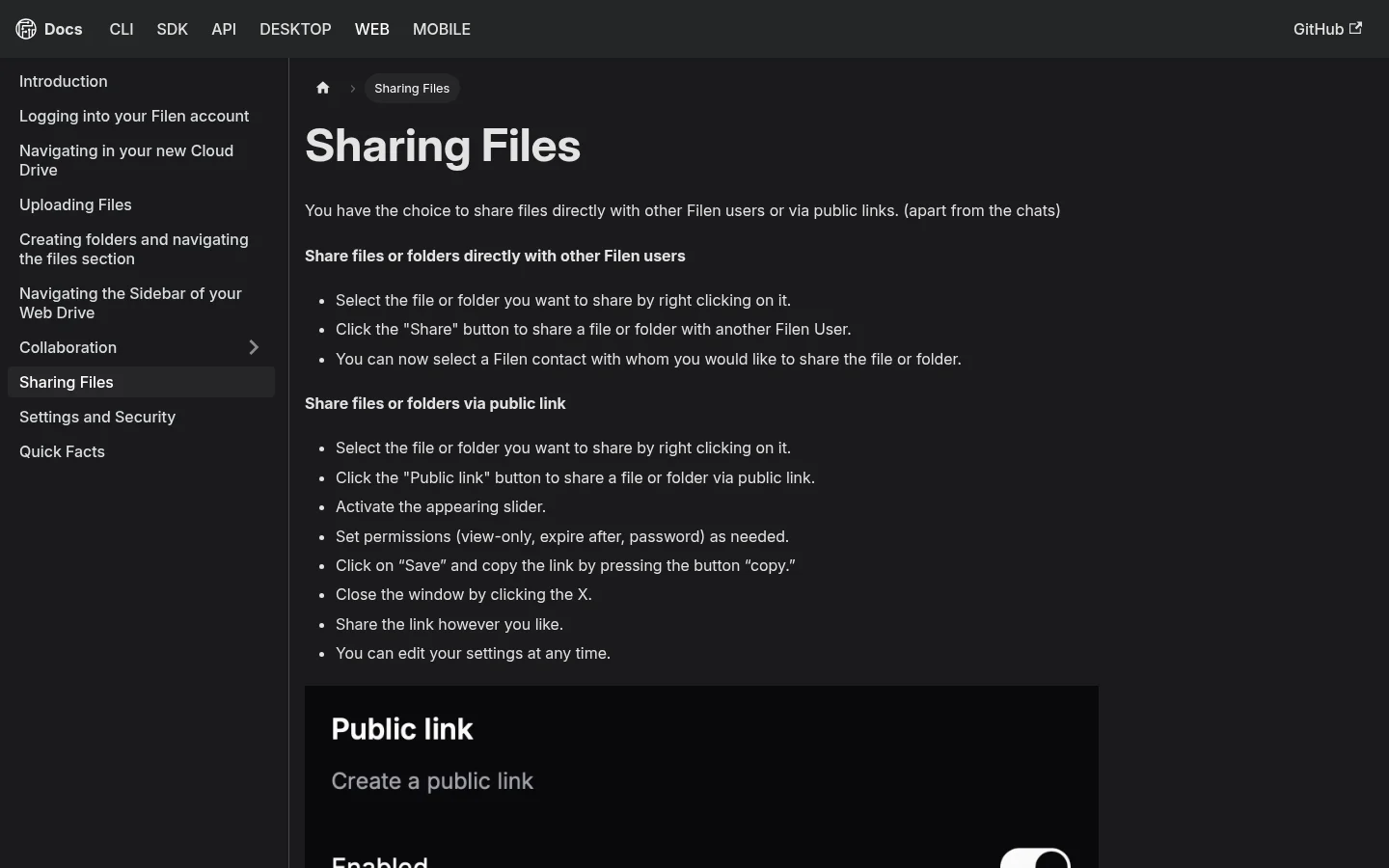
Filen says it does not track who opens a public link (Filen Q&A). We found no client portal, file request, custom domain or branding feature on the Filen pages we read. Filen's roadmap lists business and family plans as planned (roadmap). Because files are encrypted on the device, search only covers the folder you have open.
What Tarkle does
Tarkle gives freelancers, agencies and small teams one place to store files and share them with clients. You send files and folders with one link (share files by link), and the person downloading needs no account. Pages carry your logo and colors (custom branding), and the pricing page lists a custom domain on every plan.
You decide who can open a transfer. You can require a password, ask for an email address before the download starts, set an expiry date or make the link work once. On a transfer, the Activity panel shows when it was created, last viewed and files last downloaded.
A file request turns the flow around: you send a link and clients upload into the folder you choose. On Pro and Agency, a client portal gives each client a branded place where they sign in with their email, see only what you shared with them and upload files back. Paid transfers let Pro and Agency customers charge for a download through their own Stripe account.
The platform also plays video and audio on a page before download, and you can import from Google Drive and Dropbox. The Agency plan is a white label platform: your clients sign in on your own domain, and "Powered by Tarkle" becomes your agency name (white label for agencies).
Files are protected in transit and at rest. Tarkle does not offer client-side or zero-knowledge encryption, so Tarkle can read files you store. There is no sync client, desktop app or mobile app today.
Filen vs Tarkle
Tarkle | Filen | |
|---|---|---|
Built for | Sending and collecting files with clients | Private encrypted storage for individuals |
Free plan | 5 GB, 1 GB per upload, 1 workspace | 10 GB, no public links |
Paid plans | Pro $29 a month ($19 a month yearly), 3 TB, 200 GB per upload. Agency $59 a month ($49 a month yearly), 6 TB | €1.99 to €39.99 a month, 200 GiB to 10 TiB |
Encryption | In transit and at rest | Client-side, zero-knowledge AES-256 |
Link protection | Password, email gate, expiry, one-time link | Password, expiry, view only |
Recipient needs account | No | No (public link) |
Branding and domain | Your logo and colors, custom domain, white label on Agency | Not published |
Client portal | Pro and Agency | Not published |
File requests | Yes, into a folder you choose | Not published |
Opens and downloads | Viewed and downloaded shown per transfer | Not tracked, per Filen |
Payments before download | Pro and Agency, through your Stripe account | Not published |
Sync, desktop and mobile apps | None today | Yes, plus a network drive and command line |
Data location | Europe, US, Asia-Pacific or Oceania | Germany |
Filen prices and features are as published on filen.io in 2026. Tarkle prices are from the Tarkle pricing page.
Who should choose Filen
Choose Filen if encryption is your first priority. If you want files encrypted before they leave your device, with a provider that cannot open them, Tarkle does not do that and Filen does. Choose it also if you want a synced folder on your laptop, a network drive or a phone app, or if you want open source clients and servers in Germany only.
Filen suits one person or a small circle who store and share their own files. It is a fair pick for a lawyer or consultant who sends a few sensitive files now and then and wants the strongest storage design. Filen's own roadmap says it has no team or business plan yet, so it is a weaker fit for an organization with several people and many clients.
Who should choose Tarkle
Choose Tarkle if the job is sending work to clients and getting files back. Each point below is a job, not a feature list.
Send files on your name. Your logo, colors and a custom domain sit on every transfer and request page, so clients see your studio, not a storage brand.
Give each client a place. The client portal shows each client only what you shared with them, and they sign in with an emailed link instead of a password.
Control who opens a link. Use a password, an email gate, an expiry or a one-time link, depending on how sensitive the file is.
Know it arrived. The Activity panel shows when a transfer was viewed and when its files were downloaded.
Get files back. File requests collect uploads from clients into a folder, so you stop chasing attachments.
Get paid first. On Pro and Agency, a transfer can charge for access through your own Stripe account.
Send big files. Pro and Agency take uploads up to 200 GB, and Free takes 1 GB.
If you run an agency, the Agency plan adds 20 workspaces for clients and a white label platform on your own domain. A free workspace is enough to send one real transfer and see what your client sees. Start for free.
Switching from Filen to Tarkle
Filen encrypts files on your device, so there is no direct import. You move files by downloading them from Filen and uploading them to Tarkle.
Download the files you want to share with clients from Filen on your computer.
Create a free workspace and add your logo and colors under Branding.
Upload the files into a folder, then send a transfer link with a password or expiry.
For repeat clients, turn on the client portal (Pro and Agency) from the client's contact page.
Keep sensitive archives in Filen if you want them encrypted on your device, and use Tarkle only for what you hand to clients.
Many people use both. Keep your private archive in Filen and upload only the final files for a client to Tarkle, so the encrypted store and the page your client sees do separate jobs.
Tarkle vs Filen: questions people ask
Is Filen good for sending files to clients?
Filen can share a public link with a password and expiry, and the recipient needs no account. It does not publish branding, a client portal, file requests or tracking, so it is a thin fit for sending work to clients.
Does Tarkle encrypt files like Filen?
No. Files are protected in transit and at rest, with passwords and access controls on shares, but Tarkle does not offer zero-knowledge encryption. If that matters most, choose Filen.
Does Filen have a free plan?
Yes, 10 GB. Public links are for paid accounts only since November 2024. Tarkle Free gives 5 GB, 1 GB per upload and sharing with passwords.
Can Tarkle sync folders like Filen?
No. There is no sync client, desktop app or mobile app today. You upload from the browser and share by link.
Where does Filen store files?
Filen says its servers are in Germany. Tarkle lets a workspace use storage in Europe, the US, Asia-Pacific or Oceania.
Which is cheaper?
Filen's entry prices are lower, starting at €1.99 a month for 200 GiB. Tarkle's paid plans start at 3 TB: Pro costs $29 a month, or $19 a month billed yearly, and includes the client portal, 200 GB uploads and unlimited team members.
Can clients upload files without an account?
Yes, through a file request link. Clients in a portal sign in with their email.
Next step
Try one real delivery. Send a transfer from a free workspace and see what the recipient gets. For how portals and plain links differ, read client portal vs file sharing.