Tarkle vs Google Drive: branded client sharing on your own domain
Where Google Drive fits, and where Tarkle is better for sending and collecting client files under your brand.
Google Drive is the better choice when your team lives in shared documents, spreadsheets and synced folders. Tarkle is the better choice when the job is business file sharing with clients: a link on your own domain, your own logo, a password, an expiry date, and a record of whether the transfer was viewed or downloaded. This page compares Tarkle vs Google Drive for that second job. We make Tarkle, so read it as one vendor's view and check the sources.
What Google Drive is
Google Drive is Google's cloud file storage and sharing service. It is sold to individuals through Google One and to organizations through Google Workspace. Its core job is storing files and letting people work on them together, above all Google Docs, Sheets and Slides, which several people can edit at the same time. Google describes this on its Drive product page (checked October 2026).
Most people already have a Google account, so Drive is often where client files end up by default. That is a real strength. It is also why teams later notice that a tool built for collaboration is not built for delivery.
What Google Drive offers
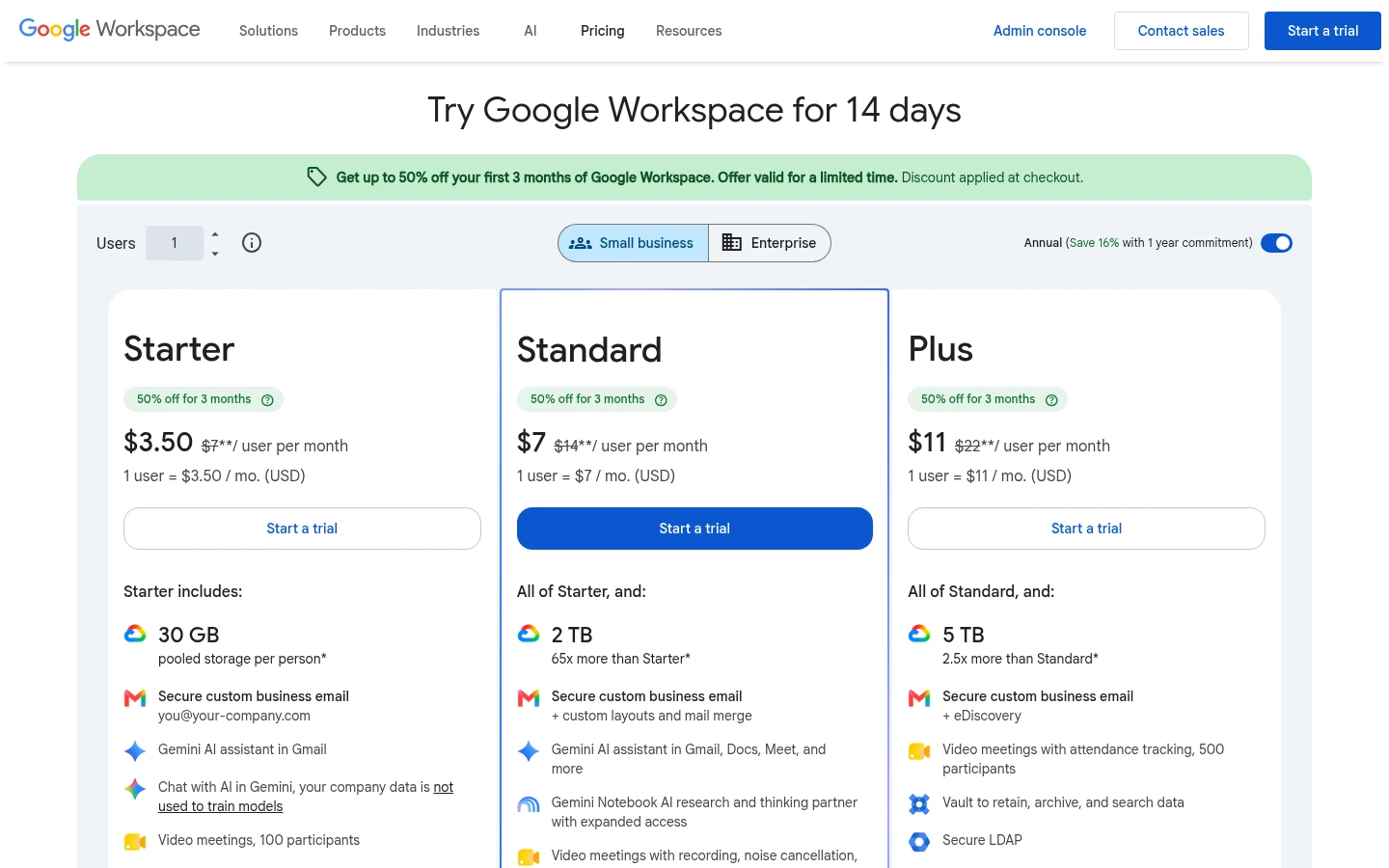
Plans and prices. A personal Google account includes 15 GB, shared across Drive, Gmail and Google Photos. Paid personal storage starts at 100 GB for $1.99 per month, according to Google One (as published in October 2026). Business use runs on Google Workspace, listed on the Workspace pricing page at $7 per user per month for Starter (30 GB per user), $14 for Standard (2 TB per user) and $22 for Plus (5 TB per user). Enterprise is quote-based. Workspace is priced per user, so the bill grows with every person you add.
File limits. Google's file size page says files other than Google documents can be up to 5 TB each (October 2026). That is far above what most deliveries need.
Sharing with people outside your team. Per Google's sharing help (October 2026), you can give people the Viewer, Commenter or Editor role, or switch a file to "Anyone with the link". Access expiry dates exist for work and school accounts, up to one year, and on folders only for the Viewer role. You can switch off download, print and copy for viewers and commenters. Google's sharing help lists no password for a link. Sharing with people who have no Google account (visitor sharing) works only if an administrator turns it on, and visitors confirm their email with a PIN.
Tracking. The activity dashboard shows who viewed Google Docs, Sheets and Slides files. Per Google's admin page, viewers need edit access and must be in the same domain as the file owner, and Google says it is not meant for auditing or legal purposes.
Branding and file requests. We found no page on Google's sites that describes your own logo or custom domain on Drive share pages, or a built-in upload-only link for outsiders. Google's sharing help suggests a Google Form to gather information.
Everything else. Drive for desktop syncs files on Windows and macOS (Google help). Admins can pick the United States or Europe as the data region in some Workspace editions (Google admin help). Third-party integrations and data loss prevention rules sit on higher Business and Enterprise plans.
What Tarkle does
Tarkle gives freelancers, agencies and small teams one place to store and share files with clients. The job it was built for is delivery under your own name, not co-editing.
Share files by link. Pick files or folders and get one link. The person downloading needs no account. Custom transfer links let you name the link, like files.yourstudio.com/t/brand-assets.
Your brand and your domain. Custom branding puts your logo, colors and favicon on transfer pages, request pages and the portal. A custom domain is available on every plan.
Control who gets in. Password protection asks for a password before anyone opens a transfer. Link expiration stops a link on a date you set, view-only transfers let people look without a download, and you can revoke a link in one click.
See what happened. Transfer status shows whether a transfer was delivered, viewed or downloaded. The activity log is a searchable record across your workspace, with export, and Slack alerts tell you when files are viewed, downloaded or uploaded.
Collect files back. File requests take files from anyone with one link, into the folder you choose, and you can set a deadline and a size cap per person.
Client portal. On Pro and Agency, each client signs in with their email and sees only what you shared with them in a branded client portal.
Video, payments and team. Video and audio play on a page with a built-in player. Paid transfers charge for access through your own Stripe account. Pro and Agency add team members with the roles Owner, Admin, Member or Viewer.
Agencies. The Agency plan adds 20 client workspaces and a fully white-label platform on your own domain.
Plans. Free costs $0, with 1 workspace for one person, 5 GB of storage and uploads up to 1 GB. Pro costs $29 per month, or $19 per month billed yearly ($228 per year), with 3 TB of storage and files up to 200 GB. Agency costs $59 per month, or $49 per month billed yearly ($588 per year), with 6 TB of storage on top of everything in Pro. Plans belong to your organization, not to each person. You can also pick a storage region: Europe, the US, Asia-Pacific or Oceania.
Google Drive vs Tarkle
Feature | Google Drive | Tarkle |
|---|---|---|
Built for | Storing files and editing documents together | Sending and collecting client files under your brand |
Starting price | 15 GB free; Workspace from $7 per user per month | Free at $0; Pro $29 per month ($19 billed yearly); Agency $59 per month ($49 billed yearly) |
Largest file | 5 TB | 1 GB on Free, 200 GB on Pro and Agency |
Storage | 30 GB to 5 TB per user on Workspace | 5 GB Free, 3 TB Pro, 6 TB Agency per organization |
Real-time document editing | Yes, Docs, Sheets and Slides | No |
Link password | None in Google's sharing help | Yes, password protection |
Link expiry | Access expiry for work and school accounts | Link expiration and one-time links |
Your own logo and domain on transfer pages | Not found on Google's pages | Custom branding and custom domain on every plan |
Request files from outsiders | No built-in feature found; Google Forms suggested | File requests with deadline and size cap |
Who opened or downloaded | Dashboard for Docs, Sheets and Slides, same domain only | Delivered, viewed and downloaded status; Slack alerts |
Client portal | No | Branded portal on Pro and Agency |
Data location | United States or Europe in some Workspace editions | Europe, US, Asia-Pacific or Oceania |
Google Drive facts are as published on Google's own pages in October 2026, linked above. Tarkle facts come from Tarkle's plan and feature pages.
Who should choose Google Drive
Stay with Google Drive if your team writes and edits in Google Docs, Sheets and Slides together, because Tarkle does not edit documents. Stay if people work from a synced folder on their computer, if you already pay for Workspace and use its email and calendar, or if you need files above 200 GB. Drive also fits internal sharing, where everyone has a Google account and the admin settings are yours.
If clients are happy to work inside your Google account and edit shared documents with you, Drive is a sensible default. Many teams keep it for exactly that and use Tarkle only for deliveries.
Who should choose Tarkle
Choose Tarkle when the people on the other end are clients, not colleagues. A client who clicks a Drive link lands on a Google page, not yours. With Tarkle the link, the page and the sign-in sit on your domain with your logo. Each of these ties to something you do every week:
Delivering finished work. Send a folder with a password and an expiry date, or a view-only transfer for a draft, and revoke the link when the project ends.
Knowing it arrived. Transfer status tells you whether the client viewed or downloaded, so you stop asking "did you get my email?".
Getting files back. A file request takes logos, tax documents or raw footage from a client who has no Google account, into the folder you choose.
Giving each client a place. A portal where every client sees only their own files.
Selling files. Paid transfers charge for access before a download.
Free is enough to send one real transfer on your own domain. Compare it with how your clients see a Drive link today, then decide. Start for free. For more on the same decision, read how to share files with clients without Google Drive and whether Google Drive is safe for client files. Comparing other tools? See Tarkle vs OneDrive.
Switching from Google Drive to Tarkle
You do not have to leave Drive. Most teams move only the files they send to clients.
Create a free Tarkle account and set your logo and custom domain.
Connect Google Drive from the upload dialog and pick your files in Google's picker. See import from Google Drive and Dropbox and the Google Drive integration. Folders cannot be imported, so pick files. Google Docs, Sheets and Slides are converted to Word, Excel, PowerPoint or PNG files on import.
Create a transfer, add a password or expiry date, and send the new link.
Stop sharing the old Drive links, so clients use one address.
For incoming files, create a file request instead of asking for Drive access.
Import one active client project first and send that client the new link. You will see how the branded page looks to them before you move anything else.
FAQ
Is Tarkle a replacement for Google Drive? For sending and collecting client files, yes. For editing documents together or syncing a computer folder, no: keep Drive for that.
Is Tarkle free? Yes. Free includes 1 workspace for one person, 5 GB of storage, file sharing and file requests, custom branding, a custom domain and password protection, with uploads up to 1 GB.
What is the biggest file I can send with Tarkle? 1 GB on Free and 200 GB on Pro and Agency. Google Drive allows up to 5 TB per file.
Do clients need an account to download from Tarkle? No. The person downloading needs no account. Portal clients sign in with their email.
Can I use my own domain with Tarkle? Yes, on every plan. Agency also runs the whole platform on your own domain.
Can I add a password to a Google Drive link? Google's sharing help lists no way to set a password on a link. You can restrict a file to named people instead.
Can I import my files from Google Drive? Yes. Connect Google Drive and pick files to bring into your Tarkle library.
Does Tarkle track who downloaded my files? Transfer status shows whether a transfer was delivered, viewed or downloaded.