
Tarkle vs Internxt: client sharing or zero-knowledge storage
Internxt keeps your own files private with zero-knowledge storage. Tarkle sends and collects client files.
Tarkle vs Internxt comes down to the job. Internxt is better for private, zero-knowledge encrypted storage of your own files, with sync apps and backups. Tarkle is better when you send files to clients and collect files back, under your own brand and domain.
We make Tarkle, so read this as one vendor's view, and check the sources linked below. Internxt facts come from Internxt's own pages, read in 2026.
What Internxt is
Internxt is encrypted cloud storage from Internxt Universal Technologies SL, based in Valencia, Spain. It was built for people who want a private place for their files. Its pages say that files are encrypted on your device before they leave it, with zero-knowledge and post-quantum encryption, so Internxt cannot read them (Internxt Drive). Its code is open source and published on GitHub.
Around Drive it sells a privacy suite: VPN, Antivirus, Cleaner, Meet, Mail and Photos. The Drive page also speaks to businesses and families, but its pricing page lists personal-style plans rather than client-facing sharing tools.
What Internxt offers
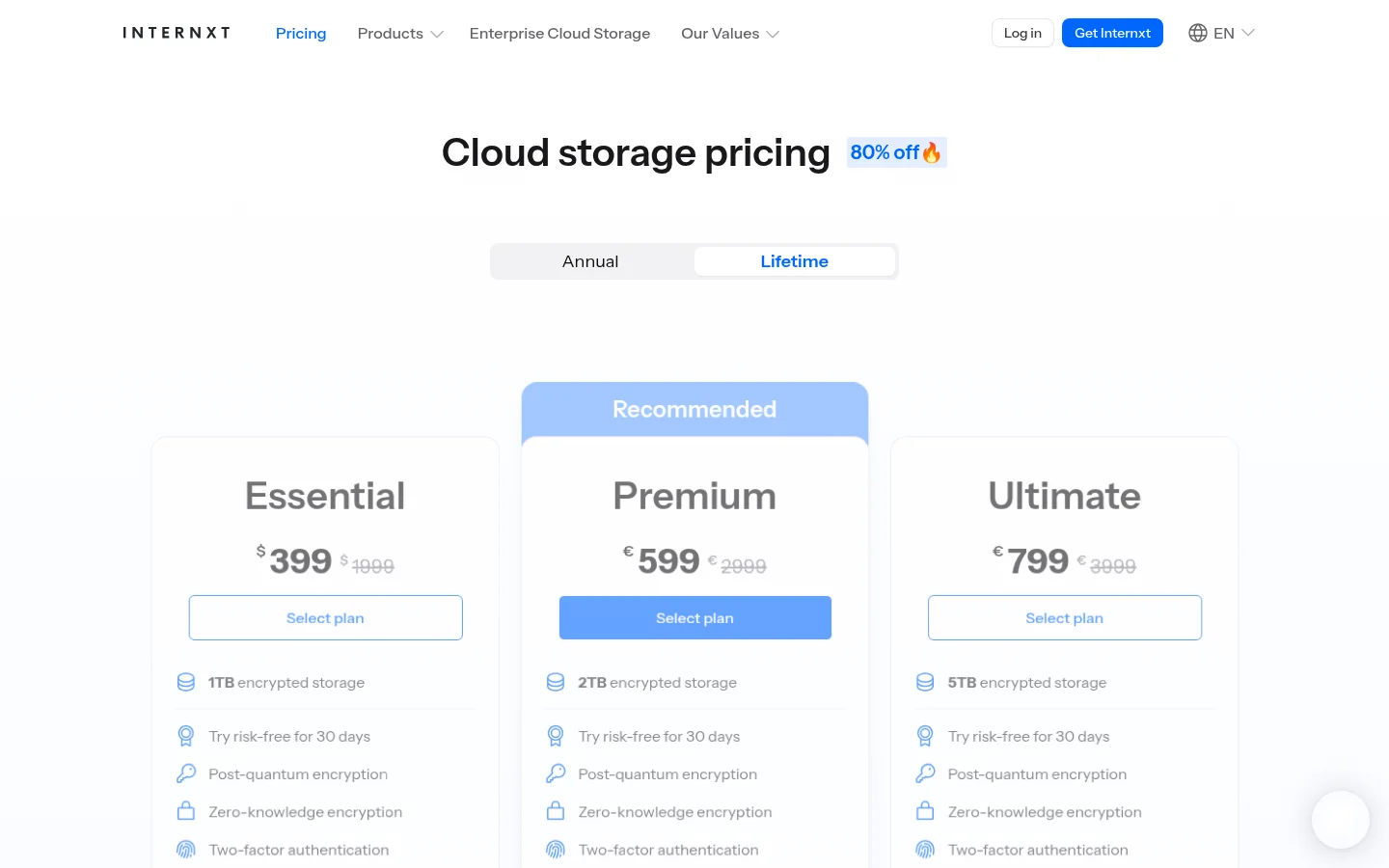
Internxt has a Free plan with 1 GB of storage and paid plans of 1 TB (Essential), 2 TB (Premium) and 5 TB, billed annually or as a one-time payment. Read the latest prices on the Internxt pricing page, because they change with offers.
Per-file upload limits depend on the plan. Its help center lists 100 MB per file on Free, 10 GB on the 1 TB plan, 50 GB on the 2 TB plan and 100 GB on the 5 TB plan, and says files shared by link are limited to 10 GB (upload limits, as published in July 2026). The separate Internxt Send service sends encrypted files up to 5 GB by link.
For sharing, the Drive page describes encrypted links with passwords that you can revoke, and the pricing table lists password-protected sharing, "invite, share and collaborate" and file versioning. It also lists desktop apps for Windows, macOS and Linux, iOS and Android apps, a web app, file backups, WebDAV, rclone and NAS support, two-factor authentication, and HIPAA, ISO 27001 and SOC 2 compliance. Its pricing and Drive pages do not list branded client portals, file requests, a custom domain or white label.
What Tarkle does
Tarkle gives freelancers, agencies and small teams one place to store and share files. You upload to a workspace, send a file transfer with one link, collect files from clients with a file request, and give each client a branded place to sign in through the client portal.
On a transfer link you can set a password, a link expiry, an email check before download, view-only access, or a one-time link that stops working after a download is reported. Each transfer has an Activity panel that shows when it was viewed or downloaded, with the visitor's country. Recipients do not need an account to download.
Branding is part of the product: your logo and colors on transfer pages, request pages and the portal, and a custom domain so links read files.yourstudio.com. Agency adds a white label platform where "Powered by Tarkle" becomes your agency name, with 20 workspaces for your clients and a client provisioning portal.
The plans, as listed on the Tarkle pricing page:
Free ($0, one person): 1 workspace, 5 GB of storage, uploads up to 1 GB each, share and request files, client feedback and approval, custom branding and a custom domain as the pricing page lists them, and import from Dropbox or Google Drive. Free has monthly caps on transfers and file request submissions.
Pro ($29 a month, or $19 a month billed yearly): 3 TB of storage, files up to 200 GB, 2 workspaces, team members and team folders, file versioning, 90-day file recovery, the branded client portal and an AI assistant (Beta).
Agency ($59 a month, or $49 a month billed yearly): everything in Pro, plus 6 TB of storage, 20 workspaces for clients and the white label platform.
Pro also lets you charge for a transfer through your own Stripe account, and you can share video and audio on a page with a built-in player.
On security, Tarkle's privacy policy lists TLS encryption in transit and AES encryption at rest, access controls, two-factor authentication and passkeys, audit logging and malware scanning. Tarkle is not zero-knowledge, and files are not encrypted on your device before upload. You choose a storage region (European Union, United States, Hong Kong or Australia) when you create a workspace.
Internxt vs Tarkle
What | Tarkle | Internxt |
|---|---|---|
Built for | Sending and collecting files for clients | Private storage for your own files |
Encryption | TLS in transit, AES at rest; not zero-knowledge | Zero-knowledge and post-quantum, as published |
Free plan | 5 GB, 1 GB per file, one person | 1 GB, 100 MB per file |
Largest file | 200 GB on Pro and Agency | 100 GB on the 5 TB plan; 10 GB by share link |
Password on a link | Yes | Yes |
Link expiry and one-time links | Yes | Not listed on its pricing page |
Request files from clients | File requests, no account needed | Not listed on its pricing page |
Client portal | Pro and Agency | Not listed on its pricing page |
Domain and branding | Custom domain and branding; white label on Agency | Not listed on its pricing page |
See who viewed or downloaded | Activity panel per transfer | Not listed on its pricing page |
Sync, backup, mobile apps | Not a backup service; not built around sync | Desktop and mobile apps, backups |
Storage region | EU, US, Hong Kong or Australia | Data centers in Europe and elsewhere |
Open source | No | Yes, on GitHub |
Who should choose Internxt
Choose Internxt if the main job is keeping your own files private. If you want zero-knowledge encryption, where even the provider cannot open your files, Internxt is built for that and Tarkle is not. It is also the better fit if you need desktop sync, scheduled backups and mobile apps, open-source code you can inspect, or the VPN, Mail and Meet products in one subscription.
Tarkle keeps deleted files in a recovery bin for 30 days on Free and 90 days on Pro, but that is recovery, not a backup of your computer.
If your clients ask for HIPAA or SOC 2 compliance in writing, check the Internxt claims against its certifications page first, because this page makes no such claims for Tarkle.
Who should choose Tarkle
Choose Tarkle when files move between you and your clients. That job needs things a private vault does not list: a link on your own domain, your logo on the page, a client portal where each client sees only what you shared, a request link that brings files back without an account, and a record of when a file was opened.
Sending work: send a transfer on your domain, with a password or expiry, and see in the Activity panel when it was viewed or downloaded.
Collecting work: send a file request instead of chasing email attachments.
Running it for clients: on Agency, each client gets a workspace under your name and domain.
Big files: send files up to 200 GB on Pro and Agency, and the person downloading needs no account. See send large files.
Try one real transfer on the Free plan before you decide. Upload a folder, set a password, add your logo, and open the link in a private window to see what your client sees.
Start for free and send one transfer. If you are choosing between a client portal and plain links, client portal vs file sharing explains the difference.
Switching from Internxt to Tarkle
You do not have to leave Internxt completely. You can keep Internxt for private files and use Tarkle for client work. To move client files:
Download the folders you share with clients from Internxt Drive, using the web or desktop app.
Create a Tarkle account and a workspace, and pick a storage region.
Upload the folders to Files. Tarkle has no import from Internxt, so this is an upload. Import from Dropbox and Google Drive exists, but only for those two services.
Add your logo and colors, then connect your custom domain.
Send your first transfer or file request, and tell clients the new link.
Move one active client first. Keep the rest on Internxt until you are happy with how the link, the portal and the Activity panel work for you.
FAQ
Is Tarkle as private as Internxt?
No, not in the same way. Internxt says files are encrypted on your device so it cannot read them. Tarkle encrypts files in transit and at rest, but it is not zero-knowledge, so use Internxt for material that nobody but you should ever be able to open.
Can Internxt send files under my own brand?
Its pricing and Drive pages do not list a custom domain, branding or white label. Check with Internxt if you need them.
Does Tarkle have a free plan?
Yes. Free has 5 GB of storage, uploads up to 1 GB each, file sharing and file requests, and custom branding, for one person. See the pricing page for the caps.
What is the largest file I can send?
On Tarkle, 200 GB per file on Pro and Agency, and 1 GB on Free. On Internxt, files shared by link are limited to 10 GB as of its July 2026 help article, and Internxt Send goes up to 5 GB.
Does Tarkle back up my computer or sync a folder?
No. Tarkle is for sharing and storing files for client work, not for backing up a computer. Internxt lists file backups and sync apps.
Where are my files stored?
On Tarkle you choose one of four regions when you create a workspace: European Union, United States, Hong Kong or Australia. You can change it once, for a fee shown on your Billing page. Internxt says its data centers are in Europe and other locations.
Can I use both?
Yes. Keep private personal files in Internxt and run your client work from Tarkle.