Tarkle vs NordLocker: sharing with clients or a private vault
NordLocker keeps your own files private. Tarkle sends files to clients and collects them back, on your brand.
NordLocker is better for keeping your own files private, because only you hold the keys. Tarkle is better for sending files to clients and collecting files back, on a link or portal that carries your brand. This page compares NordLocker with Tarkle so you can pick for the job you do. We make Tarkle, so read this as one vendor's view, and check the sources.
What NordLocker is
NordLocker is encrypted cloud storage from Nord Security, the company behind NordVPN and NordPass. It was built to store files so that nobody but you can read them. The NordLocker home page describes an encryption tool that anyone can use, and its secure cloud storage page describes a zero-knowledge design: files and file names are encrypted before they leave your device, with a separate cloud password and a recovery key. Both pages were read in 2026.
Most people use it as a private vault for documents and photos. NordLocker also sells a Business plan to small firms that want a shared, encrypted store.
What NordLocker offers
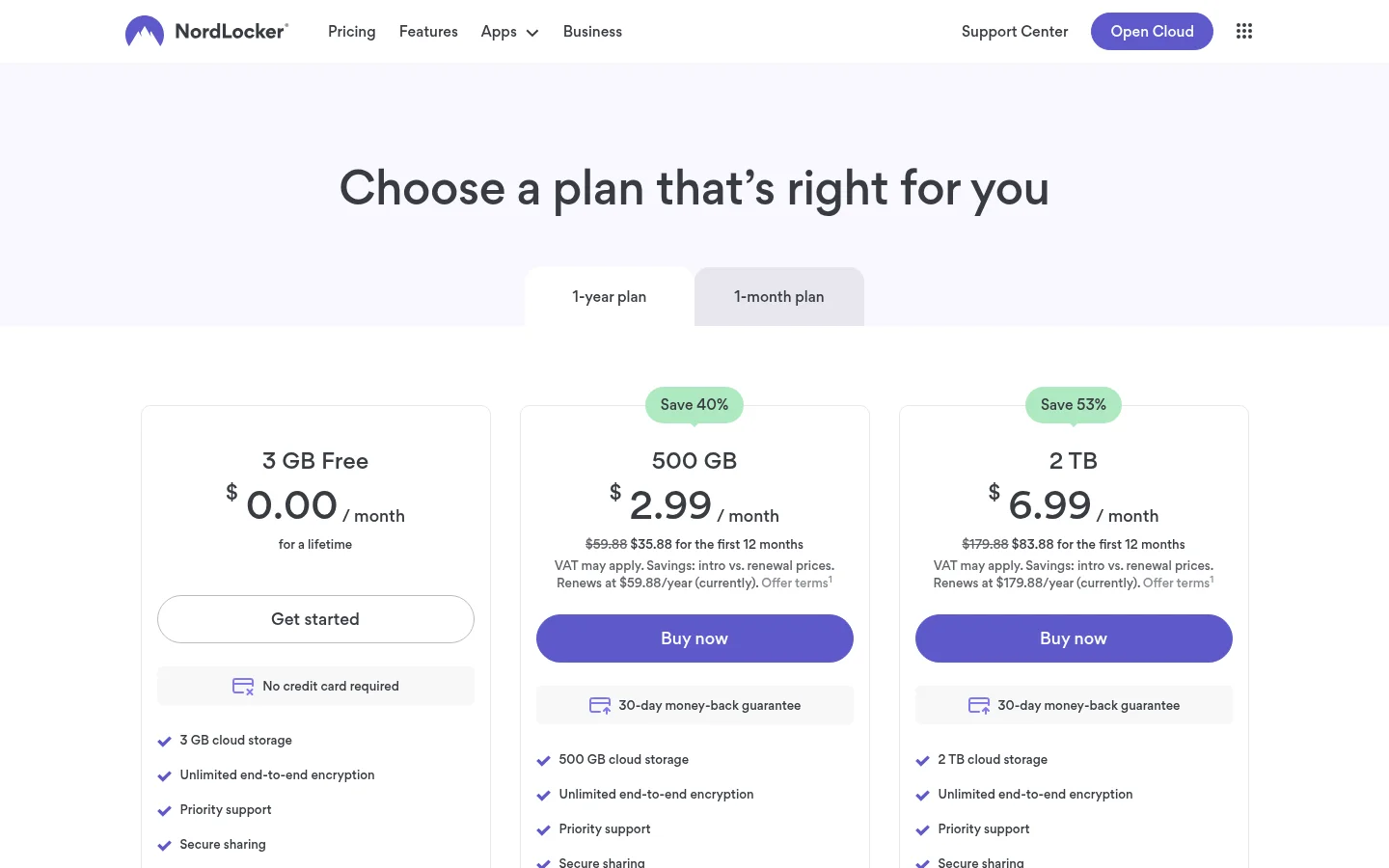
Plans as published on the NordLocker plans page in 2026: a Free plan with 3 GB, and paid plans of 500 GB and 2 TB. The paid plans show an introductory price for the first 12 months and a higher renewal price, and the page mentions a 30-day money-back guarantee. The secure cloud storage page advertises 500 GB from $2.99 a month. The Business page shows one plan, 2 TB at $29.99 a month billed annually, with an admin panel and access control. Check the plans page for today's prices before you decide.
For sharing with people outside your team, NordLocker's support article on sharing by link describes a link plus a security code, and the link expiry date can be changed. In its terms of service, NordLocker says it does not tell you when and by whom your content was previewed, downloaded or uploaded. We did not find branding, a custom domain or a client portal on its published pages.
On devices, NordLocker publishes a Windows app, Android and iOS apps, and a web app. Its support page on file size limits gives 10 GB per file on Windows and 8 GB on web, Android and iOS. A Gizmodo review from October 2026 notes no macOS app, no trash or version history, and Windows sync limited to one folder.
What Tarkle does
Tarkle is file sharing and cloud storage for freelancers, agencies and client-facing businesses. You upload files, send them as a transfer with one link, and decide who can open it. A client portal gives each client a branded place to sign in with their email, see only what you shared with them and send files back.
Sharing controls on a transfer include password protection, link expiration, one-time links, view-only transfers and email capture before a download starts. Transfer status shows whether a transfer was delivered, viewed or downloaded, and Slack notifications tell you when files are viewed, downloaded or uploaded. File requests collect files from anyone with one link into the folder you choose. Paid transfers charge for access through your own Stripe account.
Branding and a custom domain are available on every plan, Free included. The Agency plan adds a fully white-label platform, so your clients log in on your own domain and the Powered by Tarkle backlink becomes your agency name.
On security, Tarkle's Privacy Policy lists encryption in transit (TLS) and at rest (AES), two-factor authentication and passkeys, and audit logging, and adds that no system is perfectly secure. Tarkle does not offer zero-knowledge or client-side encryption: the key is not held only by you. You pick where workspace files are stored: European Union, United States, Hong Kong or Australia.
Plans, as listed on the Tarkle pricing page:
Free: $0, 1 workspace, 5 GB of storage, 1 GB upload limit, file sharing and file requests, client feedback and approval, custom branding and a custom domain.
Pro: $29 a month, or $19 a month billed yearly ($228 a year). 3 TB of storage, uploads up to 200 GB, 2 workspaces, unlimited team members, team folders, file versioning, a fully branded client portal and 90-day file recovery.
Agency: $59 a month, or $49 a month billed yearly ($588 a year). Everything in Pro, plus 6 TB of storage, 20 workspaces for clients, a white-label platform and a client provisioning portal.
NordLocker vs Tarkle
NordLocker | Tarkle | |
|---|---|---|
Built for | A private encrypted vault | Sending and collecting files with clients |
Encryption | Zero-knowledge, files and names encrypted on your device | TLS in transit, AES at rest, no zero-knowledge |
Free plan | 3 GB | 5 GB, 1 GB upload limit |
Paid storage | 500 GB or 2 TB | Pro 3 TB, Agency 6 TB |
Biggest file | 10 GB on Windows, 8 GB on web and mobile | 200 GB on Pro and Agency |
Share link controls | Security code, changeable expiry | Password, expiry, one-time, view-only, email capture |
Know who opened it | Not notified, per its terms | Delivered, viewed and downloaded status, Slack alerts |
Collect files from others | Not confirmed on its pages | File requests with one link |
Branding and domain | Not found on its pages | Branding and custom domain on every plan |
Client portal | Not found on its pages | Branded portal on Pro and Agency |
White label | Not found on its pages | Agency plan |
Who should choose NordLocker
Choose NordLocker if the main job is keeping your own files unreadable to everyone else, including the provider. That is what zero-knowledge storage is for, and Tarkle does not offer it. Choose it too if you want apps on Windows, Android and iOS, or if you already pay for a NordVPN plan that bundles it, as the Gizmodo review notes. It also fits a person or a very small firm that shares an occasional file and does not need to know who opened it.
Who should choose Tarkle
Choose Tarkle when files are part of how you serve clients. Send a finished delivery on a link with your logo and your own domain, protect it with a password, set it to expire, and see whether the client viewed and downloaded it. Ask for source files with a file request instead of chasing email attachments. Give each client a portal where they sign in and find only their files. Charge for a transfer before the download when the files are the product. If you run an agency, the Agency plan puts all of this on your domain, with a workspace for each client.
Tarkle also handles bigger deliveries: uploads up to 200 GB on Pro and Agency, against the 8 to 10 GB per file NordLocker publishes. A free workspace is enough to send one real transfer to a client and see what the status page shows. Start for free.
Switching from NordLocker to Tarkle
Decide which files are client-facing. A private vault usually holds more than you want to share.
Download those files from NordLocker to your computer, using its web or Windows app.
Create a Tarkle workspace and upload them into folders named after your clients. If any of the files already sit in Dropbox or Google Drive, you can import them directly.
Add your logo and connect your custom domain, then create a transfer or a file request and send the link to a client.
Keep NordLocker for the files only you should read, and move only client deliveries to Tarkle. Many people need both a vault and a place to share.
FAQ
Is NordLocker free?
Yes, NordLocker has a Free plan with 3 GB, as published on its plans page. Paid plans start with an introductory price for the first 12 months and renew at a higher price. Tarkle's Free plan has 5 GB.
Does NordLocker tell me when someone downloads a file?
According to its terms of service, no. Tarkle shows whether a transfer was delivered, viewed or downloaded, and can alert you in Slack.
Can I use NordLocker with my own domain and logo?
We did not find branding or a custom domain on NordLocker's published pages. On Tarkle, branding and a custom domain are on every plan, including Free.
Does Tarkle use zero-knowledge encryption?
No. Tarkle encrypts files in transit and at rest, but it does not offer zero-knowledge or client-side encryption. If you need that, NordLocker is the better fit.
Is there a Mac app for NordLocker?
A Gizmodo review in October 2026 reports no macOS app. Tarkle runs in the browser on any computer.
Can clients upload files to Tarkle without an account?
File requests collect files from anyone with one link, into the folder you choose. Clients who want a place to return to can use the client portal on Pro and Agency.
Which Tarkle plan do I need to white label?
The Agency plan. Branding and a custom domain are on every plan, but the full white-label platform for your clients is Agency.