
Tarkle vs Sinosend: client portals or location tracking
Sinosend leads on location tracking and regions; Tarkle on client portals, payments and team size.
Sinosend is the better pick if you send files across borders and need to see the city a recipient opened them from, or to choose among eight or more storage regions per transfer. Tarkle is the Sinosend alternative to choose if you want a branded client portal, payments before download, and unlimited team members on one plan. We make Tarkle, so read this as one vendor's view, and check the Sinosend facts against its own pricing page.
What Sinosend is
Sinosend is a branded file transfer and request service. Its home page describes it as "branded file delivery for global trade", and it is aimed at sourcing, export, logistics, legal, real estate and creative teams that send large files to people outside the company. Recipients do not need an account to download. Sinosend lists a 4.9 rating across more than 250 reviews on its pricing page, which is the vendor's own figure.
Everything below about Sinosend comes from sinosend.com and its pricing page, as read in 2026.
What Sinosend offers
Sinosend has three paid plans. Personal is US$20 a month, Pro is US$40 and Business is US$80, with yearly billing listed as $180, $360 and $720 a year. Each plan has a "Try for a week" button, and the page promises a 30-day refund.
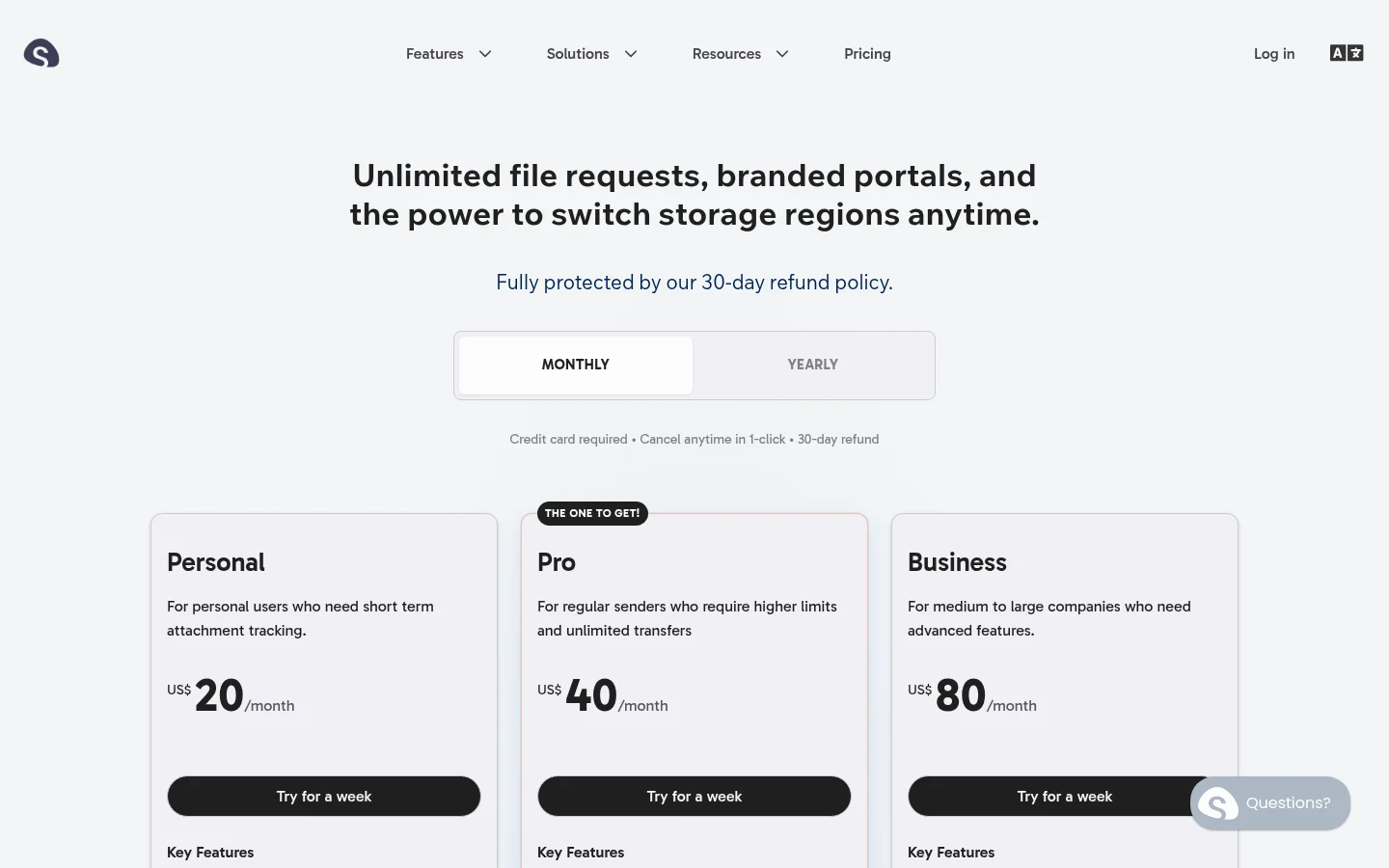
Limits grow with the plan:
Personal: 50 GB of storage, 10 GB per transfer, email to 20 contacts per transfer.
Pro: 200 GB of storage, 25 GB per transfer, 3 team members included, email to 50 contacts, up to 250 files at once, and removed Sinosend branding.
Business: 1 TB of storage, 100 GB per transfer, 6 team members included, email to 100 contacts, one custom subdomain, sending email from your own domain, and a full white label.
Extra seats cost $9 per seat a month and extra storage costs $10 per 100 GB a month, up to the caps on the page.
For sharing, Sinosend lists password protection, transfer expiry of up to one year that can be extended, recipients who can ask for more time, forwarding a transfer without uploading again, and updating or removing files in an existing transfer without changing the link. It also has unlimited file requests with an embeddable request form, size limits on incoming files, voice messages, and tags.
Two features stand out. The first is geolocation: the pricing page promises city, region and country for who accessed your files, plus real-time read notifications. The second is storage regions. Sinosend lists Hong Kong, Frankfurt, US West, Dubai, London, US East, Shanghai and Mexico City, lets you switch the region on the fly, and offers storage in Mainland China on Business.
The pricing page lists no payment feature, no API and no integrations list. We could not confirm those either way, so check with Sinosend if you need them.
What Tarkle does
Tarkle gives freelancers, agencies and small teams one place to store and share files. You send files and folders with one branded link (file sharing), and the person downloading needs no account. You can protect a link with a password, set a link expiry, ask for an email address before a download, make a one-time link or a view-only transfer.
Branding and domain come on every plan. Free includes custom branding and a custom domain, so links can sit on an address like files.yourstudio.com. "Powered by Tarkle" stays on Free, Pro can switch it off, and Agency replaces it with your own name across a fully white label platform where clients log in on your domain.
Pro and Agency add the client portal: each client signs in with their email, sees only what you shared with them, and can upload files back. Paid transfers let you charge for access through your own Stripe account. File requests collect files from anyone with one link, and transfer status shows whether a transfer was delivered, viewed or downloaded. Pro and Agency can also get Slack notifications when files are viewed, downloaded or uploaded.
Plans, as listed on the live pricing page:
Free: $0, 5 GB of storage, 1 GB per upload, one person.
Pro: $29 a month, or $19 a month billed yearly ($228 a year). 3 TB of storage, uploads up to 200 GB, 2 workspaces, unlimited team members, file versions and the AI assistant (Beta).
Agency: $59 a month, or $49 a month billed yearly ($588 a year). Everything in Pro, plus 20 client workspaces, 6 TB of storage and the white label platform.
Tarkle stores data in Europe, the United States, Asia-Pacific or Oceania. The region is set for a workspace, not for each transfer. Tarkle has no free trial on its paid plans; the Free plan is the way to test it.
Sinosend vs Tarkle
Tarkle | Sinosend | |
|---|---|---|
Entry price | Free, then Pro $29 a month ($19 billed yearly) | Personal US$20 a month |
Branding removed | Pro and Agency (Agency adds white label) | Pro (full white label on Business) |
Custom domain | Every plan, including Free | One custom subdomain listed on Business |
Team members | Unlimited on Pro and Agency, one person on Free | 3 on Pro, 6 on Business, extra seats $9 a month |
Storage | 5 GB Free, 3 TB Pro, 6 TB Agency | 50 GB, 200 GB, 1 TB |
Largest transfer | 1 GB Free, 200 GB Pro and Agency | 10, 25 and 100 GB |
Client portal | Pro and Agency, with upload back | Branded transfer and request portals |
File requests | Yes, with deadlines and size limits | Unlimited, with embed and size limit |
Paid downloads | Pro and Agency, through your Stripe account | Not listed on the pricing page |
Tracking | Delivered, viewed, downloaded, Slack alerts | Real-time read notifications, city-level geolocation |
Storage regions | Europe, US, Asia-Pacific, Oceania, set per workspace | 8+ regions, switched per transfer, Mainland China on Business |
Trial and refund | No trial; Free plan | 7-day trial, 30-day refund |
Sinosend figures are from its pricing page as read in 2026. Tarkle figures are from the live pricing page and product.
Who should choose Sinosend
Choose Sinosend if you need to know where a recipient opened a file, for example to time a sales follow-up or prove who accessed a shipping document. Tarkle shows delivered, viewed and downloaded, and does not list location data.
Choose Sinosend if data location is a per-deal question. Switching the region for each transfer, and storing files in Mainland China, Dubai or Mexico City, is something Tarkle does not offer. Tarkle sets one region per workspace.
Sinosend also fits you if you want to swap files inside a live transfer link or forward a transfer to new people without uploading again, and if you want a 7-day trial before paying.
Who should choose Tarkle
Choose Tarkle when the job is delivering work to clients and getting files back. A client portal gives each client one sign-in where they see their files and upload their own, instead of a new link each time. Charging before a download works through your own Stripe account, so a photographer or designer can sell final files without a separate shop.
Choose Tarkle when you have a team. Pro includes unlimited team members at $29 a month, with 3 TB of storage and uploads up to 200 GB. On Sinosend the 3 included seats and 200 GB sit at US$40 a month, and extra seats cost $9 each. If you run work for many client companies, Agency gives 20 client workspaces and a white label platform on your own domain at $59 a month, compared with Sinosend Business at US$80 for one custom subdomain.
Choose Tarkle if you want to start without paying. The Free plan includes file sharing, file requests, custom branding and a custom domain, so you can send one real transfer to a client before you decide. Start for free.
Switching from Sinosend to Tarkle
Create a free Tarkle workspace and add your logo and colors under Branding.
Connect your own domain, such as files.yourstudio.com, as the custom domain.
Download the files you still need from Sinosend and upload them into folders. If copies already sit in Dropbox or Google Drive, import them instead.
Recreate your open requests as file requests and send the new links.
Send one test transfer to yourself, then to a client.
Sinosend transfers expire, so check which ones are still live before you close the account. Tarkle has no tool that moves transfers across, so active links need to be created again.
Run both for a week. Keep your Sinosend plan for deliveries where you need location data, and send the next transfer to a client from Tarkle on your own domain to see how your clients react.
FAQ
Is Tarkle a good Sinosend alternative?
Yes, for teams that send files to clients and want a client portal, payments and unlimited team members. It is not the alternative if you need per-transfer storage regions or location data on every open.
Does Tarkle have geolocation tracking?
Tarkle shows whether a transfer was delivered, viewed or downloaded, and can alert you in Slack. It does not list city or country data.
Does Sinosend have a free plan?
Sinosend's home page says free sends are available without an account, with smaller limits. Its paid plans start at US$20 a month, as read in 2026.
Can I use my own domain on Tarkle?
Yes. A custom domain is available on every plan, including Free. Agency also runs the whole platform on your domain.
How big a file can I send with Tarkle?
Up to 1 GB on Free and up to 200 GB on Pro and Agency. Sinosend's limits are 10, 25 and 100 GB by plan.
Can I charge clients before they download?
On Tarkle, Pro and Agency can turn on paid transfers through their own Stripe account. Sinosend's pricing page does not list a payment feature.
Does Tarkle have a free trial?
No. Tarkle has a Free plan instead. Sinosend lists a 7-day trial and a 30-day refund.