Tarkle vs Tresorit: branded sharing or zero-knowledge
Tresorit encrypts files so only you can read them. Tarkle brands and tracks the files you send to clients.
Tresorit is better when your files must be zero-knowledge encrypted and your industry audits where they live. Tarkle is better when the job is sending files to clients, collecting files back and putting your own brand and domain on every link. We make Tarkle, so read this as one vendor's view, and check the sources linked below. Facts about Tresorit were read on its own pages in October 2026.
What Tresorit is
Tresorit is a zero-knowledge encrypted platform for storing, syncing, sharing and signing confidential files. It started in 2011 and is part of Swiss Post's digital business services, with offices in Switzerland, Germany and Hungary (About, as published in October 2026). Its home page says it is trusted by 11,000+ organizations and regulated industries, and its sector pages cover healthcare, finance, legal and IT.
The job it was built for is confidential file exchange where the provider should not be able to read the files. Files are encrypted on the device before upload, and the keys stay with users (zero-knowledge encryption, as published in October 2026). That design has a cost: password recovery works only from a device where you are still logged in, or on a Business account with Advanced Control turned on.
What Tresorit offers
Tresorit sells several products. Pricing amounts did not appear in the page text we could read in October 2026, so we quote no Tresorit prices here. Check the Tresorit business pricing page for up-to-date figures.
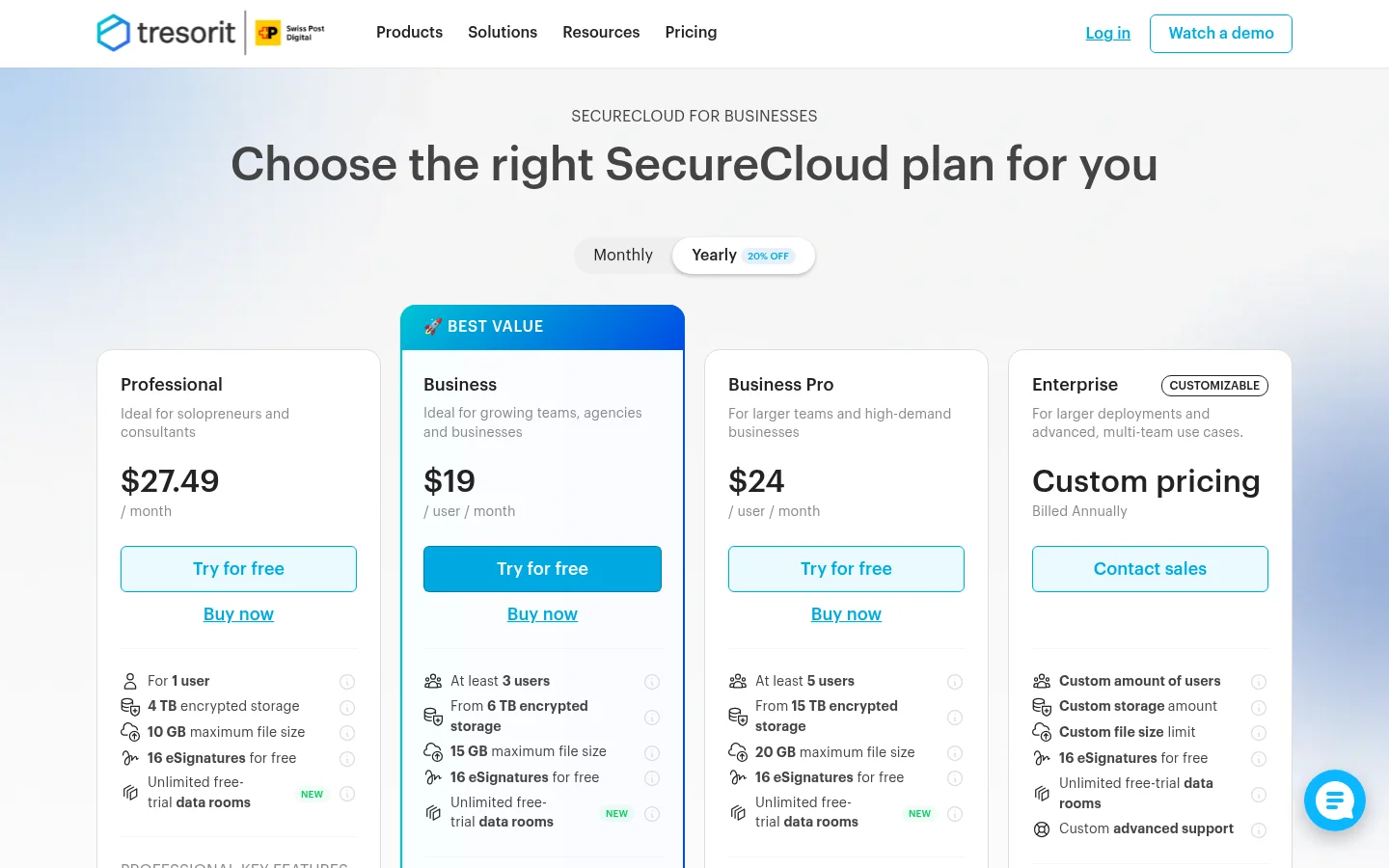
As published in October 2026, SecureCloud for businesses has four tiers:
Professional: 1 user, 4 TB, files up to 10 GB, file requests, free eSignatures.
Business: from 3 users, from 6 TB, files up to 15 GB.
Business Pro: from 5 users, from 15 TB, files up to 20 GB, dynamic watermarks and link tracking, and custom domain for links.
Enterprise: custom users, storage and file size, through sales.
Tresorit also sells Engage data rooms with branded rooms and tasks, and a FileSharing product. A free Basic plan gives 3 GB and files up to 500 MB, and it is not for business use. Every paid plan has a 14-day trial, and the trial asks for payment details (business pricing FAQ).
For sharing with outsiders, Tresorit offers encrypted links with a password, an expiry date, an open limit, an email check and a setting to disable download and print. You can revoke access at any time (secure file sharing). Link pages can carry your logo and brand color. Compliance badges include ISO 27001, GDPR, HIPAA, TISAX and FINRA, and files can sit in 12 locations, such as Germany, Switzerland, the UK, Canada and Singapore (data residency). It has sync apps for Windows, Mac, Linux, Android and iOS, plus Outlook, Gmail, Microsoft Teams and single sign-on integrations.
What Tarkle does
Tarkle gives freelancers, agencies and small teams one place to store files and share them under their own brand. You send a transfer with one link, and the person downloading needs no account. You choose the controls on each link: a password, an expiry date, an email address before the download, view-only access, a one-time link, or instant revocation. Transfer status shows whether a transfer was delivered, viewed or downloaded.
The client portal is a branded place where each client signs in with their email, sees only what you shared with them and sends files back. File requests collect files from anyone with one link, into the folder you choose. Your logo, colours and favicon go on transfer pages, request pages and the portal, and a custom domain lets every link live on an address like files.yourstudio.com. Video and audio play on the page before anyone downloads.
Plans belong to your organization. Prices below are as listed on the Tarkle pricing page.
Free, $0: 1 workspace for 1 person, 5 GB, uploads up to 1 GB, file sharing and file requests, client feedback and approval, custom branding, custom domain, password protection, and import from Dropbox or Google Drive.
Pro, $29 a month or $19 a month billed yearly ($228 a year): 2 workspaces, 3 TB, uploads up to 200 GB, file versions, the client portal, team members and team folders, 90-day file recovery, and an AI assistant in Beta.
Agency, $59 a month or $49 a month billed yearly ($588 a year): everything in Pro, 20 workspaces for your clients, 6 TB, a white-label platform on your own domain with "Powered by Tarkle" replaced by your agency name, and a client provisioning portal.
On security, Tarkle's Privacy Policy lists encryption in transit (TLS) and at rest (AES), two-factor authentication and passkeys for users, and audit logging. Tarkle does not offer zero-knowledge encryption and does not claim certifications such as ISO 27001 or HIPAA on this page. You can also pick where a workspace's files are stored: the European Union, the United States, Hong Kong or Australia.
Tresorit vs Tarkle
Tarkle | Tresorit | |
|---|---|---|
Encryption | TLS in transit, AES at rest | Encrypted on the device, zero-knowledge |
Built for | Sending and collecting files with clients | Confidential files in regulated industries |
Free plan | 5 GB, business use allowed | 3 GB, not for business use |
Largest upload | 1 GB on Free, 200 GB on Pro and Agency | 10 to 20 GB on SecureCloud business tiers |
Custom domain | On every plan | Business Pro and Enterprise |
Client portal | Pro and Agency | Engage data rooms, sold separately |
White label | Agency plan, on your own domain | Logo and colour on link pages |
File requests | Free, Pro and Agency | Professional card and Personal Pro |
Storage regions | EU, US, Hong Kong, Australia | 12 locations |
e-signature | Not offered | eSign add-on |
Compliance badges | None claimed | ISO 27001, GDPR, HIPAA, TISAX, FINRA |
Tresorit rows are from its own pricing and feature pages, as published in October 2026. Tarkle rows are from the Tarkle pricing page, feature pages and Privacy Policy.
Who should choose Tresorit
Choose Tresorit if a rule or a client requires zero-knowledge encryption, or a compliance badge such as HIPAA or ISO 27001 that you must show an auditor. Tarkle does not claim those certifications, and it does not encrypt files so that Tarkle cannot read them. Choose Tresorit too if your team needs files synced to laptops and phones, e-signatures, or a data room for a deal, all of which it sells today.
Tresorit also suits internal work. If nobody outside your company needs a branded portal, you give up little by picking the tool built for secure storage. Reviewers do raise cost for small teams and slower sync on large folders, so test it on your own files first. Those are reviewer opinions, not Tresorit claims.
Who should choose Tarkle
Choose Tarkle if most of your files go to clients and come back from them. A designer sending a final package, an accountant collecting documents or an agency running ten client accounts needs the client to open a link without creating an account, and needs to see that it happened. Tarkle puts that in front of you: the link, its password and expiry, and whether it was viewed or downloaded.
Your brand is the other reason. On Tarkle your logo, your colours and your own domain are on the Free plan, and the client portal is on Pro and Agency. The Agency plan replaces "Powered by Tarkle" with your agency name and lets clients log in at an address like cloud.youragency.com. On Tresorit, a custom domain for links sits on Business Pro and above.
Size matters too. An organization on Pro uploads files up to 200 GB, which suits video, raw photos and project folders, and 3 TB of storage covers two workspaces. You can start on Free and send one real transfer before you pay for anything.
Send the same real project to yourself on both tools. Open the link as the client would, from a private browser window, and judge what they see: whose name is on the page, whether they need an account, and how many clicks it takes to download.
Start for free and make one transfer under your own logo.
Switching from Tresorit to Tarkle
Tarkle does not import from Tresorit, so the move is a download and an upload. Import from Dropbox and Google Drive exists, which helps if part of your files live there too.
Create your free account and set your workspace branding: logo, colours, favicon.
Add your custom domain so links already carry your name.
Download the folders you share with clients from Tresorit to your computer, then upload them to Tarkle.
Choose the storage region when you create the workspace, for example the European Union.
Send one transfer to a colleague, with a password and an expiry date, and check the status page.
Replace old Tresorit links in your emails and proposals, then revoke them on the Tresorit side.
Move one active client first. Keep everything else on Tresorit until that client has opened a Tarkle link and sent a file back through a file request.
Frequently asked questions
Is Tarkle zero-knowledge encrypted like Tresorit? No. Tarkle encrypts files in transit with TLS and at rest with AES. Tresorit encrypts on your device before upload, so it cannot read the files.
Does Tresorit have a custom domain? Yes, for links. Its pricing page lists it under Business Pro for SecureCloud, and Enterprise includes it. Engage lists custom domains only for Enterprise.
Does Tresorit have a free plan? Yes. Basic gives 3 GB and files up to 500 MB, and it is not for business use. Paid plans have a 14-day trial.
Can clients upload files to me? On both. Tarkle has file requests on Free, Pro and Agency. Tresorit lists file requests on its Professional card.
Which one is cheaper for a small team? We cannot quote Tresorit prices, because they did not show in its page text. Tarkle starts at $0 on Free, and Pro is $19 a month billed yearly. Compare against Tresorit's pricing page.
Can I resell or white label either one? Tarkle's Agency plan replaces Tarkle's name with yours on your own domain. Tresorit offers logo and colour on link pages. See white label for agencies.
Where are my files stored? In Tarkle you choose the European Union, the United States, Hong Kong or Australia when you create the workspace. Tresorit lists 12 locations for Business and Enterprise.
Does Tarkle meet HIPAA or ISO 27001? Tarkle does not claim either. If you need a certification, check that the vendor lists it before you move files.