
Tarkle vs vBoxxCloud: client sharing or a team sync cloud
A Dutch team cloud with sync and editing against branded client sharing on your own domain, with plans and limits.
vBoxxCloud is better when your team needs a Dutch-hosted cloud with sync clients, a file server connection and online document editing. Tarkle is better when the job is sending, collecting and delivering files to clients under your own name and domain. We make Tarkle, so read this as one vendor's view, and check the sources we link.
Last checked: October 2026.
What vBoxxCloud is
vBoxxCloud is a business cloud storage service from the Dutch company vBoxx B.V. It was built for teams that want to store, sync and edit files together, with hosting in the Netherlands. On its own site it names sectors such as healthcare, construction, lawyers, freelancers and nonprofits as users (vboxxcloud.com, October 2026).
The vendor states that its data sits in a Dutch data centre with ISO 27001:2013, ISO 9001:2015 and ISAE 3402 Type 1 listed, and that files are encrypted with 256-bit AES (encryption page, October 2026). These are the vendor's own statements.
One thing to know before you compare: vBoxx B.V. now publishes two sites. The main one, vboxxcloud.com, shows a "2.0 launches soon" banner. A second one at cloud.vboxx.eu presents a rebuilt product with different plans. This page covers vboxxcloud.com and mentions the second site where it differs.
What vBoxxCloud offers
The vboxxcloud.com pricing page (October 2026) sells a Basic plan per user: €9.90 per user per month billed monthly, or €8.80 billed yearly. Storage is added in blocks of 250 GB at €4.40 per month, or €3.30 billed yearly. Teams of 12 to 49 users are listed from €108.90 per month with 500 GB to 1 TB included, and larger organizations from €415.80 per month. The page offers a 14-day free trial and no free plan.
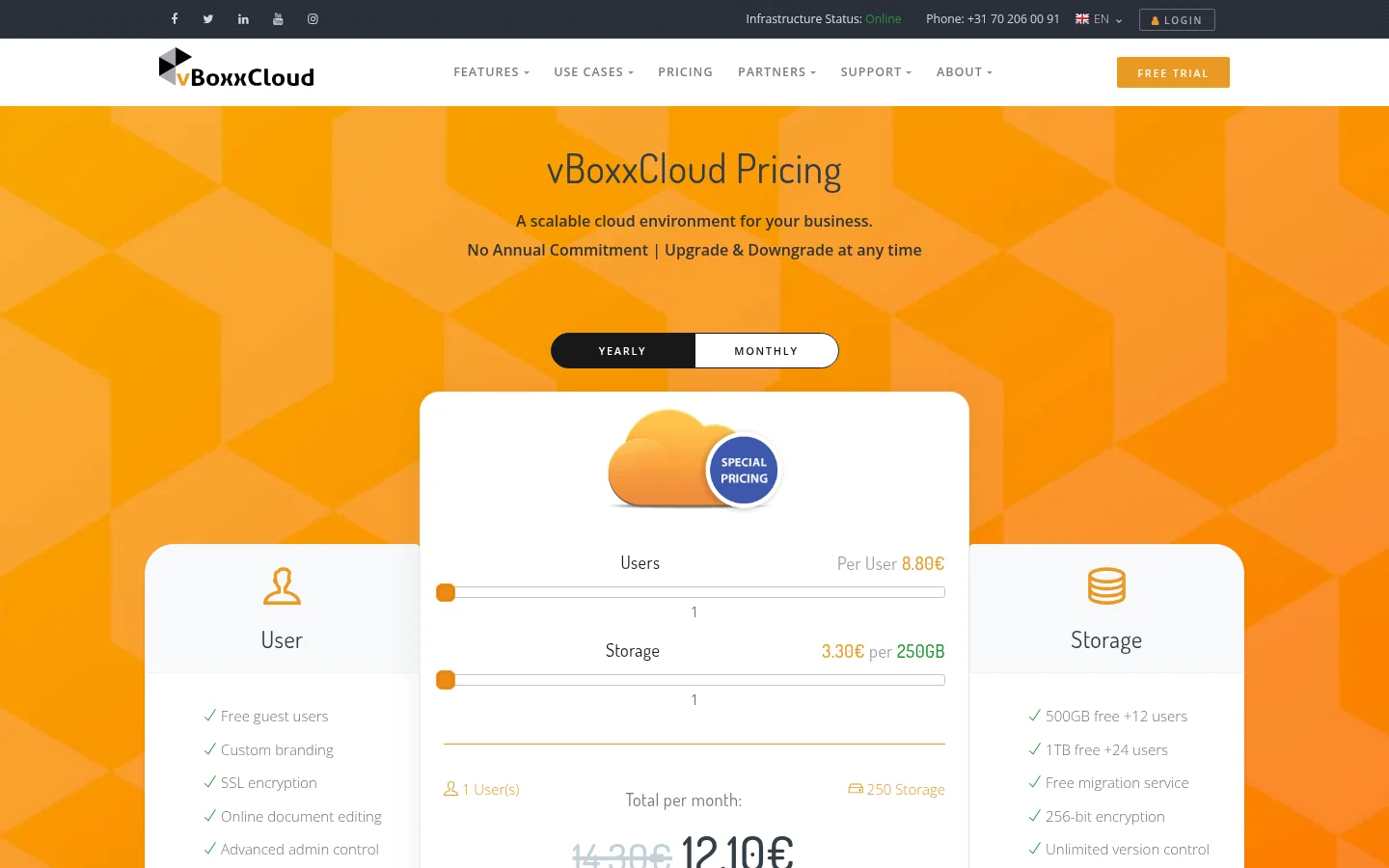
For work inside the team, the vendor lists a sync tool for Windows and macOS, an Outlook plugin, iOS and Android apps, WebDAV and a NAS or file server connection. It also lists team folders with per-user rights based on NTFS permissions, file locking, versions, device management with remote wipe, two-factor authentication and Active Directory. A web editor opens Word, Excel and PowerPoint files with co-authoring (file sharing page, online collaboration, October 2026).
For people outside the team, it offers public links, password-protected shares, expiry dates and download limits, upload and download notifications, and free guest users who open files in the browser. Branding covers a custom logo, a custom URL, email templates and splash screens (branding page, October 2026). Separate environments for different teams or clients are possible, and a partner program offers special pricing, with terms not published. We did not find file requests or payments for downloads on the pages we read.
The rebuilt product at cloud.vboxx.eu lists Starter at €202 per month for 5 to 15 users and Business at €300 per month from 20 users, with a 50 GB or 250 GB biggest file and custom branding on Business. Its trial is an early access sign-up, not a trial period (cloud.vboxx.eu, October 2026).
What Tarkle does
Tarkle gives freelancers, agencies and small teams one place to store files and share them with clients. You pick files or folders, press Share, and send one link. The person who receives it needs no account. A transfer can be password protected, gated by an email address, set to burn after read, view only, given an expiration date, or sold through your own Stripe account on Pro and Agency (paid transfers).
File requests collect files from anyone with one link, into the folder you choose, and you can set a deadline and a size cap per person. A client portal gives each client a branded place to sign in, see what you shared with them and send files back. Brand pages hold logos, colours and fonts for a brand. You can serve every link from your own domain.
For tracking, transfer status shows whether a transfer was delivered, viewed or downloaded, the activity log keeps a searchable record, and Slack alerts tell you when files are viewed, downloaded or uploaded.
The plans, as published on Tarkle's pricing page: Free is $0 with 5 GB, one person and uploads up to 1 GB. Pro is $29 per month, or $19 per month billed yearly, with 3 TB, files up to 200 GB, two workspaces, team members without a per-seat price, team folders and a fully branded client portal. Agency is $59 per month, or $49 per month billed yearly, and adds 20 client workspaces, 6 TB and a white label platform where your name, logo and domain replace Tarkle's. Free also limits transfers to 15 per month.
You choose where a workspace stores its files: Europe, the United States, Asia-Pacific or Oceania (storage regions).
vBoxxCloud vs Tarkle
vBoxxCloud (vboxxcloud.com) | Tarkle | |
|---|---|---|
Built for | Team storage, sync and editing | Sharing with and delivering to clients |
Pricing model | Per user plus 250 GB blocks | Flat per plan: Free, Pro, Agency |
Entry price | €9.90 per user per month | Free, then $29 per month (Pro) |
Free plan | No, 14-day trial | Yes, 5 GB for one person |
Biggest file | "No file size limit" on its sharing page | 1 GB on Free, 200 GB on Pro and Agency |
Data location | Netherlands | Europe, US, Asia-Pacific or Oceania |
Sync and apps | Windows, macOS, iOS, Android, NAS | Built around sharing, not team sync |
Document editing | Web editor for Office files | Previews more than 100 formats in the browser |
File requests | Not found on pages we read | Yes, with deadlines and caps |
Client portal | Separate environments per team | Branded portal on Pro and Agency |
Own domain | Custom URL | Custom domain on every plan |
White label | Logo, URL and email templates, partner program | Agency plan, 20 client workspaces |
Payments for files | Not found | Stripe, on Pro and Agency |
Tracking | Activity log, notifications | Transfer status, activity log, Slack alerts |
Who should choose vBoxxCloud
Choose vBoxxCloud if your own staff are the main users. Folder sync on every laptop and phone, a NAS or file server link, Outlook, Active Directory permissions and co-editing Word files are what it is built for, and they are not what Tarkle is built for. It is also a fit if a Dutch data centre and its listed ISO certificates are a hard rule for your clients, since Tarkle's regions are Europe, the US, Asia-Pacific and Oceania and do not name a country here.
Who should choose Tarkle
Choose Tarkle if most of your files go to people outside your company. A client who gets a link on your own domain, with a password, an expiry date and a record of when they opened it, sees your brand and not a storage vendor. File requests bring files back without email attachments. An agency can run a branded workspace for each client on the Agency plan, and charging for a download through Stripe is a setting on a transfer.
The cost shape differs too. vBoxxCloud charges per user and per 250 GB block. On Tarkle a Pro plan adds team members without a per-seat price, so a growing team does not change the bill.
The Free plan is enough to send one real transfer to a client and see what they see. Start for free.
Switching from vBoxxCloud to Tarkle
Download the client files you want to move from vBoxxCloud, or keep working files there and move only what you share with clients.
Start for free and create your account. Pick the storage region you need at the start.
Upload files or folders with Share or from the library. If some files live in Dropbox or Google Drive, import them without downloading first.
Add your logo, colours and custom domain, then send one transfer to yourself to check how it looks.
Move clients over transfer by transfer. Keep vBoxxCloud until the last project is delivered.
Run both tools side by side for one project. Keep team documents in vBoxxCloud and deliver only the finished files through Tarkle, then decide what to move.
FAQ
Is vBoxxCloud free?
There is no free plan on vboxxcloud.com. The pricing page offers a 14-day free trial (October 2026). Tarkle has a Free plan with 5 GB for one person.
How much does vBoxxCloud cost?
Basic is €9.90 per user per month billed monthly, or €8.80 billed yearly, plus €4.40 per 250 GB per month, or €3.30 yearly (October 2026). The Team plan starts at €108.90 per month.
Where does vBoxxCloud store data?
The vendor says in the Netherlands (October 2026).
Can I white label vBoxxCloud?
It offers a custom logo, custom URL, email templates and splash screens. Its page does not say the product is sold under a partner's own brand.
Can Tarkle replace vBoxxCloud for a team?
For sharing, collecting and delivering files to clients, yes. For folder sync, a file server link and editing Office files together, no. See the table above.
Does Tarkle store data in Europe?
Yes. You choose Europe, the United States, Asia-Pacific or Oceania for a workspace.
What does Tarkle cost compared with vBoxxCloud?
Free is $0, Pro is $29 per month or $19 per month billed yearly, and Agency is $59 per month or $49 per month billed yearly. See Tarkle's plans and prices. The two price models differ, so compare your own user count and storage.