
Tarkle vs Hightail: branded delivery or creative review
Hightail suits multi-round creative review. Tarkle suits branded delivery, one approval and files sent back.
Hightail is the better fit when a team runs multi-stage creative review with version compare and several approvers. Tarkle is the better fit when the job is sending finished files to clients under your own brand, collecting one approval and getting files back. This is a Tarkle vs Hightail comparison, and a Hightail alternative page for agencies. We make Tarkle, so read this as one vendor's view and check the sources linked below.
What Hightail is
Hightail is a cloud service for sending large files, previewing creative work and managing review. It was formerly YouSendIt, founded in 2004, and OpenText acquired it in 2018. The site is now branded "Hightail by OpenText" (hightail.com, as published in October 2026). It is built for creative, marketing and media teams that pass work back and forth before it is final.
Recipients can open files without an account unless the sender asks for verification. Beyond sending, Hightail adds Spaces (shared visual folders), Projects, comments and annotations, to-dos and approval routing.
What Hightail offers
Hightail publishes four plans on its pricing page (as published in October 2026). Paid prices are quoted as billed annually.
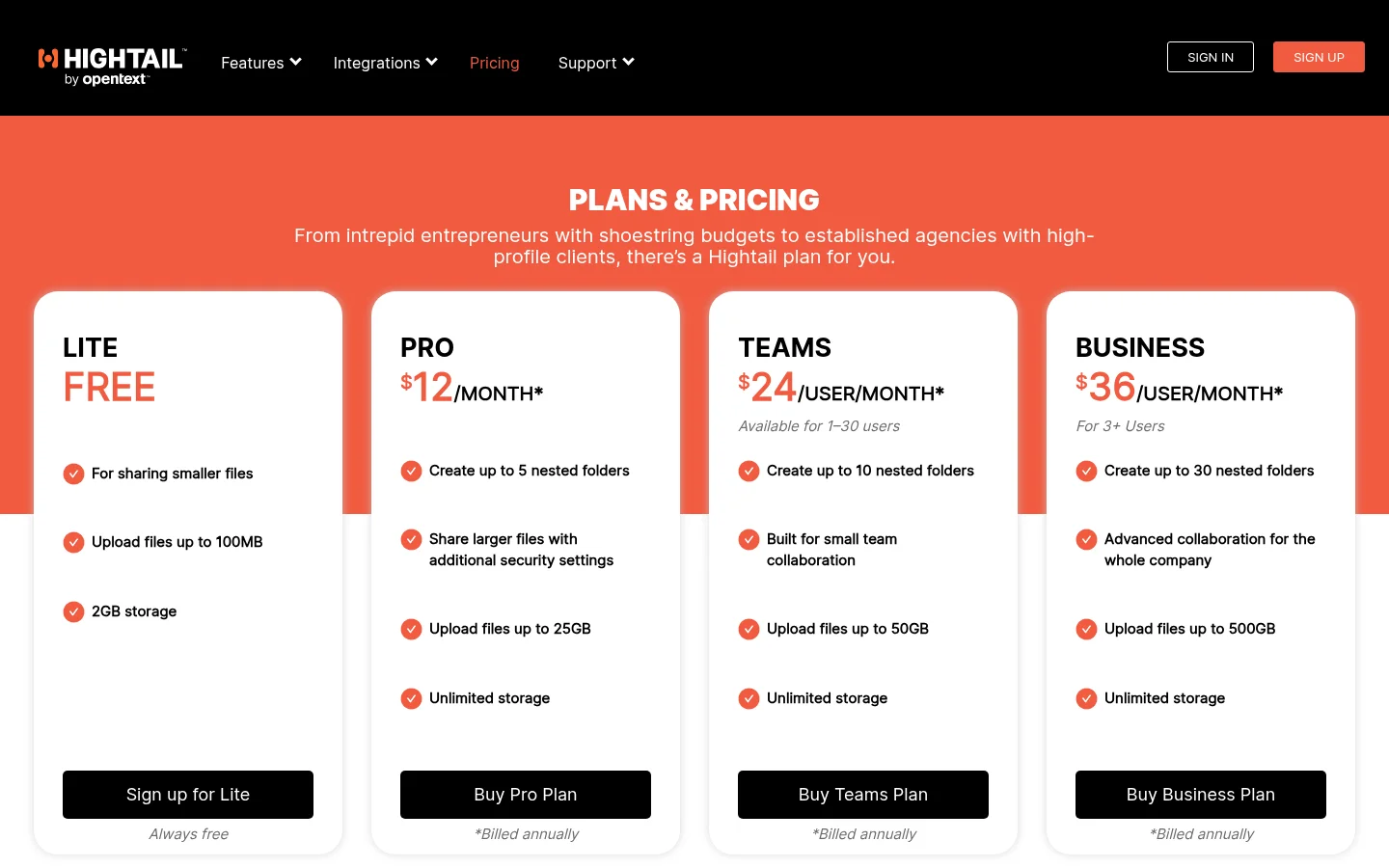
Lite is free, with 100 MB per file, 2 GB of storage and a 7-day expiry. Pro is $12 per month billed annually for one user, with 25 GB per file and no storage cap listed. Teams is $24 per user per month with 50 GB per file. Business is $36 per user per month with 500 GB per file. The pricing FAQ and file sharing page list monthly prices of $15, $30 and $45 per user, so check which price applies to you at checkout.
For sharing with outsiders, Hightail offers access codes (the sender passes the code on), expiry, a send tracker that shows delivery and downloads, and Uplink, a personal link where people upload files to you. Custom branding is listed as an add-on on paid plans, with no price shown. We found no custom domain, client payments or e-signature on its pages.
On the review side, Hightail has comments on images, video and audio, freehand annotation, version control with side-by-side compare, and approval routing with due dates. Version compare and approval routing are on Teams and Business. It also offers Adobe Photoshop and Illustrator plugins, sync from Dropbox, Google Drive and OneDrive, Zapier on Teams and Business, mobile apps and a desktop app. Hightail also advertises a 14-day free trial of its collaboration features.
What Tarkle does
Tarkle gives freelancers, agencies and small teams one place to store and share files. A transfer is one link to files or folders, and the person downloading needs no account. You can set a password, set an expiry date, ask for an email address before download, switch on burn after read or make a transfer view only. Transfer status shows whether a transfer was delivered, viewed or downloaded, and the activity log keeps a searchable record.
Branding is where Tarkle is built for client work. Your custom domain and logo, colours and favicon show on transfer pages, request pages and the portal. Custom domains are available on every plan. The client portal gives each client a sign-in by emailed link, shows only what you shared and lets them send files back. It is on Pro and Agency. The Agency plan adds a white-label platform on your own domain, with your agency name in place of the "Powered by Tarkle" link.
Client feedback turns images and PDFs into a review board. Clients comment with one link and no account, and reviewers can submit a review. It does not review video or websites. File requests collect files from anyone with one link, and you can import from Google Drive and Dropbox. A built-in player lets people watch or listen on a page before they download (video and audio sharing). Pro adds paid transfers through your own Stripe account.
Plans, as listed on the pricing page:
Free: $0, one person, 1 workspace, 5 GB of storage, files up to 1 GB.
Pro: $29 per month, or $19 per month billed yearly ($228 per year). 2 workspaces, 3 TB of storage, files up to 200 GB, unlimited team members, team folders, file versioning and the branded client portal.
Agency: $59 per month, or $49 per month billed yearly ($588 per year). Everything in Pro, 20 workspaces for clients, 6 TB of storage and the white-label platform.
Hightail vs Tarkle
Tarkle | Hightail | |
|---|---|---|
Free plan | $0, 5 GB, files up to 1 GB | Lite: 100 MB per file, 2 GB |
Entry paid plan | Pro $29/month, or $19/month billed yearly | Pro $12/month billed annually, 1 user |
Largest file | 200 GB on Pro and Agency | 25 GB Pro, 50 GB Teams, 500 GB Business |
Storage | 3 TB Pro, 6 TB Agency | No cap listed on paid plans |
Team members | Unlimited on Pro and Agency | Priced per user |
Custom domain | Yes, every plan | None found |
Branding | Logo, colours, favicon; white label on Agency | Add-on on paid plans |
Client portal | Pro and Agency | Spaces with client view |
Receiving files | File requests | Uplink |
Client review | Comments and approval on images and PDFs | Comments, annotation, video and audio |
Version compare, approval routing | File versioning on Pro; no version compare or approval routing | Teams and Business |
Paid downloads | Pro, through your Stripe account | None found |
Apps and plugins | No desktop or mobile app | Mobile apps, desktop app, Adobe plugins |
Who should choose Hightail
Choose Hightail if your team reviews creative work in several rounds. Side-by-side version compare, approval routing with order and due dates, to-dos and timestamped comments on video and audio are things Tarkle does not offer. Photoshop and Illustrator plugins matter if designers want to send from inside Adobe. Hightail also has mobile apps and a desktop app, and Tarkle has neither. If your clients are enterprise accounts that expect single sign-on, Hightail lists it on Business through sales.
Hightail also has the lower entry price for one paid user. If you only need to send files up to 25 GB and do not need your own domain, Pro at $12 per month billed annually costs less than Tarkle Pro.
Who should choose Tarkle
Choose Tarkle when the files are finished and the point is how they arrive. A link on files.yourstudio.com with your logo and colours looks like your business, not a tool you rent. Hightail's pages show custom branding only as an add-on and show no custom domain.
Tarkle suits agencies and freelancers who:
Send large final files. Pro and Agency take files up to 200 GB, against 25 GB on Hightail Pro.
Give each client a branded place to sign in, find their files and upload back, through the client portal.
Need to know who opened and downloaded, through transfer status and the activity log.
Want one approval on an image or PDF without asking the client to create an account.
Run many clients. Agency gives you 20 workspaces and white-labels the whole platform.
Sell files. Paid transfers on Pro take payment through your Stripe account before download.
A Free account is enough to send one real transfer on your own domain and see how it looks to a client. Start for free.
Switching from Hightail to Tarkle
Create a workspace and add your logo, accent color and, if you want one, a custom domain.
Download the files you still need from Hightail, or from the Dropbox, Google Drive or OneDrive folder it syncs to.
Upload them to Files, or use the import from Google Drive and Dropbox to pull them over without downloading first.
Create a transfer or a client portal contact, add a password if the files are sensitive and send the link.
Send clients a file request link so they can return files to the same place.
Keep your Hightail links alive until clients confirm they have what they need. Hightail Lite sends expire after 7 days, so re-send anything still in use from Tarkle with your own branding.
Hightail and Tarkle FAQ
Is Tarkle a Hightail alternative for agencies? Yes, for delivering finished files, collecting an approval on images and PDFs and receiving files back, all on your own brand. It does not replace Hightail's version compare or multi-approver routing.
Does Hightail let me use my own domain? We found no custom domain on Hightail's pages as published in October 2026. Tarkle supports a custom domain on every plan.
How big a file can I send? On Tarkle, Free allows files up to 1 GB, and Pro and Agency up to 200 GB. On Hightail, Lite allows 100 MB, Pro 25 GB, Teams 50 GB and Business 500 GB.
Can my clients review work without an account? On Tarkle, yes: a client feedback link for images and PDFs needs no account. On Hightail, guest commenting is a Business feature that an admin turns on.
Does Tarkle have a free plan? Yes. Free is $0 for one person with 5 GB of storage and files up to 1 GB. Hightail's free plan is Lite.
Does Tarkle have desktop or mobile apps? No. Tarkle runs in the browser. Hightail has mobile apps and a desktop app.
Can Tarkle review video? Tarkle plays video and audio on a page, but client feedback boards cover images and PDFs only. Hightail offers comments on video and audio.