
Tarkle vs LucidLink: a shared drive or branded file sharing
LucidLink streams large working files to a team's desktop. Tarkle sends and collects files for clients.
LucidLink is better when a team edits large working files live from a shared cloud drive. Tarkle is better when a freelancer or agency sends finished files to clients, collects uploads back and does it all on its own branded address. If you are looking for a LucidLink alternative for sending files to clients, that is the job Tarkle was built for, and it does not replace a mounted drive.
We make Tarkle, so read this as one vendor's view and check the sources. LucidLink facts below come from LucidLink's own pages as published in October 2026. Tarkle facts come from Tarkle's live plans and feature pages.
What LucidLink is
LucidLink is a cloud file streaming platform from LucidLink Corp. It mounts a shared cloud filespace on your computer like a local drive, so large files open in place without a full download, a sync client or a VPN (platform page, October 2026).
It was built for teams that work with very large files: video, audio and VFX, architecture and engineering, and marketing and advertising. Its pages mention integrations with Adobe Premiere Pro and After Effects, AutoCAD, Figma and Final Cut, app-aware file locking, and desktop, web and mobile apps.
On security, LucidLink states that it uses zero-knowledge encryption: your organization controls the keys, and LucidLink cannot see your data (security page, October 2026). Tarkle does not make that claim.
What LucidLink offers
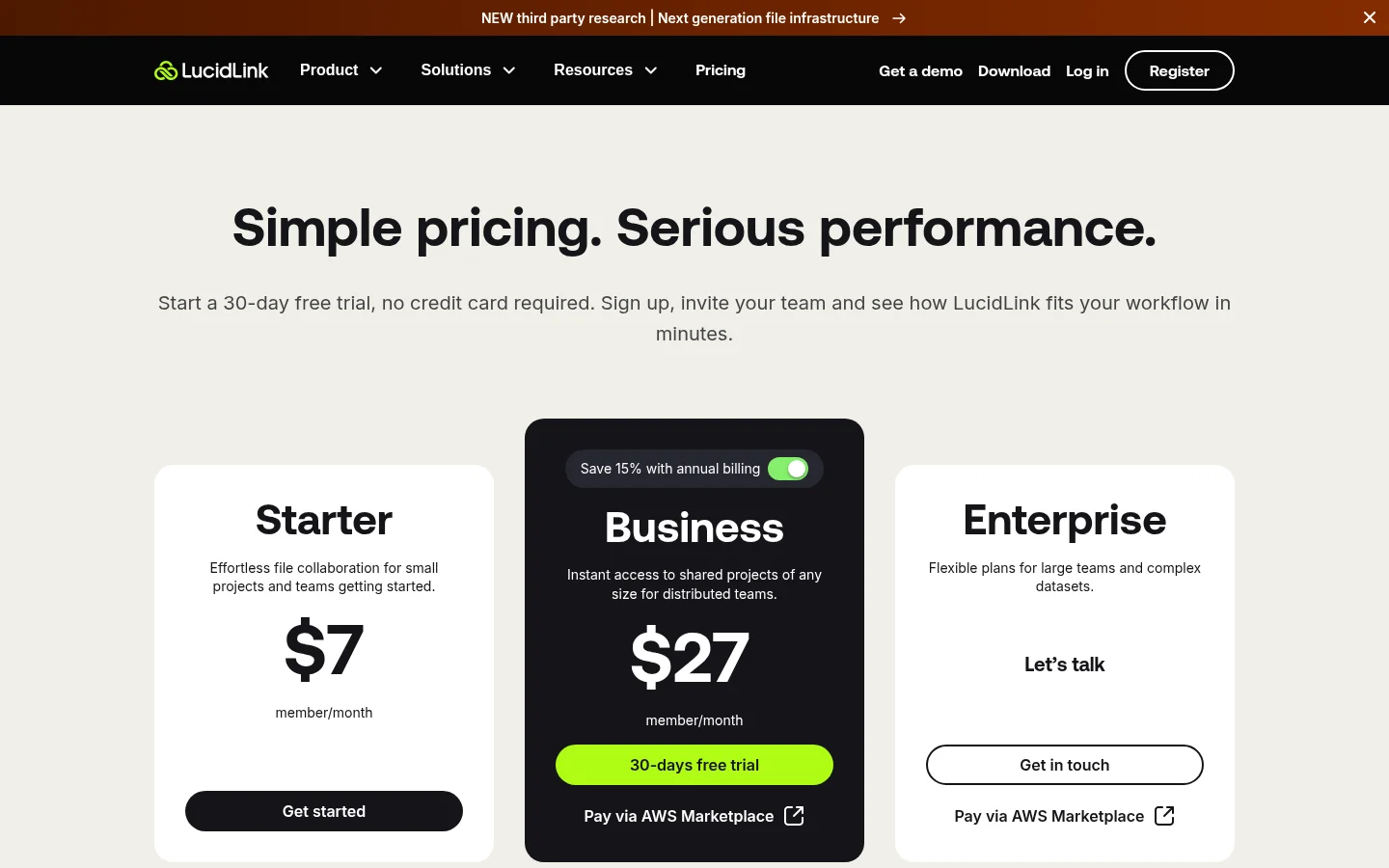
LucidLink prices per member. As published on its pricing page in October 2026:
Starter: $7 per member per month, with 100 GB per member shared across the workspace and up to 10 members.
Business: $27 per member per month (shown next to a struck-through $32; the page does not say which billing period applies), with 400 GB per member and up to 25 members.
Enterprise: custom pricing, with SSO, bring-your-own storage and an audit trail listed.
Extra storage is charged per 100 GB per month. LucidLink says charges apply while members are active in a filespace, even if no data is stored, and that billing cannot be paused. It offers a 30-day free trial and no free plan.
To share with people outside the team, LucidLink uses guest links (guest access announcement, August 2026). Admins and owners create them. A guest needs no account or paid seat, verifies with an emailed code and gets read-only access to a folder or a single file. Links expire automatically on Business and Enterprise but not on Starter, and Starter allows 10 active guest links per filespace, Business 100. LucidLink's pages do not list branded guest pages, a custom domain, password links, file requests, a client portal or payments.
What Tarkle does
Tarkle gives freelancers, agencies and small teams one place to store files and share them with clients. The jobs it covers:
Send files by link. Pick files or folders, get one link and share files by link. The person downloading needs no account. Pro and Agency can send large files up to 200 GB each.
Control who opens it. Add a password, a link expiry date, an email check before download, or make a transfer view only. You can disable a link in one click.
Collect files back. File requests let anyone upload into the folder you choose, and you can close a request on a date and cap what each person uploads.
See what happened. Transfer status shows whether a transfer was delivered, viewed or downloaded, and the activity log records what happened across the workspace.
Brand it. Custom branding puts your logo, colors and favicon on transfer pages, request pages and the portal, and a custom domain serves links from your own address. Both are on every plan, Free included.
Run a client portal. On Pro and Agency, the client portal gives each client an email sign-in, shows only what you shared with them and lets them send files back.
White label. Agency runs Tarkle entirely on your own domain, with a workspace for each client and "Powered by Tarkle" replaced by your agency name (white label for agencies).
Review and get paid. Client feedback turns images and PDFs into a board clients approve with one link, and paid transfers charge for access through your own Stripe account.
Plans, from the live pricing page: Free is $0 with 1 workspace, 5 GB of storage and uploads up to 1 GB. Pro is $29 a month, or $19 a month billed yearly ($228 a year), with 3 TB, 200 GB per file, 2 workspaces and unlimited team members. Agency is $59 a month, or $49 a month billed yearly ($588 a year), and adds a workspace for each of up to 20 clients, 6 TB and white label. Tarkle has no mounted drive, no desktop sync and no desktop or mobile app today.
LucidLink vs Tarkle
Tarkle | LucidLink | |
|---|---|---|
Built for | Sending and collecting files with clients | Live work on large files from a shared drive |
Mounted drive on your computer | No | Yes |
Entry price | Free plan, $0 | Starter, $7 per member per month |
Team pricing | Pro $29 a month ($19 billed yearly), unlimited team members | Business $27 per member per month |
Storage | Free 5 GB, Pro 3 TB, Agency 6 TB | 100 GB per member (Starter), 400 GB per member (Business) |
Biggest file | Free 1 GB, Pro and Agency 200 GB | Up to the storage limit |
Recipient needs an account | No | No (guest link, emailed code) |
What an outsider can do | Download, or upload through a file request | Read-only view and download |
Password on a shared link | Yes | Not listed |
Link expiry | Yes | Business and Enterprise only |
Your logo and domain on transfer pages | Yes, on every plan | Not listed |
Client portal and white label | Portal on Pro and Agency, white label on Agency | Not listed |
Encryption | In transit and at rest | Zero-knowledge, AES-256 |
Free trial | None, but Free is a permanent plan | 30 days |
Who should choose LucidLink
Choose LucidLink if your team opens, edits and saves large project files every day and wants them to behave like local files: a video team cutting in Premiere Pro, an architecture firm in CAD, or a studio sharing one global filespace across offices. Tarkle has no mounted drive, so it cannot do that job.
Stay with LucidLink too if zero-knowledge encryption is a rule for your clients, or if you need SSO and an audit trail on an Enterprise plan. Those are LucidLink strengths that Tarkle does not claim.
Reviewers on Capterra and G2 praise its streaming speed and also mention a high price for small teams and storage limits, as read in October 2026. If the team is already inside LucidLink, a drive is the right place for working files. For the question of what sits between a team drive and the client, see client portal vs file sharing.
Who should choose Tarkle
Choose Tarkle if the work ends with someone outside your team. A seat in LucidLink is meant for the people doing the work. Tarkle is meant for the people receiving it.
You send finished files. A client opens one link, with no account and no seat for you to pay for, and downloads files up to 200 GB each on Pro and Agency.
You need files back. A file request gives clients a link to upload into a folder you choose, instead of attachments by email.
Your brand matters. Your logo, colors and your own domain appear on every page the client sees, from the free plan up. Agency removes the Tarkle name completely.
You want to know it arrived. See whether a transfer was delivered, viewed or downloaded before you chase anyone.
You manage many clients. Agency gives each client its own workspace with its own storage, sharing and portal. See file sharing for agencies for a setup.
You want a flat team price. Pro has unlimited team members at one price, not a price per member.
The cheapest way to judge it is to send one real transfer. A free workspace is enough: start for free, upload a project, set a password and send the link to a client.
Switching from LucidLink to Tarkle
You do not have to move everything. Most teams keep working files in the drive and move only what clients see.
Pick the files clients see: finals, proofs, source files after approval.
Copy them from your LucidLink drive to your computer.
Create a Tarkle account, add your logo and accent color in Branding, and connect your custom domain.
Upload the files to a folder, then create a transfer with a password and an expiry date.
For clients you work with often, set up a client portal on Pro, or a workspace per client on Agency.
Send a file request to each client who owes you material.
Move one active client first. Run a real transfer and one file request with them before you cancel anything. LucidLink says billing cannot be paused and that you stop charges by deleting the workspace within the billing period, so end it only after the client side works.
If the files also sit in Dropbox or Google Drive, you can import from Google Drive and Dropbox instead of uploading by hand.
FAQ
Is Tarkle a LucidLink alternative? For sending files to clients and collecting files back, yes. For streaming working files to a desktop drive, no: Tarkle has no mounted drive or desktop sync.
Do my clients need an account to download? No. Recipients can open or download shared files on Tarkle without creating an account. A LucidLink guest also needs no account, but gets read-only access after an emailed code.
Does Tarkle have a free plan? Yes. Free is $0 with 1 workspace, 5 GB of storage and uploads up to 1 GB, and it includes file requests, custom branding and a custom domain. It is a permanent plan, not a trial.
Can I put my own domain and logo on shared files? Yes. A custom domain and custom branding are on every Tarkle plan. LucidLink's pages do not list either for guest links.
What is the biggest file I can send with Tarkle? 1 GB on Free, and 200 GB per file on Pro and Agency.
Is Tarkle as private as LucidLink? Not in the same way. LucidLink states zero-knowledge encryption. Tarkle protects files in transit and at rest and gives you passwords, expiry and instant link revocation. If client contracts demand zero-knowledge, LucidLink fits that rule better.
Can I use both? Yes. Keep working files in LucidLink and use Tarkle for the last step, where files go to the client and come back.