
Tarkle vs Sync.com: branded file sharing or private storage
Sync.com is encrypted storage for teams. Tarkle is branded file sharing with a client portal on Pro and Agency.
Tarkle vs Sync.com comes down to the job. Sync.com is encrypted storage for teams, and it is the better pick when encryption and compliance decide the purchase. Tarkle is branded file sharing for client work.
We make Tarkle, so read this as one vendor's view and check the sources linked here.
What Sync.com is
Sync.com publishes its plans on its pricing page. Its pricing page lists encryption. Its pricing page lists SOC 2 Type 1. Its pricing page lists HIPAA compliance.
What Sync.com offers
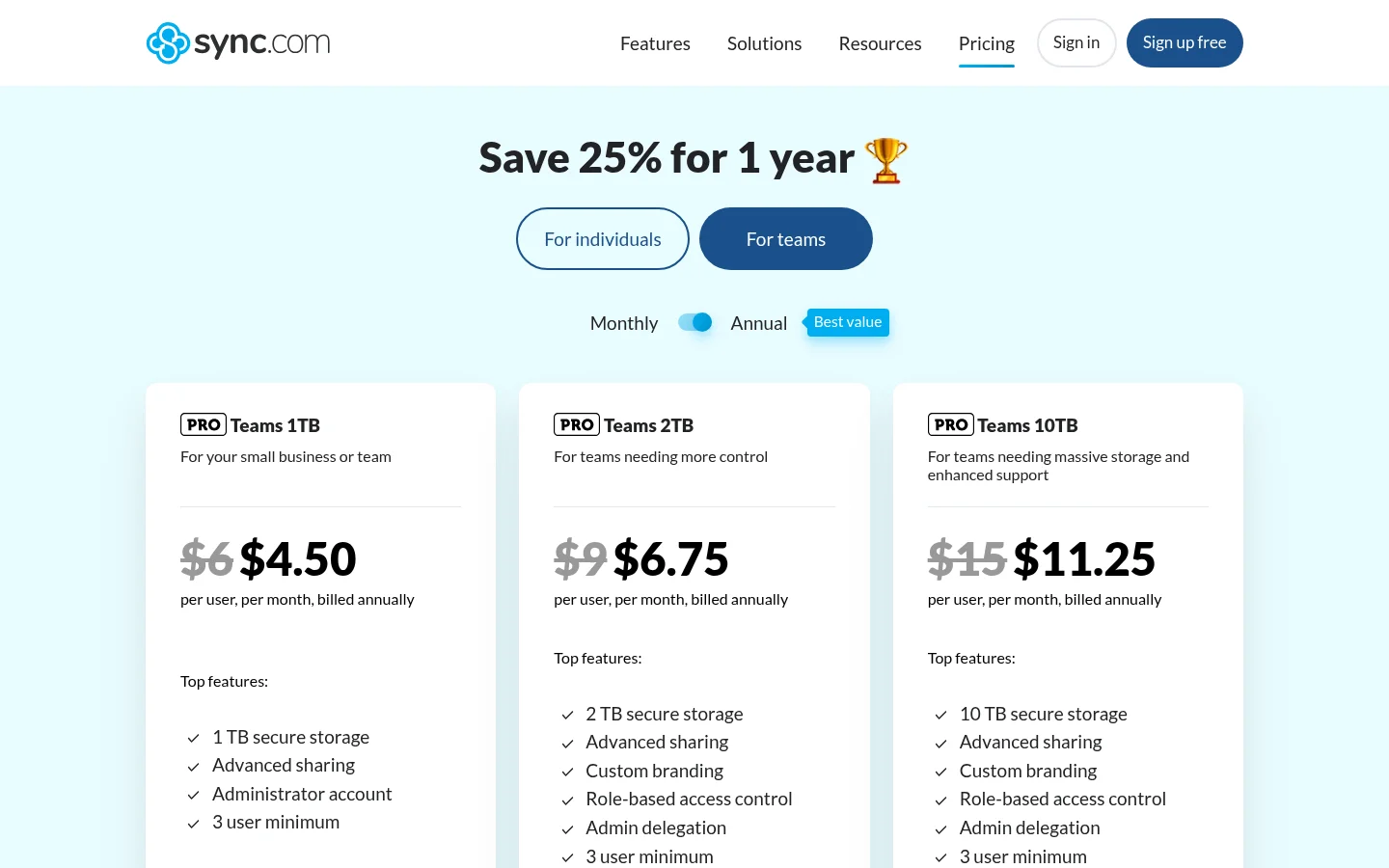
Sync sells team plans priced per user, with a 3 user minimum. Teams 1TB is $8 per user per month, or $6 per user per month billed annually. Teams 1TB includes 1 TB secure storage per user. Teams 2TB includes 2 TB secure storage per user. Teams 10TB includes 10 TB secure storage per user. Custom branding is listed on Teams 2TB and 10TB.
Its comparison table lists:
Password protected sharing
Restrict downloads
File requests
The page also shows "Save 25% for 1 year" on those prices. The page also states a 30-day free trial. It also states a full 30-day money-back guarantee.
What Tarkle does
Tarkle is designed primarily for agencies, consulting firms and other client-facing businesses.
Free is $0 with no credit card required. It includes 5 GB cloud storage. It is for one person. It allows uploads up to 1 GB. Sharing and requesting files is included. Client feedback and approval is included. Custom domain and branding is included. You can also protect shared files with passwords.
Every workspace can connect one domain, including Free. A brand page can have its own domain on Pro. You can read more about custom domains on the feature page.
Pro is $29/month, or $19/month billed yearly ($228/year). Pro adds 3 TB cloud storage. Pro allows files up to 200 GB. Pro includes unlimited team members. Pro includes a fully branded client portal. On a monthly or yearly Pro subscription, the Powered by Tarkle line can be removed. Free keeps the Powered by Tarkle line.
Agency is $59/month, or $49/month billed yearly ($588/year). Agency adds 6 TB cloud storage. Agency includes a 100% white-label platform. Agency also lets you run Tarkle entirely on your own domain, like cloud.acme.com. The Powered by Tarkle backlink is replaced by your agency name.
The client portal is a branded place where each client signs in with their email. The client portal is on Pro and Agency. Each client can see only what you shared with them and send files back, and you can review the details on the client portal feature page.
Transfer status shows whether a transfer was delivered, viewed or downloaded. Slack notifications are available on Pro. Paid transfers charge for access to a transfer through your own Stripe account. Paid transfers are on Pro and Agency. See paid transfers for the details.
Tarkle offers secure data residency in Europe, the United States, Asia-Pacific, and Oceania. Recipients can open or download shared files without creating a Tarkle account. Prices and plan details are on the Tarkle pricing page.

Who should choose Sync.com
Choose Sync.com when encryption and compliance decide the purchase. Its pricing page lists encryption, SOC 2 Type 1 and HIPAA compliance, so start there. Sync also fits a team that mostly shares files inside the team rather than with clients.
Who should choose Tarkle
Tarkle fits the job of sending work to clients and getting files back. A client opens a link on your domain. The client does not need a Tarkle account to open it. A few jobs where this matters:
Sending final work: Pro and Agency support files up to 200 GB.
Collecting files: file requests are on Free.
Approvals: client feedback and approval is on Free.
A client area: the client portal on Pro and Agency.
Getting paid before a download: paid transfers on Pro and Agency.
Reselling as your own: Agency replaces the Powered by Tarkle line with your agency name.
Pro and Agency include unlimited team members. If what you want is personal storage, compare Sync.com's individual plans first.
Switching from Sync.com to Tarkle
You do not need to move everything. Move the files you share with clients and leave the private archives where they are.
Create a Free account at tarkle.com/sign-up.
Connect your own domain. Every workspace can connect one domain, including Free.
Add the folders you share with clients. Import file from Dropbox or Google Drive on Free if your files sit there.
Send a first transfer or file request, and open the link as a client would.
Upgrade to Pro when you need the client portal.
Keep your Sync.com account until your clients have used the new links once. Then stop sharing the old Sync.com links.
Frequently asked questions
Which one is better if encryption is the priority? Sync.com. Its pricing page lists encryption.
Do my clients need an account? Recipients can open or download shared files without creating a Tarkle account. Clients sign in to the client portal with their email.
What does Sync.com cost compared with Tarkle? Teams 1TB is $8 per user per month, or $6 per user per month billed annually. Tarkle Pro is $19/month billed yearly ($228/year). Agency is $49/month billed yearly ($588/year).
What is the biggest file I can send with Tarkle? Free supports uploads and transfers up to 1 GB each. Pro and Agency support files up to 200 GB.
Where are my files stored? Tarkle offers secure data residency in Europe, the United States, Asia-Pacific, and Oceania.