
Tarkle vs TransferNow: your own domain on every plan
TransferNow suits big one-off transfers. Tarkle suits client files on your own domain, brand and portal.
TransferNow is the better pick if you send very large one-off transfers to people you do not work with again. Its Team plan allows up to 500 GB per transfer for each member, and Premium allows 250 GB. Tarkle is the better pick if you send files to clients under your own name and want the links, the branding and a client portal on a domain you own. Custom domains are available on every Tarkle plan, Free included.
We make Tarkle, so read this as one vendor's view, and check the sources. TransferNow facts below come from its own pages, as read in November 2026.
What TransferNow is
TransferNow is a service for sending and receiving large files by email or by link. Its Free plan needs no sign-up.
What TransferNow offers
TransferNow's pricing page lists Free, Premium, Team and Enterprise plans. Check the prices on that page before you compare them.
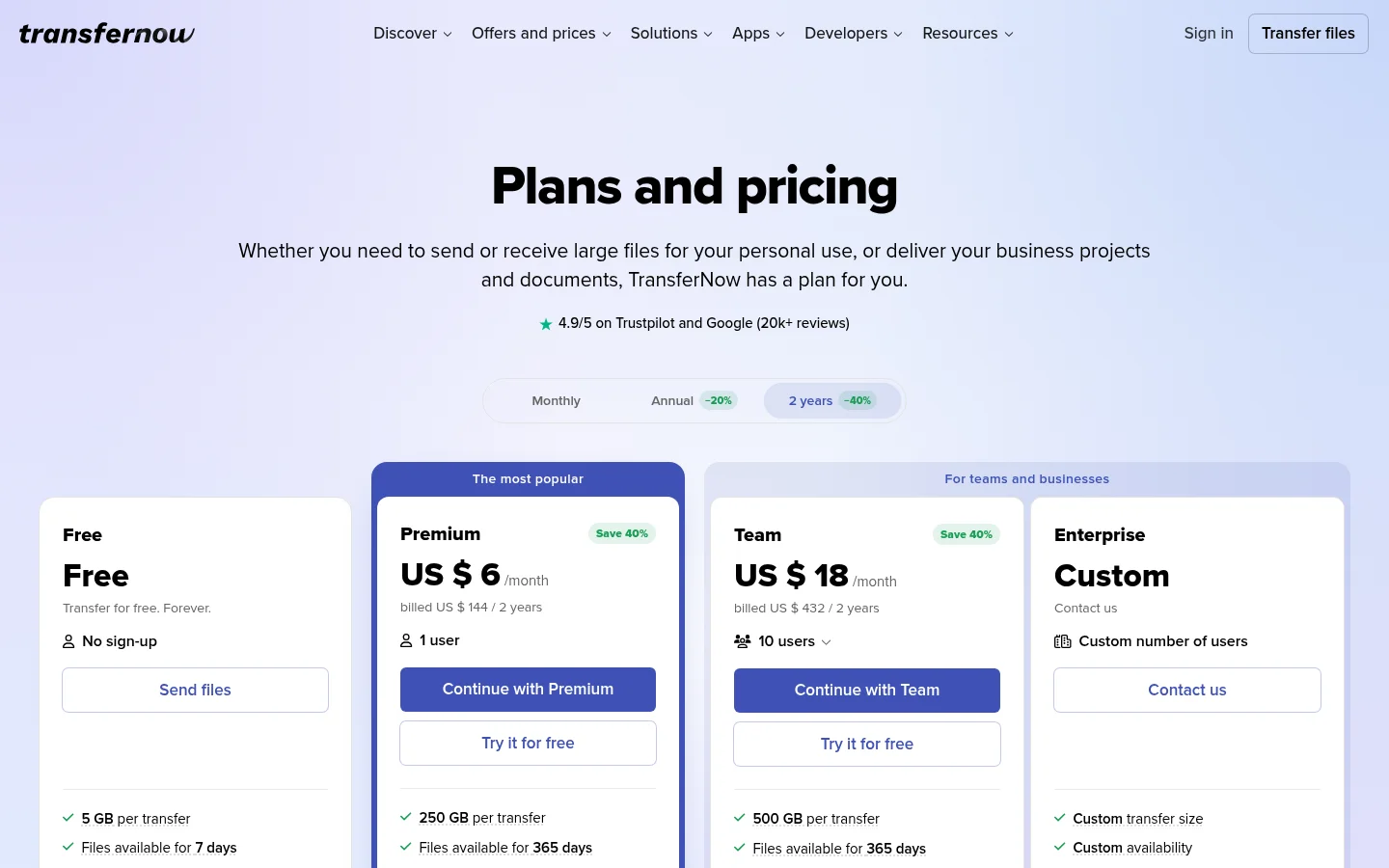
Free: up to 5 GB per transfer, with no sign-up.
Premium: up to 250 GB per transfer. On its Premium page, you can set your price when you create a file transfer.
Team: each member sends and receives up to 500 GB per transfer.
Enterprise: a custom domain through a CNAME DNS record.
What Tarkle does
Tarkle is a cloud storage and file-sharing platform for freelancers, agencies, and client-facing businesses. Recipients need no Tarkle account.

Your own domain. Your links and client portal open from your own domain, like files.yourdomain.com. Custom domains are available on every plan. On Agency, your clients log in and manage their files on your own domain.
Branding. Your logo, colours and favicon go on every transfer page, request page and portal. On Free, a small Powered by Tarkle line shows. Pro removes it, and on Agency your agency name replaces the "Powered by Tarkle" backlink.
Access control. You can also protect shared files with passwords.
Tracking. Transfer status shows whether the page was viewed and whether the files were downloaded. Slack alerts, on Pro and Agency, tell you in Slack when files are viewed, downloaded or uploaded.
Getting files back. A file request collects files from anyone with one link, into the folder you choose. You can set a deadline on a file request.
Client portal. On Pro and Agency, the client portal gives your recipients a branded place to receive and manage the files you share with them.
Paid transfers. On Pro and Agency, the buyer pays through Stripe checkout, and the money goes to your own Stripe account. After payment they download the files.
Each of these has its own page: custom domain, branding, transfer status, file requests and paid transfers.
Free is $0 forever, with no credit card required. Free also has monthly limits: 15 transfers a month, 1 active file request form and 50 request submissions a month. Free uploads and transfers are capped at 1 GB each. The pricing page lists every plan.
Pro is $29 a month, or $19 a month billed yearly ($228 a year). It adds 3 TB of cloud storage, uploads up to 200 GB, unlimited team members, and no monthly transfer or request limits. Agency is $59 a month, or $49 a month billed yearly ($588 a year). It includes everything in Pro, plus 6 TB of cloud storage and a 100% white-label platform.
TransferNow vs Tarkle
Tarkle | TransferNow | |
|---|---|---|
Free plan | $0 forever, no credit card required | Up to 5 GB per transfer, no sign-up |
Custom domain | Available on every plan | CNAME DNS record on Enterprise |
Branding | Logo, colours and favicon. Free shows a Powered by Tarkle line | Logo, background and colors on Premium |
Tracking | Transfer status; Slack alerts on Pro and Agency | Download tracking |
Paid downloads | Pro and Agency, through your own Stripe account | Premium: set a price when creating a transfer |
Compare the job you do most. A one-off send and a client who comes back every month need different tools, so price each plan against that job.
Who should choose TransferNow
Stay with TransferNow if one of these is you:
You send single transfers above 200 GB. TransferNow's Premium plan allows 250 GB per transfer and Team allows 500 GB per member, while Tarkle's largest upload is 200 GB on Pro and Agency.
You send one-off transfers to people you will not see again, and you do not need a branded portal for your clients.
You want add-ins or extensions for the apps you send from. TransferNow lists extensions and add-ins.
Who should choose Tarkle
Tarkle fits better when the files you send belong to a client relationship rather than a single send.
Your name on the link. Your links and client portal open from your own domain, like files.yourdomain.com.
A place clients return to. On Pro and Agency, the client portal gives your recipients a branded place to receive and manage the files you share with them.
Files that come back. A file request collects files from anyone with one link, into the folder you choose.
Proof of what happened. Transfer status shows whether the page was viewed and whether the files were downloaded.
Payment before download. On Pro and Agency, the buyer pays through Stripe checkout, and then downloads the files.
An agency platform. On Agency, your clients log in on your own domain, on a 100% white-label platform.
The one place TransferNow goes further is file size: its Premium plan allows 250 GB per transfer and Team allows 500 GB per member. Tarkle's largest upload is 200 GB on Pro and Agency, and Free uploads are capped at 1 GB. For one-off files above that size, TransferNow is the better fit.
Start for free on the Free plan. Choose Pro or Agency when your clients need the portal, paid transfers or the white-label platform.
Switching from TransferNow to Tarkle
Files that sit on TransferNow move by upload. Tarkle imports files from Dropbox and Google Drive.
Sign up on the Free plan.
Add your logo, colours and favicon, then connect your domain.
Upload the files you still share, or import them from Dropbox or Google Drive.
Create a transfer, add a password where you need one, and copy the link.
Send the new link to your clients, and ask them to use it in place of the old TransferNow link.
Move your most active client folders first. Once clients use the new link, move the rest on a quiet day.
Frequently asked questions
Is TransferNow free?
Yes. Its Free plan says "Transfer for free. Forever." and allows up to 5 GB per transfer, with no sign-up.
Does TransferNow allow a custom domain?
On its pricing page, a custom domain through a CNAME DNS record is listed for Enterprise.
Can Tarkle send files as large as TransferNow?
Not in one file. Tarkle's largest upload is 200 GB on Pro and Agency, and Free uploads are capped at 1 GB. TransferNow lists up to 250 GB per transfer on Premium.
Does the person downloading from Tarkle need an account?
No. Recipients can open or download shared files without creating a Tarkle account.
Can I put my own brand on Tarkle links?
Yes. Your logo, colours and favicon go on every transfer page, request page and portal. On Free, a small Powered by Tarkle line shows, and Pro removes it.
Can I try Pro or Agency before I pay?
Free is $0 forever, with no credit card required, and it has monthly limits: 15 transfers a month, 1 active file request form and 50 request submissions a month.
Can I collect files from clients with Tarkle?
Yes. A file request collects files from anyone with one link, into the folder you choose.