
Tarkle vs Box: client sharing or enterprise content
Tarkle sends and collects client files on your own domain. Box suits governed internal content and compliance work.
Tarkle vs Box comes down to the job. Box is better for governed internal content: large organizations, compliance programs, e-signatures and 1,500+ connected business apps. Tarkle is better for sending files to clients, collecting files back and presenting both under your own brand and domain, with unlimited team members on Pro and Agency.
We make Tarkle, so read this as one vendor's view, and check the sources. Box plan details below come from Box's homepage, Box's file size documentation and a PCMag review of Box for Business (March 2026). Check Box pricing before you buy.
What Box is
Box is an enterprise cloud content management platform. Box describes its platform as intelligent content management with secure collaboration, AI and workflows. Its homepage lists 1,500+ app integrations and support for rules such as GDPR, HIPAA and FINRA, and names large organizations among its customers (Box, 2026). Small teams can buy it too, on the Business plans.
What Box offers
Box sells per-user plans, from a free personal plan up to Enterprise Advanced. PCMag lists Business at $15 per user a month, or $20 per user a month with an annual plan, and says external collaborators on Business cost extra. Business Plus adds unlimited extra collaborators (PCMag, March 2026). Prices change, so use Box's own page for today's number.
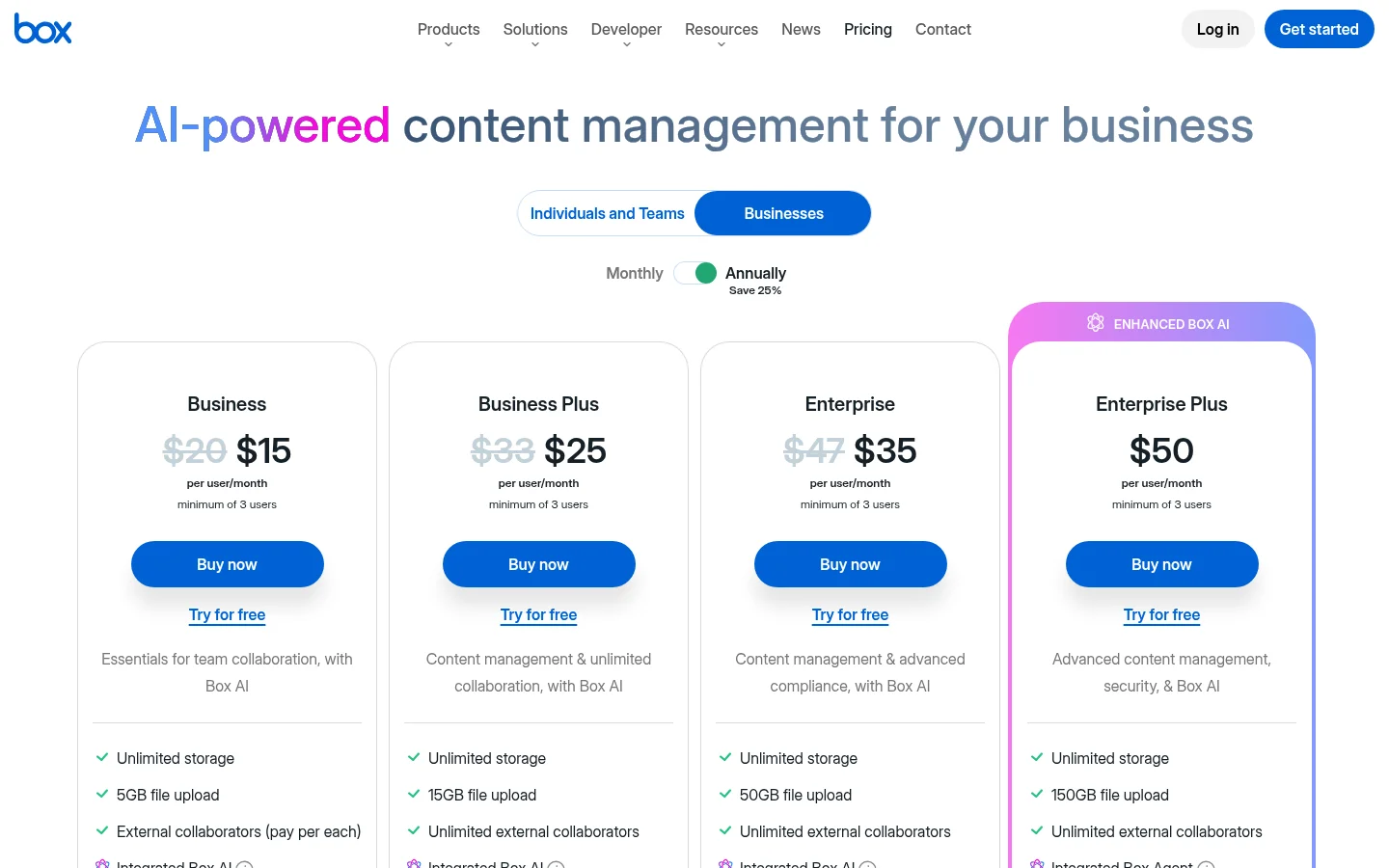
PCMag lists storage and e-signatures as included with every Box plan. The size of one uploaded file depends on the plan. Box's documentation gives these limits (Box documentation, 2026):
Free personal: 250 MB
Starter: 2 GB
Business: 5 GB
Business Plus: 15 GB
Enterprise: 50 GB
Enterprise Plus: 150 GB
Enterprise Advanced: 500 GB
Box also offers e-signatures, which its homepage describes as unlimited for free, and Box Drive for desktop sync on macOS and Windows (PCMag). Its Hubs content portals sit on the Enterprise plan.
What Tarkle does
Tarkle is built for freelancers, agencies and small teams that send files to clients. There are three plans: Free, Pro and Agency (Tarkle pricing).

Send files. Pick files or folders, get one link, and share files by link. The person downloading needs no account. You can add a password or a link expiry date.
See when it was opened. Each transfer has an Activity panel with three rows: Transfer created, Transfer viewed and Files downloaded. The viewed and downloaded rows show the time of the latest view and the latest download, not a list of every event.
Collect files. File requests are part of the Free plan too.
Brand it. Free includes custom branding and a custom domain. Custom branding puts your logo, colours and favicon on every transfer page, request page and portal. Powered by Tarkle stays on Free and can be removed on Pro.
Give clients a place. The client portal on Pro and Agency lets each client sign in with a link sent to their email, with no password to remember, and see what you shared with them.
Review and approve. Client feedback turns images and PDFs into a review board that clients comment on and approve with one link, no account.
Get paid. Paid transfers charge for access through your own Stripe account on Pro and Agency. A paid transfer switches off the password, expiry, one-time and view-only options, because payment is the access gate.
Run it for clients. Agency includes 20 workspaces in total, and your own workspace counts toward them. Its 100% white-label platform can run entirely on your own domain, with your agency name in place of Powered by Tarkle.
Box vs Tarkle
Prices and limits as published by each vendor in 2026. Tarkle's come from its pricing page.
Point | Tarkle | Box |
|---|---|---|
Pricing model | Free, Pro and Agency plans | Per-user seats |
Price | Free $0. Pro $29 a month, or $19 a month billed yearly. Agency $59 a month, or $49 a month billed yearly | Business $15 per user a month, or $20 on an annual plan (PCMag, March 2026) |
Storage | Free 5 GB, Pro 3 TB, Agency 6 TB | Storage and e-signatures with every plan (PCMag, March 2026) |
Largest file | Free 1 GB, Pro and Agency 200 GB | See the file size list above |
Team members | Free: one person. Pro and Agency: unlimited | Per-user seats |
Client portal | Pro and Agency, sign in by emailed link | Hubs content portals, on Enterprise (PCMag, March 2026) |
Compliance | Designed to meet GDPR rules | GDPR, HIPAA and FINRA compliance tools, per Box's homepage |
Connected apps | Import from Dropbox or Google Drive | 1,500+ app integrations |
Who should choose Box
Stay with Box, or pick it, when the work is internal and governed. That means a large staff managed through one admin console, e-signatures inside the content platform, or a compliance program such as HIPAA that your contract demands. Tarkle's pricing page says it is designed to meet GDPR rules, so a regulated buyer should check which documents its contract needs from each vendor before it moves files.
Box also fits teams that live inside many business apps, since it lists 1,500+ integrations, and teams that want a desktop sync client such as Box Drive. If you need files larger than the 200 GB Tarkle allows on Pro and Agency, Box Enterprise Advanced lists 500 GB.
Some organizations use both: Box for internal records, Tarkle for what goes to clients.
Who should choose Tarkle
Choose Tarkle when the job is sending finished work to clients. A designer, photographer, consultant or agency sends final files, asks clients for source material and wants the link, the page and the sender address to look like their own business. A per-user enterprise platform asks you to buy seats and configure policies for that.
Your domain. Free includes custom branding and a custom domain, so the first client link can already carry your brand.
No account for the client. Recipients download without signing up, and you add a password or an expiry date when the files are sensitive.
You see when it was opened. The transfer shows when it was created, when it was last viewed and when its files were last downloaded.
Files come back. A file request replaces the email attachment chase.
One price for the team. Pro and Agency allow unlimited team members, so you do not count seats.
Payment first. On Pro and Agency, charge for a transfer through your own Stripe account.
A platform for your clients. On Agency, each client gets a branded workspace, and the platform can carry your own name and domain.
Free stops at 5 GB of storage and 1 GB per file, so you can send one real transfer and see the recipient page before you pay. Start for free.
Switching from Box to Tarkle
Tarkle's import option names Dropbox and Google Drive, so the move from Box is a manual upload.
Download the folders you want from Box. Start with active client projects, not the whole archive.
Sign up and set your logo and colours, then your custom domain.
Upload the folders in the browser. Check the file limit for your plan in the table above.
If any files also sit in Dropbox or Google Drive, import them into Tarkle.
Create a transfer for one live client, add a password or expiry if needed, and send it.
When clients are used to the new link, delete the old Box shared links.
Move one active client first and keep Box for everything else for a month. You learn how the recipient page looks and works before you change anything else.
Tarkle vs Box: questions people ask
Is Box good for sharing files with clients?
Yes. Box lets you access and share content, and its Hubs content portals sit on the Enterprise plan. The question is whether you want an enterprise platform with per-user seats for that job.
Can I use my own domain with Tarkle?
Yes. Custom domains are available on every plan, and the client portal can run on your own domain too. Box's own domain settings are in its documentation, so check there before you decide.
Does Tarkle replace Box?
For sending files to clients and getting files back, often yes. For internal governance, e-signatures and admin control across a large staff, Box is the better fit, and many teams keep it for internal files.
How large a file can I send?
On Tarkle, Free supports 1 GB per file and Pro and Agency 200 GB. Box depends on the plan, from 250 MB on the free personal plan to 500 GB on Enterprise Advanced.
Do my clients need an account?
Not to download a transfer. The client portal on Pro and Agency lets each client sign in with a link sent to their email, with no password to remember.
Where are my files stored?
On Tarkle you choose one of four regions when you create a workspace: the European Union, the United States, Hong Kong (Asia Pacific) or Australia (Oceania). Files stay in that region, and you can change a workspace's region one time, for a fee shown on your Billing page before you confirm. For Box's data location options, check Box's own documentation.
Is Tarkle certified for HIPAA or SOC 2?
Tarkle's pricing page says it is designed to meet GDPR rules. If your contract needs HIPAA or SOC reports, ask each vendor for its documents before you move files.
Does Tarkle charge per user?
No. The plan covers your organization. Free is for one person, and Pro and Agency allow unlimited team members.