
Tarkle vs Playbook: branded sharing or a creative library
Playbook suits a creative asset library; Tarkle suits branded file sharing with clients. Plans and limits compared.
Playbook is better when your work is a large visual library that your team searches, tags and reviews. Tarkle is better when the job is sending and collecting files with clients, under your own brand and, if you want, on your own domain. We make Tarkle, so read this as one vendor's view, and check the Playbook facts against the sources linked below.
What Playbook is
Playbook is a visual asset library for creative work. Its pricing page describes the Free plan as a way to "Organize personal files and try out Playbook for free." The Team plan adds Playbook Intelligence, which the pricing page presents as a way to find things faster. The library comes first.
What Playbook offers
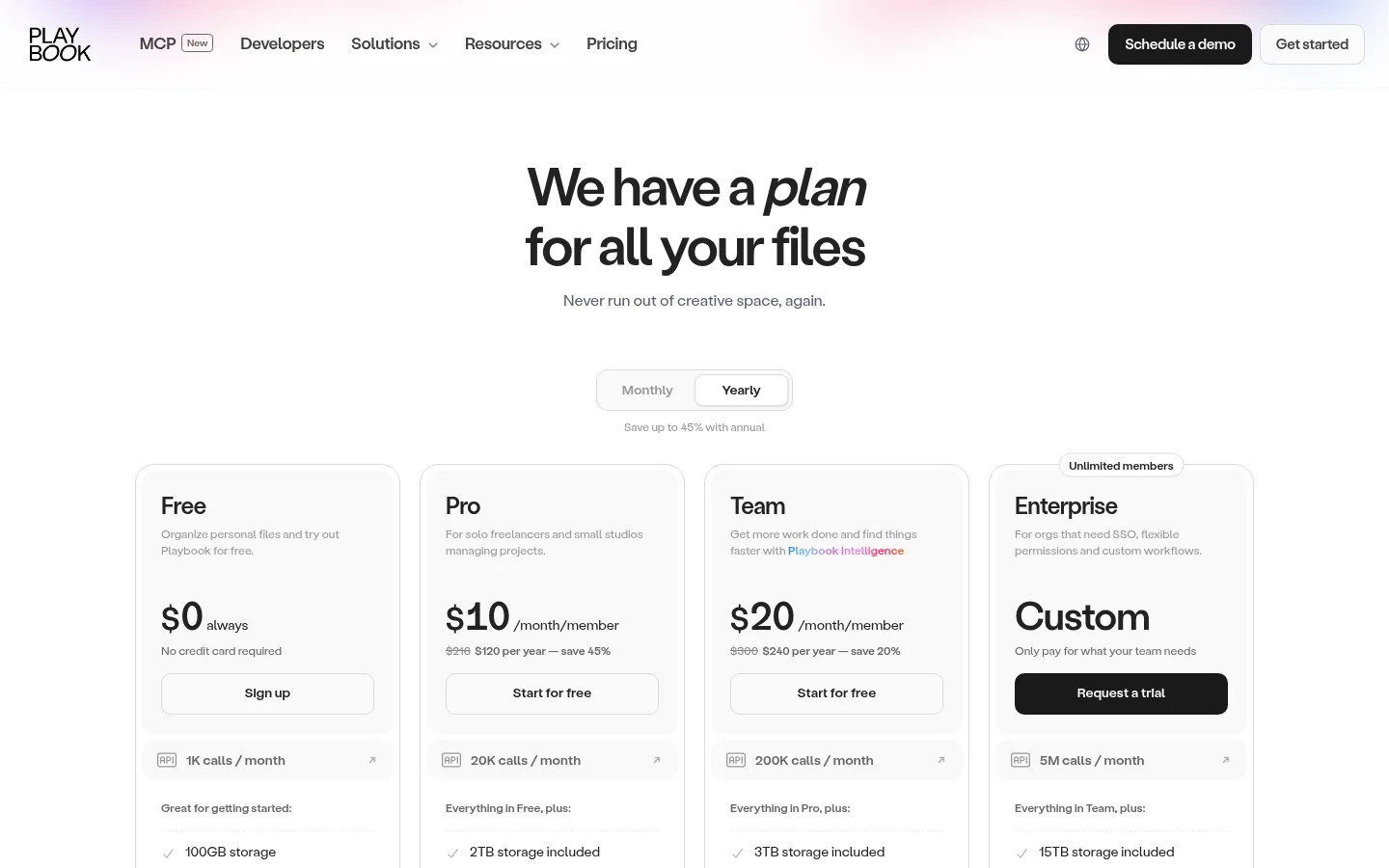
Playbook prices per member. As published on its pricing page:
Free: $0 with 100GB of storage or up to 300 assets, 1 member, 3 guests, 5 public share links and 1 publish page.
Pro: $10 per member per month, or $120 per year. It includes 2TB of storage, unlimited assets and guests, shared link controls for downloads, password and email collection, and a custom logo and branding.
Team: $20 per member per month, or $240 per year. It adds Playbook Intelligence, AI tagging for images and videos, video segment search and instant frame scrubbing, with 3TB of storage.
Enterprise: custom pricing, with SAML SSO and a view-only member role.
Pro also includes desktop and mobile sync apps.
What Tarkle does
Tarkle gives freelancers, agencies and small teams one place to store and share files. You pick files or folders, get one link and decide who can open it. Recipients can open or download shared files without creating a Tarkle account.
Link controls: a password can be required before anyone opens a transfer, a link expiration stops a link after a date you set, an email capture asks for an address before a download starts, and view-only transfers let people look without offering a download.
Tracking: transfer status shows whether a transfer was delivered, viewed or downloaded.
File requests: file requests collect files from anyone with one link, into the folder you choose. A request deadline sets a closing date, and a size limit caps the total size of one submission.
Client portal: on Pro and Agency, each client signs in with their email, sees only what you shared with them and sends files back.
Brand and domain: custom branding and a custom domain are on the Free plan.
Review: client feedback turns images and PDFs into a review board that clients comment on and approve with one link, no account.
Paid transfers: paid transfers charge for access through your own Stripe account, on Pro and Agency.
Free is $0 with 1 workspace, 5 GB of storage, uploads and transfers up to 1 GB each, file sharing and file requests, client feedback and approval, custom branding, a custom domain and passwords. On Free, file requests allow 1 active request form and 50 submissions a month, and transfers are limited to 15 a month. Pro is $29 a month, or $19 a month billed yearly ($228 a year). It includes 2 workspaces, 3 TB of storage, files up to 200 GB, file versioning, the AI assistant (Beta), unlimited team members and a fully branded client portal. Agency is $59 a month, or $49 a month billed yearly ($588 a year). It includes everything in Pro. It adds 20 client workspaces, 6 TB of storage, a 100% white-label platform and a client provisioning portal.

On Agency, your clients log in on your own domain, and the Powered by Tarkle line becomes your agency name. To set it up, open Organization settings, add your branding and turn on White label. On a tarkle.com address, the Powered by Tarkle line stays.
Playbook vs Tarkle
Tarkle | Playbook | |
|---|---|---|
Free plan | 5 GB, 1 workspace, uploads up to 1 GB | 100GB or up to 300 assets, 1 member, 3 guests |
Paid price | Pro $29 a month, or $19 a month billed yearly | Pro $10 per member per month, Team $20 per member per month |
Link controls | Password, expiry, email check, view-only | Downloads, password and email collection on Pro and up |
Review | Images and PDFs, approve with one link, no account | Video segment search and instant frame scrubbing on Team |
Playbook facts are from its pricing page. Tarkle facts are from the live pricing page and the feature pages linked above.
Who should choose Playbook
Choose Playbook if your main problem is finding and reviewing creative assets. Its Team plan adds AI tagging for images and videos, video segment search and instant frame scrubbing, so a team that reviews video frame by frame will find more in Playbook. Tarkle's review boards take images and PDFs.
Who should choose Tarkle
Choose Tarkle if the files go to clients and the delivery should carry your brand. Links can sit on a custom domain on Free, with custom branding, and Agency gives you a 100% white-label platform. Pro includes unlimited team members.
Switching from Playbook to Tarkle
Download the files you need to keep from Playbook.
Sign up and create your workspace.
Upload the files you share with clients, or import them from Google Drive or Dropbox if they already sit there.
Share one transfer with one client and check the link, the password and the expiry before you move the rest.
Do not move everything at once. Keep Playbook for review rounds and tagging, and move the client deliveries first.
Frequently asked questions
Is Tarkle a Playbook replacement? Tarkle is for sending files to clients, and its review boards take images and PDFs. It is not a replacement for a visual library with frame-by-frame video review.
Does Playbook have a free plan? Yes. Its Free plan has 100GB or up to 300 assets, 1 member, 3 guests. Tarkle's Free plan has 5 GB and 1 workspace.
Can Tarkle review video like Playbook? No. Tarkle's review boards take images and PDFs.
Start with Tarkle on the Free plan and send one real transfer. Start for free.