Free file sharing for small business: what to check
Match free file sharing to occasional sends, client exchanges or a shared library, and check the free limits first.

Free file sharing for small business works best when the plan matches how your team sends files: how big the files are, how long a client needs the link, and who may open it. Before you compare tools, sort your sending into one of three patterns: occasional sends, repeated exchanges with the same clients, or a shared working library. Each pattern asks a different question, so each one leads to a different check.
Free file sharing for small business starts with your sending pattern
Most small teams do a bit of each. Pick the pattern that takes most of your week, and check that one first.
Pattern | What to check first | What Tarkle Free covers |
|---|---|---|
Occasional sends: one deliverable to one client | File size and when the link expires | Uploads up to 1 GB, and passwords on shared files |
Repeated exchanges: the same clients send and receive files every month | Who can open each link, and whether clients can send files back | File requests, and client feedback and approval |
A shared working library: files you reuse across projects | Storage size, and how easily you find files again | 5 GB of storage |
Check access control before you send
Decide who can open a link before it leaves your inbox. Ask every tool the same question: can you add a password, and can you pause a link once it has gone out? In Tarkle, you can protect shared files with a password, and the help article on pausing a transfer says you can pause a transfer to mark it Disabled, and enable it again whenever you need it.
If you need a name and an email address before a download starts, look for an email gate. Tarkle's help article describes it: the email gate asks visitors for an email address before the files open, and saves it as a contact.
Write down your three largest files from the last month before you compare tools. The largest one decides whether a free upload limit is enough.
Check expiry for the links you send
A link should stop working when the job is over. In Tarkle you set the expiry in the transfer itself. An expiration date ends access to a file transfer on a day you choose. The same help article says that paid transfers cannot expire. Transfers are created in your workspace: open Transfers and start a new one.
Set a date on any transfer that holds contracts, invoices or identity documents. Then the link does not sit in an old email for years.

Check the recipient's experience
Ask whether the person on the other end needs an account. Tarkle's help article on recipients says that a recipient does not need a Tarkle account to open a transfer. Then send yourself a test link and open it on a phone. That is the page your client will see.
For repeat work, ask whether the client can send files back. Tarkle's file requests let anyone with the link send files to a folder in your workspace, with no sign-in. That replaces the chain of attachments that a small team loses track of.
Check storage for files you reuse
Sending and storing are different jobs. A link moves a file to someone else. A library keeps it for the next project. If you reuse brand files, contracts or past deliverables, check how much storage the free plan gives you. Tarkle's Free plan includes 5 GB of storage. For the difference in more detail, read file sharing vs cloud storage.
Where Tarkle Free may fit, and where it stops
Tarkle's Free plan costs nothing and needs no credit card. Its pricing page lists one workspace, 5 GB of cloud storage, file sharing and file requests, client feedback and approval, custom branding, a custom domain, and event management. You can also protect shared files with passwords.
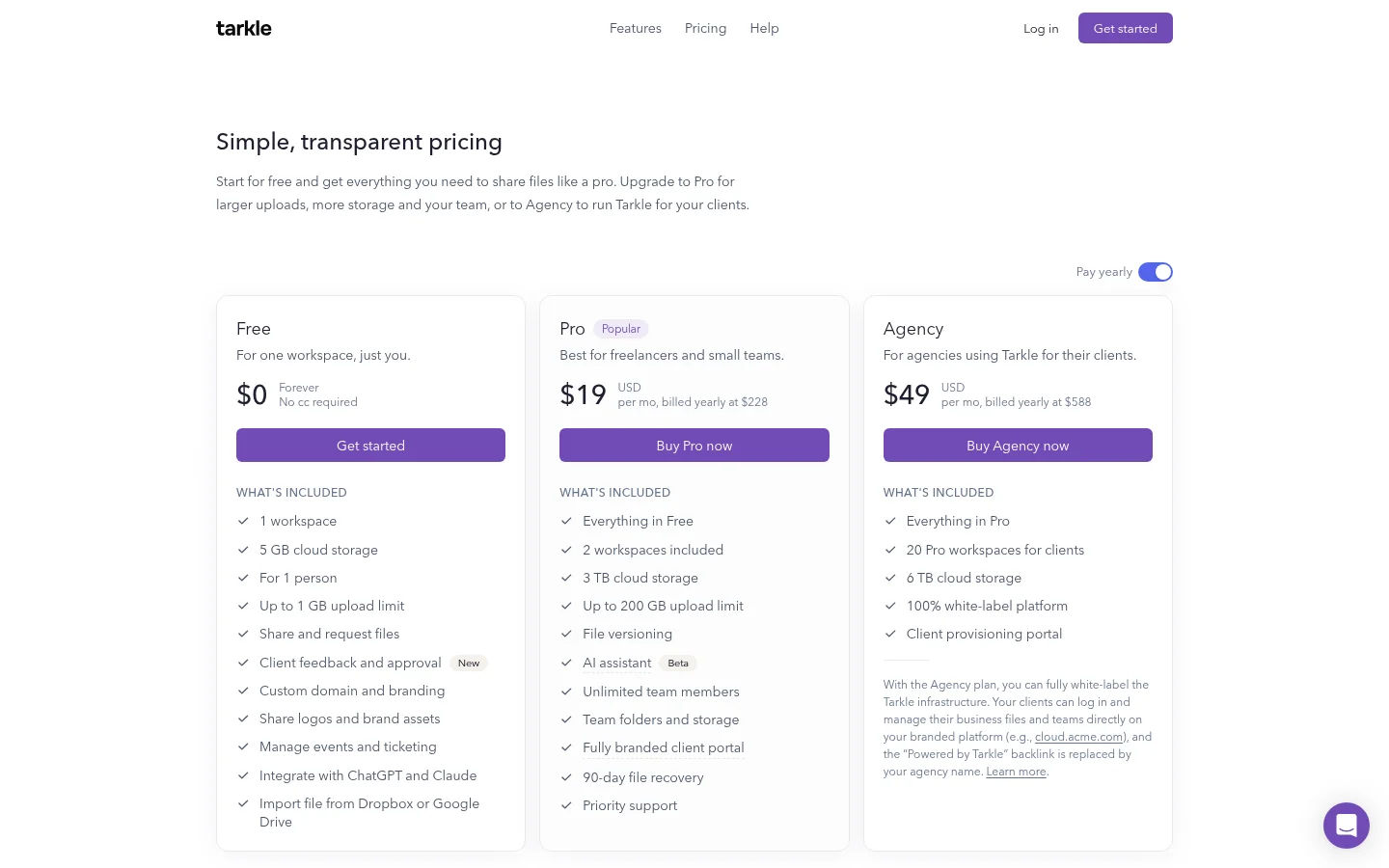
The limits matter as much as the list. Free uploads go up to 1 GB, and Free is for one person. Pro and Agency include unlimited team members, and Pro raises the upload limit to 200 GB. Pro also adds a fully branded client portal, where your recipients receive and manage the files you share with them. Pro costs $29 per month, or $228 per year when billed annually.
So the honest answer is this. A solo owner who sends files under 1 GB, keeps a small library and wants a link on their own domain can start on Free. A team with several people in the account, files above 1 GB, or clients who need a portal should compare Pro on the pricing page before they choose.
Questions small businesses ask
Can a client download a file without making an account? Yes, for a transfer link. The recipient help article says a recipient does not need a Tarkle account to open a transfer.
Is the free plan really free? The pricing page lists the Free plan as $0 forever, with no credit card required.
Which free option should a team of several people pick? Free is for one person. If the team needs more than one person in the account, check the Pro plan, which includes unlimited team members.
For a longer scorecard of free business plans, read free file sharing for business: a checklist before you pick. For a look at how small firms organize client files, read file sharing for small business: organize files for clients.
What to remember about Tarkle
Tarkle's Free plan suits one person who sends files under 1 GB and keeps a small library. It includes file sharing, file requests, passwords on shared files and expiry dates on transfers. When the team grows, the files get larger or clients need a portal, Pro adds them. Start for free, or compare plans on the pricing page.