pCloud lifetime: prices, what you get and who should buy
pCloud lifetime plan prices, what they include, where they stop for client file sharing, and who should buy.

pCloud lifetime is a one-time payment for 500 GB, 2 TB or 10 TB of cloud storage. The sale prices on pCloud's lifetime page are $219, $499 and $1,499 in US dollars. It suits someone who wants personal storage, phone and desktop backup, and sync across devices without a monthly bill. It is a weaker fit for a business that sends files to clients, because the plan is built around storing your own files, not delivering them.
This guide gives the prices, what each plan includes, what to check before you pay, and who should and should not buy.
How much does pCloud lifetime cost?
pCloud sells three lifetime plans. Each is a single payment with no monthly or yearly fee. The table shows the sale price and the crossed-out list price that pCloud's lifetime page displays next to it.
Lifetime plan | Sale price | List price shown | Storage | Shared link traffic |
|---|---|---|---|---|
Premium 500 GB | $219 | $279 | 500 GB | 1000 GB |
Premium Plus 2 TB | $499 | $709 | 2 TB | 4 TB |
Ultra 10 TB | $1,499 | $2,799 | 10 TB | 20 TB |
Prices checked on 31 October 2026, in US dollars. pCloud runs promotions, and its lifetime terms describe a limited-time campaign, so the sale prices above may not last. Read the total at checkout, not only in this table.
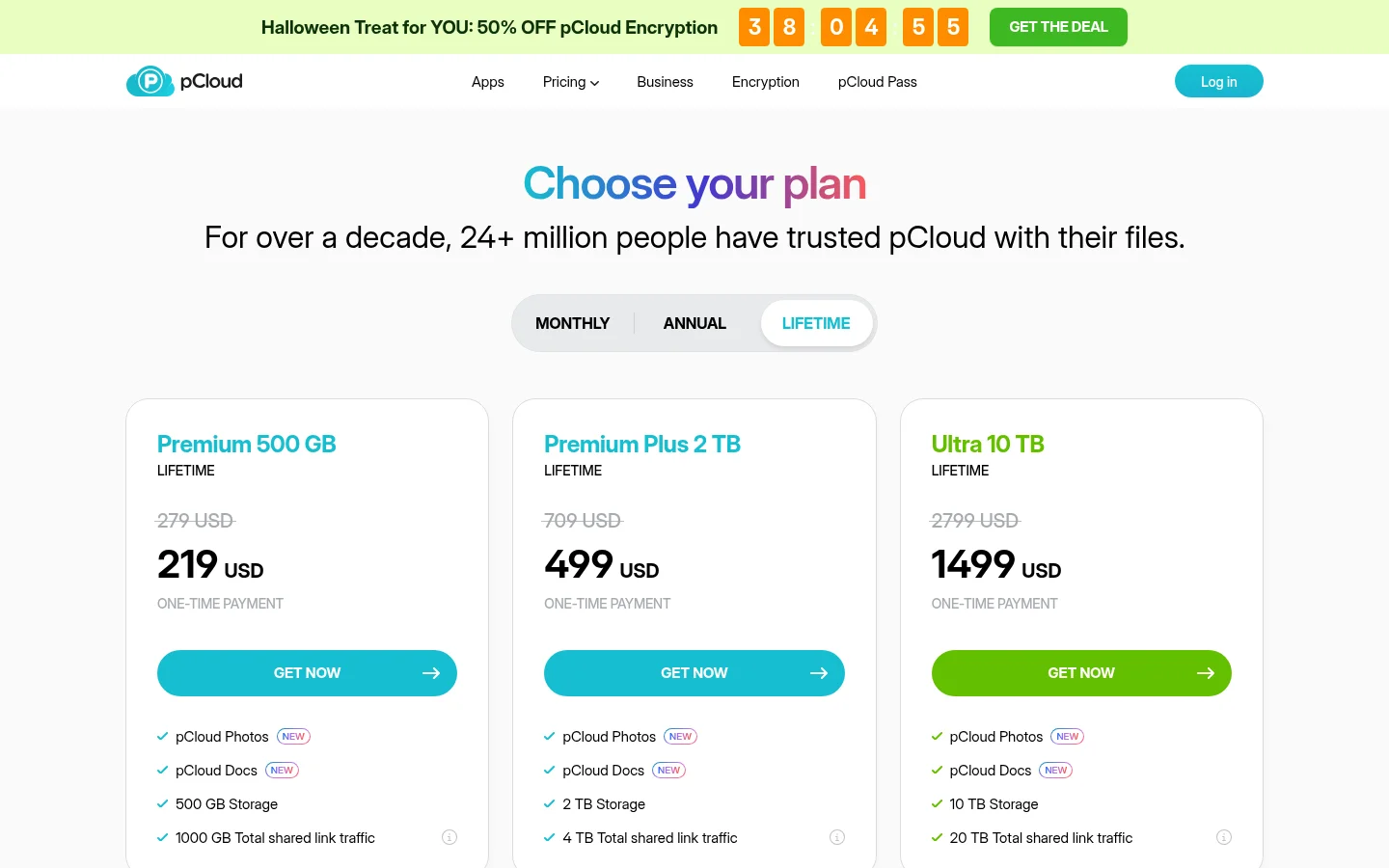
pCloud's lifetime page also says a money-back guarantee applies within the first 14 days after purchase. Its help article on upgrading to a larger lifetime plan explains that you can add another Lifetime plan to your existing storage if 500 GB turns out to be too small.
What does a pCloud lifetime plan include?
pCloud lists these features with all plans, and only the storage and shared link traffic change between plans:
Access and sync: you can use your files on any device, so you have your data with you anytime.
Media: an audio and video player, and pCloud Photos with a built-in photo editor.
Security: pCloud uses TLS/SSL encryption, applied when information is transferred from your device to the pCloud servers.
Sharing: multiple file sharing options through the pCloud applications and the web interface.
Backups: pCloud lists backups from Dropbox, Google Drive, Facebook, Google Photos and OneDrive.
If client-side encryption matters to you, confirm on pCloud's checkout whether it is included in the price before you pay.
Is pCloud lifetime cheaper than a subscription?
It depends on how long you keep the storage. Divide the lifetime price by the monthly price of a comparable subscription, and you get the number of months after which the one-time price costs less. Check the real monthly or annual price on the same pricing page, because it changes. The sum ignores taxes, currency conversion and what the money could earn elsewhere. If you keep the storage for many years, a one-time price can win; if you stop after one or two, it usually does not.
Write down the date you expect to stop needing the storage. If you might switch providers within two years, a monthly or yearly plan is usually the safer choice, even if the lifetime price looks low.
Read pCloud's terms before you buy.

What does pCloud lifetime not cover when you send files to clients?
pCloud's sharing tools work well for sending a link to a friend or collecting a few files. A business that sends work to clients usually needs more:
Each plan has a total shared link traffic allowance (1000 GB, 4 TB or 20 TB). Photo galleries, video and large archives that many people download count against it, so a large storage plan does not mean unlimited downloads.
The features on that page are the list above. It does not describe a custom domain for your links, a client portal or payment before download, so check those with pCloud before you rely on them.
None of this makes pCloud a poor product. It means the lifetime plans are individual storage plans, and judging them as a tool for sending files to clients is judging them on the wrong job.
Who should buy pCloud lifetime, and who should not?
Buy it if you want personal or family storage you will use for years, such as photo and video libraries, backups of your phone and computer, and files you want on every device. It also suits a freelancer who mostly stores their own work and only occasionally shares a link.
Skip it, or buy it only for storage, if you need any of the following:
Links on your own domain with your own logo, colors and name on every page.
A place where each client signs in and sees only their files.
Clients who upload files to you through a branded request page.
Heavy sharing of large files to many recipients every month.
On Tarkle, a custom domain, custom branding and file requests are on the Free plan, and the client portal, where each client signs in, is on Pro and Agency.
If you are comparing pCloud with another one-time storage plan, see Icedrive vs pCloud lifetime and our overview of the best lifetime cloud storage deals.
Where Tarkle fits
If your main job is sending files to clients, Tarkle is built for it. The Free plan includes a custom domain, custom branding and file requests, and it needs no credit card, so you can start for free and test your own workflow before you pay anything. Pro and Agency support files up to 200 GB, and Pro includes a fully branded client portal, where each client signs in with their email and sees what you shared with them.

If you prefer one payment, Tarkle's lifetime plans include Pro 500 GB for $29, paid once. It has 500 GB of storage, one workspace, one team seat, the fully branded client portal and files up to 200 GB, the same 500 GB size as pCloud's entry lifetime plan. Pro 500 GB keeps the Powered by Tarkle backlink on your pages, and lifetime plans do not include the AI assistant. Lifetime purchases are final except where the law requires a refund, so Tarkle recommends trying the Free plan first. The refund policy has the details.
For personal storage, pCloud's plan is built for that job. For a side-by-side of pCloud and Tarkle, see Tarkle vs pCloud.
What to check before you pay for pCloud lifetime
Before you click Get now, go through five questions:
Do I need storage for my own files, or a way to send files to clients?
Will I still use this storage in three to five years?
Does the shared link traffic cover the downloads I expect?
Is client-side encryption included, or an extra cost?
Does the price at checkout match the price on the plans page for my country?
If the answers point to personal storage, pCloud lifetime is worth a close look. If they point to sending files to clients, test a plan built for that job before you pay for years of storage you will not use.
What to remember about Tarkle
Tarkle is built for sending files to clients and collecting files from them. Its Free plan has a custom domain, custom branding and file requests with no credit card, and for a one-time payment Tarkle's lifetime Pro 500 GB costs $29 with 500 GB of storage, one workspace and one team seat. Start for free